





Djoss
Community Developer
-
Joined
-
Last visited
Everything posted by Djoss
-
Is it just the MyJDownloader connection that fails ? Can you download stuff ? You could look at /mnt/user/appdata/JDownloader2/logs/output.log or other log files to see if there is anything interesting.
-
Is JDownloader able to update itself (Help->Find Updates) ?
-
Are you using default container settings ? Does the container have access to the Internet ?
-
This is done in the container's settings. Check for the "Output Directory" setting.
-
Are you using default container settings ?
-
How did you do that ? Normally the main application window cannot be minimized.
-
No, what you need to do is edit the container settings, activate the Advanced View, edit the "Storage" setting and change the Access Mode to Read/Write.
-
Where are you restoring the files ? If it's under /storage, you have to first change container's settings and set permission to R/W for this path.
-
Right click on the Match button, then "Preferences".
-
A fix is in progres
-
You are talking about the language of the app itself or the language used to rename the files ?
-
Do you still have the issue ? It's working fine for me.
-
Looks like your Docker vDisk (the one defined under Settings->Docker) is full ?
-
It seems that this will be part of the next HandBrake version: https://github.com/HandBrake/HandBrake/pull/4362 https://www.reddit.com/r/AV1/comments/v2cpii/svtav1_encoder_is_added_to_handbrake/
-
After an update, CrashPlan re-synchronize the data. Is it what CrashPlan is doing when you look at the CPU usage ? Can you check after the synchronization completes to see if it returns to normal ?
-
This is now fixed!
-
What do you mean exactly by "edit the location" ? Are you talking about something in the container settings ?
-
Thanks for reporting, I'm fixing this. A new image will be available in few minutes.
-
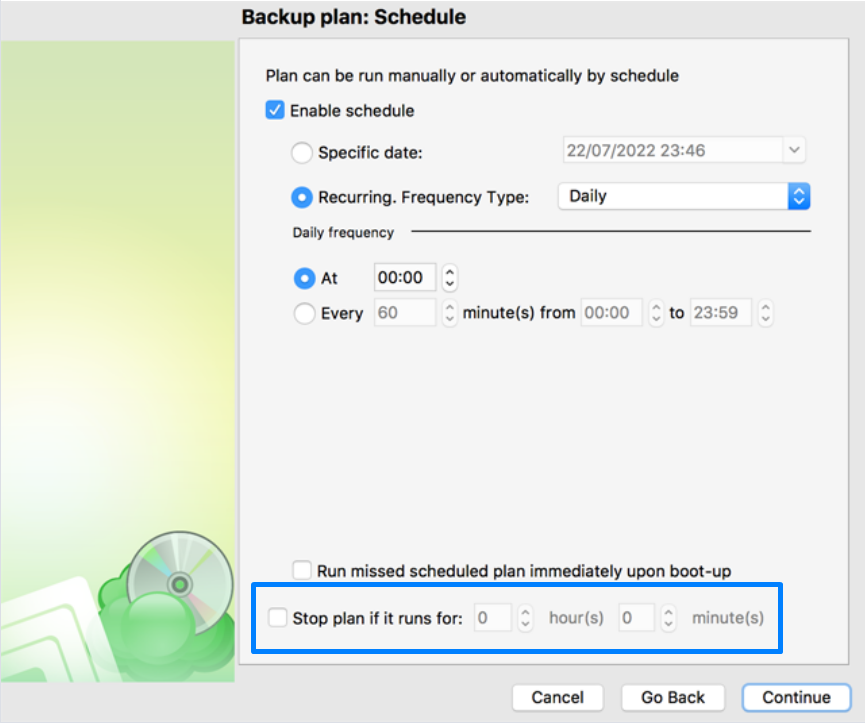
Edit you backup plan. At some point you will have the following option: Yes, I have a support ticket with them. They are trying to find to root cause. Also, the issue has been reported on their forum: https://forum.msp360.com/discussion/2644/cannot-complete-a-backup-since-upgrade-to-4-0-0-260
-
Could it be related to quotas on your B2 account ? Does the UI show any progress after a few hours ? If not, then you are probably facing a known issue with the latest version, where the backup plan gets stuck. To mitigate this issue, you can configure the backup plan to automatically abort after some time.
-
I personally never had trouble with CrashPlan. If you have a huge amont of data to backup, you will probably have trouble finding something else for the same price. But yes, the initial upload is slow...
-
Yes, I'm working on it!
-
You are welcome!
-
Not sure what happened. Looks like the profile got corrupted somehow. This is not something that should happen normally.
-
Is your problem fixed with the latest version?


