





DW_Michi
Members
-
Joined
-
Last visited
-
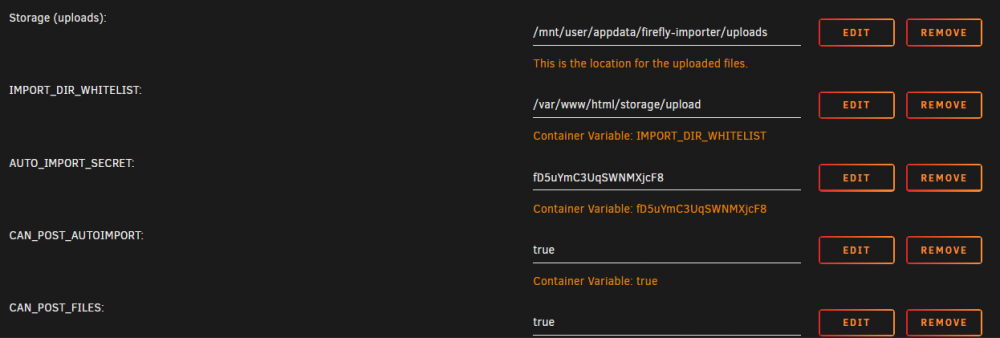
I currently have a question regarding FIDI and its very basic, but I can't solve it myself. I want to use my config file "import.json" from the Unraid-CLI to run the autoimporter. But when issuing the command I always get the same error. The error suspects to me that I haven't set the Docker-Variables correct (see screenshot)! I can't find the error there. Is there a point I missed??!! root@UNRAIDONE:/# curl --location --request POST 'http://192.168.1.104:4576/autoupload?secret=fD5uYmC3UqSWNMXjcF8' --header 'Accept: application/json' --header 'Authorization: Bearer ey....' --form 'json=@"/mnt/user/appdata/firefly-importer/uploads/import.json"' <!doctype html> <html lang="en"> <head> <meta charset="utf-8"> <meta name="viewport" content="width=device-width, initial-scale=1, shrink-to-fit=no"> <meta name="color-scheme" content="light dark"> <!-- Bootstrap CSS --> <link rel="stylesheet" href="http://192.168.1.104:4576/css/bootstrap-dark.min.css?version=0.9.9"> <link href="http://192.168.1.104:4576/fa/css/all.min.css" rel="stylesheet"> <meta name="theme-color" content="#111111" media="(prefers-color-scheme: light)"> <meta name="theme-color" content="#eeeeee" media="(prefers-color-scheme: dark)"> <title>500 error :(</title> </head> <body> <div class="container"> <div class="row mt-3"> <div class="col-lg-10 offset-lg-1"> <h1>Whoops! 500 :(</h1> <p> Sorry, the Firefly III Data Importer broke down. </p> <h2>Error message</h2> <p class="text-danger"> Disabled, not allowed to import. </p> <h2>More information</h2> <p> The error occurred in <code>/var/www/html/app/Http/Controllers/AutoUploadController.php:56</code>. </p> <p> Please collect more information in the <code>storage/logs</code> directory, where you will find log files. If you're running Docker, use <code>docker logs -f [container]</code>. You can read more about collecting error information <a href="https://docs.firefly-iii.org/faq/other#how-do-i-enable-debug-mode" target="_blank">in the FAQ</a>. </p> <h2>Get help on GitHub</h2> <p> You're more than welcome to open a new issue <strong><a href="https://github.com/firefly-iii/firefly-iii/issues">on GitHub</a></strong>. </p> <ol> <li>Use the search!</li> <li>Include the information <a href="http://192.168.1.104:4576/debug">from this debug page</a>.</li> <li>Tell us more than "it says Whoops!"</li> <li>Include error logs (see above).</li> <li>Tell us what you were doing.</li> </ol> </div> </div> </body> </html> Best regards Michael
-
I have the same problem too.
