





pingmanping
Members
-
Joined
-
Last visited
Everything posted by pingmanping
-
Is that the "occ file: scan"? Would I have to re create the users manually after running the command? Sent from my ONEPLUS A6003 using Tapatalk
-
I'm not getting any luck on upgrading. If I were to install a new nextcloud with new appdata, would the new installation see the existing user /data? How is the user mapping like with the fresh install of nextcloud 16? Sent from my ONEPLUS A6003 using Tapatalk
-
Has anyone have issue accessing the web UI? My container's repository is linuxserver/unifi-controller:LTS EDIT: This is what I am getting UniFi Controller is starting up... Please wait a moment
-
Yes, all I found was database related. Yes, I restarted the container. This is not related to Unraid being version 6.5.3, right?
-
I typo'd the 14.0.19. It is supposed to be 14.0.0.19 after the upgrade
-
I tried 14.0.0 somehow after upgrading I checked the config.php it says 14.0.19. I will try the other 14.0 version. For what I read here so far, I was getting impression that everyone who upgraded uses the latest-* instead of nextcloud-*
-
Did not work. I can only get my version up to 13.0.12
-
Are they called nextcloud-14? Sent from my ONEPLUS A6003 using Tapatalk
-
Yes Sent from my ONEPLUS A6003 using Tapatalk
-
Upgrading to the latest-13 worked, but I get the Internal server error again after upgrading to latest-14
-
I am currently at my rollback settings. Let me see if I understand your instruction. I need to upgrade to the latest-13 then to latest-14 and so on, am I right? Sent from my ONEPLUS A6003 using Tapatalk
-
I tried that as well, but I when I checked the version in the UI, it showed the version is still 13.0.1. This was from the fresh install with the old apppdata. I'm confused about the fresh install. I thought that the fresh install on nextcloud supposed to be version 16, but mine shows 13.0.1. Should I delete the appdata as well and literally do start from the beginning? Sent from my ONEPLUS A6003 using Tapatalk
-
I have the nextcloud set to port 444. The CLI upgrade gave no error. The Internal server error that I get is when I login to nextcloud. It let me enter my credentials, but the next page was the internal server error. Did some googling, but it seemed like something to do with permission. I chown -R nobody:users the nextcloud folder, but didn't helped. Sent from my ONEPLUS A6003 using Tapatalk
-
I followed the guide, but my issue was I having right after I install the lastest-14, I was getting Internal Server Error. Sent from my ONEPLUS A6003 using Tapatalk

-
It was said here that the existing installation of nextcloud was most likely version 13.0.1, which is what I have, but the brand new installation is based off the latest version. I wonder if would it be easier to start from scratch just the nextcloud and connect it to existing mariadb than upgrading? What about the existing user data? Would the new installation see them?
-
Yes, I tried updating through cli then UI with the same error. About the backup, I extracted the nextcloud folder from the CA backup last week and chown nobody:users the backup nextcloud folder. The config.php says version 13.0.1.1 and the ./occ says version 13.0.1 Sent from my ONEPLUS A6003 using Tapatalk
-
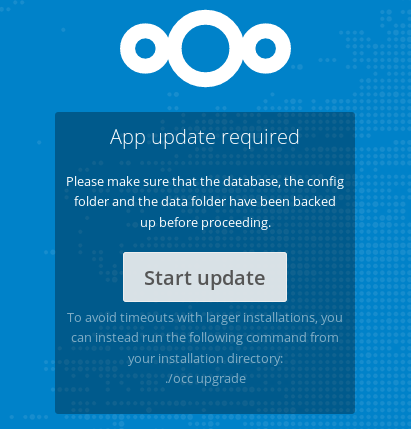
I tried to delete the nextcloud folder in the appdata and reinstall nextcloud, but I keep getting this update request. I tried to use the appdata from last week and still the same. Even the tag linuxserver/nextcloud:16.0.1-ls22 does work anymore. EDIT: Here is the output if I tried to upgrade: root@eb3e790334f8:/# sudo -u abc php7 /config/www/nextcloud/occ upgrade Nextcloud or one of the apps require upgrade - only a limited number of commands are available You may use your browser or the occ upgrade command to do the upgrade Set log level to debug Turned on maintenance mode Updating database schema Updated database Updating <federatedfilesharing> ... Doctrine\DBAL\Exception\TableNotFoundException: An exception occurred while executing 'SELECT `class` FROM `oc_admin_settings` WHERE `class` = ? LIMIT 1' with params ["OCA\\FederatedFileSharing\\Settings\\Admin"]: SQLSTATE[42S02]: Base table or view not found: 1146 Table 'nextcloud.oc_admin_settings' doesn't exist Update failed Maintenance mode is kept active Reset log level
-
I had to revert from backup then update the container settings with the tag linuxserver/nextcloud:16.0.1-ls22 My Unraid is still on version 6.5.3, the nextcloud upgrade issue is not related to my Unraid version, correct? What would be best way for me to get to the latest version of Nextcloud? While on the tag 16.0.1-ls22, I could not login anymore. It just spins then nothing happened.
-
What should be the permission for /config/www/nextcloud folder? I have mine currently at drwxrwxr-x 1 nobody users 412 May 15 09:03 nextcloud/
-
Yes, I did turn off the maintenance mode. I just quoted the last few lines of the upgrade portion. The loading ascii bar shows 0/0. I am not sure if it supposed to be like that. The only thing I didn't follow was the second part which is to delete tar and backup copies. Just to be sure, is this the correct version 14 https://download.nextcloud.com/server/releases/latest-14.tar.bz2
-
Yes, line by line. The last few lines of the output of the "sudo -u abc php7 /config/www/nextcloud/occ upgrade" is : Remove potentially over exposing share links Done 0/0 [>---------------------------] 0% Starting code integrity check... Finished code integrity check Update successful Maintenance mode is kept active Reset log level I am able to login to the nextcloud page, but right after I entered my credentials, I got the Internal Server error
-
right after upgrading from 13.0.1 to 14, I got this error on the web UI Internal Server Error The server was unable to complete your request. If this happens again, please send the technical details below to the server administrator. More details can be found in the server log.
-
it would not let me go to maintenance mode. I get this error: This version of Nextcloud is not compatible with > PHP 7.2.<br/>You are currently running 7.3.6.
-
Wait a minute. What is the default Linuxserver Nextcloud version now? I believe it is still version 13.0.1. The last time (last week) I checked on the Nextcloud web UI, it says version 13. Are we supposed to downgrade or upgrade?
-
Is there a guide on how to upgrade from the default version that came with linuxserver container? I believe it is version 13. I tried the webui upgrade and broke my nextcloud. I tried the cli way from the first page and broke my nextcloud. Sent from my ONEPLUS A6003 using Tapatalk

