





pingmanping
Members
-
Joined
-
Last visited
Everything posted by pingmanping
-
Has anyone getting this error? This version of Nextcloud is not compatible with > PHP 7.2. You are currently running 7.3.6. I am getting that error on Firefox and Chrome
-
I just updated the letsencrypt container and the moment it got started, the error is still showing up in logs. The container also created another instance of quassel-web-subfolder.conf without the .sample
-
I just updated the letsencrypt container and the moment it got started, the error is still showing up in logs. The container also created another instance of quassel-web-subfolder.conf without the .sample
-
I did, but if I restarted the letsencrypt container, the container created another file without the .sample
-
Hello CHBMB, The thing is I don't even use the Docker container quassel-web. I don't even know what this app is. I am not sure how long this quassel-web-sub* in the proxy-confs directory to begin with. It is just all of a sudden, I have the quassel-web-subdomain.conf.sample and quassel-web-subfolder.conf. The subfolder doesn't have the extension of .sample. This is the content: # Set base-url with docker run command env variable -e 'URL_BASE'='/quassel' and make sure Quassel-Web is running on http # with -e 'HTTPS'='false' or if you're using -e 'ADVANCED'='true' by editing config.json appropriately location ^~ /quassel { # enable the next two lines for http auth #auth_basic "Restricted"; #auth_basic_user_file /config/nginx/.htpasswd; # enable the next two lines for ldap auth, also customize and enable ldap.conf in the default conf #auth_request /auth; #error_page 401 =200 /login; include /config/nginx/proxy.conf; resolver 127.0.0.11 valid=30s; set $upstream_quassel_web quassel-web; proxy_pass http://$upstream_quassel_web:64080; }
-
Has anyone started getting this log ? nginx: [emerg] "location" directive is not allowed here in /config/nginx/proxy-confs/quassel-web.subfolder.conf:4 I had to remove the quassel-web.subfolder.conf file located in /mnt/cache/appdata/letsencrypt/nginx/proxy-confs/quassel-web.subfolder.conf
-
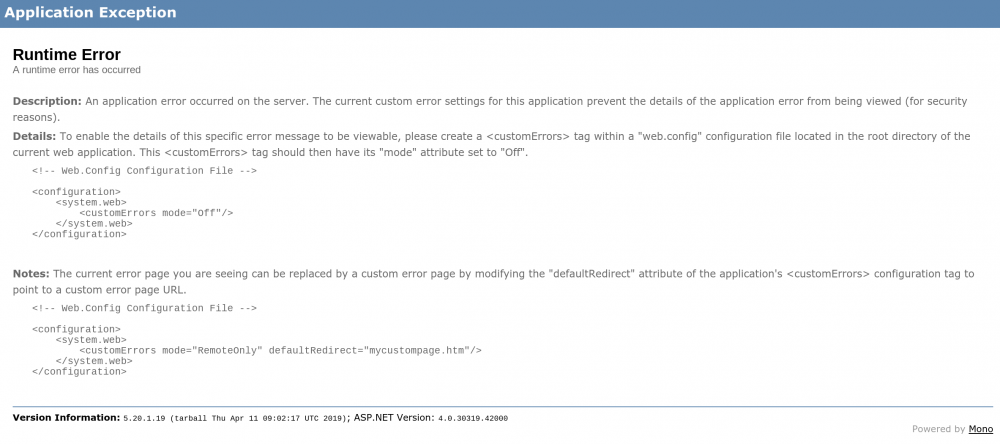
It is still didn't work. My appdata is in cache. I tried to move everything to the /mnt/user/.. but I still getting the same Runtime Error
-
I am sorry I am not familiar with your software. What do you mean by changing the directory? Can you please be more specific?
-
I tried to reinstall and still got the same page.
-
I got it work with Nextcloud and locally (community server); however, today, I get this when I tried to access the community server. This was working before.
-
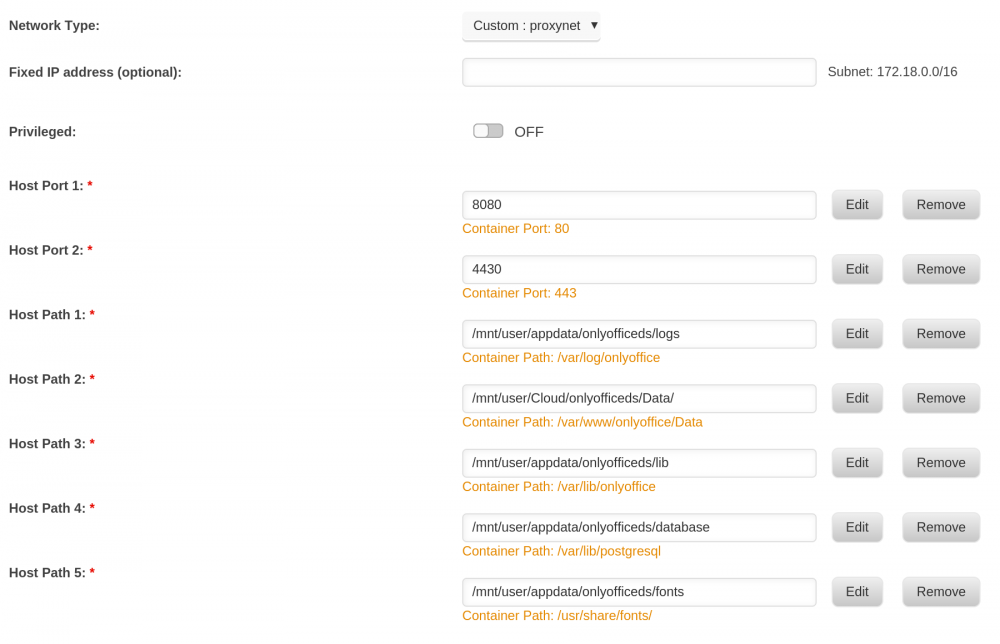
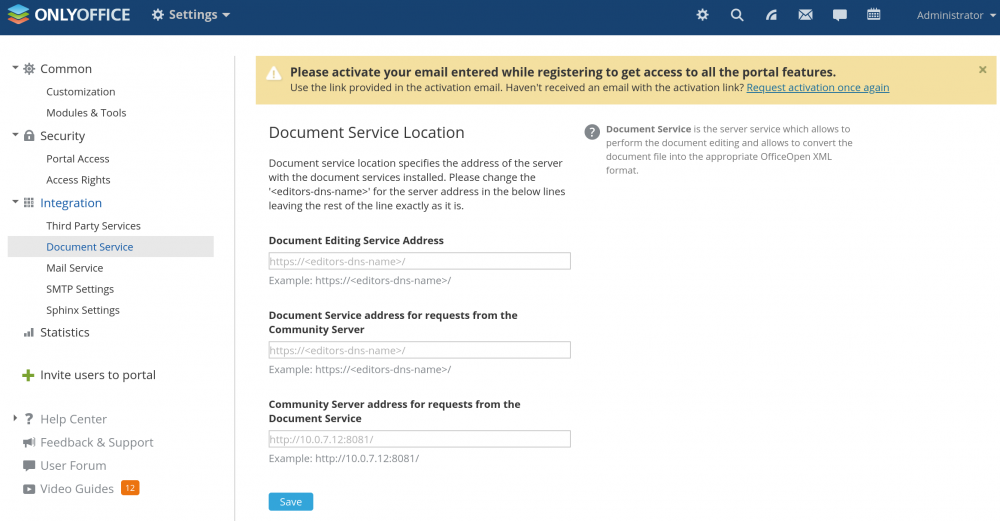
How anyone gets the onlyoffice to work? I got the Linuxserver's letsencrypt container for my reverse proxy. I created /mnt/cache/appdata/letsencrypt/nginx/proxy-confs/onlyoffice.subdomain.conf with the following info: server { listen 443 ssl; server_name onlyoffice.*; include /config/nginx/ssl.conf; client_max_body_size 0; location / { include /config/nginx/proxy.conf; resolver 127.0.0.11 valid=30s; set $upstream_docs onlyofficedocumentserver; proxy_pass https://$upstream_docs:443; proxy_redirect off; proxy_set_header Host $host; proxy_set_header X-Real-IP $remote_addr; proxy_set_header X-Forwarded-For $proxy_add_x_forwarded_for; proxy_set_header X-Forwarded-Host $server_name; proxy_set_header X-Forwarded-Proto $scheme; } } This is what I have on OnlyOffice Document Server: (see attached file) Also, I installed the OnlyOffice Community Server and what exactly goes to the Document Editing Service Address, Document Service address for requests from the Community Server and Community Server address for requests from the Document Service fields? When I opened the Document Server webUI, I get the page "cannot get /" I followed the instruction from https://hub.docker.com/r/onlyoffice/documentserver/ and generated the two keys that supposed to go to /var/www/onlyoffice/Data/certs/
-
I could not login using any regular user accounts, but I can still login via my admin account. When logging in using a regular user account, I would get a 504 error. I logged in as an admin and checked the logs and got this error message: Login failed: 'pingmanping' (Remote IP: '172.18.0.2') I changed the password for this user via the admin page, but I kept getting the same error in the logs. I don't login to the webpage that often, so I am not sure when this started. Based on the logs, it has been going on for over a month. I haven't reached the bottom but all I see is this error.
-
Have you found a solution to moving the photos to the share folder or have you found your alternatives?
-
Hello, I noticed that the photos uploaded to the Piwigo is located in /mnt/cache/appdata/piwigo/www/gallery/upload/. Is there a way to change this location to the array Shares instead? My cache drive has limited space and it got corrupted several times now and can't really trust it to hold my photos or videos. Also, backing up the appdata would get really big.
-
Hi, I have been using binhex-emby, and several weeks ago I noticed when I added a new content, the actors are not showing up anymore just for newly added ones. I have not change any settings other than updating the container via unraid docker update. Also, the container is not pulling the right primary image. Most of the time, the container would get the backdrop image and set it as primary. This is only true for the newly added items.
-
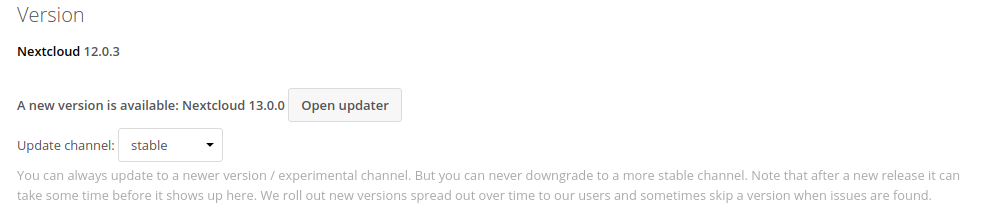
Is this the CLI upgrade you mentioned? Also, there is an update button in the UI admin settings, can I use that as well?
-
I just updated my container, but when I logged in as an admin and it is still showing the version is 12.0.3
-
I think I got my issue resolved with OpenVPN and letsencrypt. Since the letsencrypt uses port 442, I was able to use the OpenVPN port-share feature. I was able to vpn-in and still hit the nextcloud. The new problem now is when I am on my wifi and tried to go to my nextcloud, it is very slow. Logging in would take like over a minute. When I tried to enter just the IP address of my unRaid and nextcloud port 444/tcp, it changes to my nextcloud.mydomain.com.
-
Is there a stream module template for openvpn?
-
That fixed one problem. I renamed the current default to nextcloud and restarted LE. When it generated a default file, I follow your instruction and commented the entire file, and it worked. The main question now is how can I get my pivpn https://github.com/pivpn/pivpn to work behind the linuxservers' letsencrypt container. I have my unraid in servers-zone and I have my pivpn in the dmz. Both LE and pivpn use 443/tcp and I only have one dynamic IP from ISP, so I can only do one destination NAT. I can change the port of the pivpn, but my issue with these is at work the guest network only allows 443, 80 and 53. I wanted to keep the port set to 443/tcp as much possible. How hard would it be to get the LE to work with pivpn or any VPN? As you may guess I am having a hardtime already with the previous issue, and I am pretty sure this LE and VPN stuff will be harder.
-
There is no other file in /mnt/cache/appdata/letsencrypt/nginx/site-confs/
-
Yes, I got my domain at namesilo and added some subdomain entries, but somehow when I renamed the default file I get this logs nginx: [emerg] the size 10485760 of shared memory zone "SSL" conflicts with already declared size 52428800 in /config/nginx/site-confs/nextcloud.mydomain.com.conf:20 When I renamed it again back to 'default', it works again.
-
I have a pivpn in my dmz and my unraid in my servers-zone. My pivpn uses port 443/tcp. Would it be possible for my pi to hide behind the LE/nginx? Should I move the pivpn in the servers-zone to get it to work? At this point, I got my nextcloud working by following chbmb guide https://www.linuxserver.io/2017/05/10/installing-nextcloud-on-unraid-with-letsencrypt-reverse-proxy/ However, I have not tried to deal with my pivpn situation yet since I could not get the emby to work. My emby container has its own ip. When I added a new location for my emby which is in the same zone (servers-zone) with different ip address, it broke it again. The emby is not a big deal for me. But the pivpn is more important than emby. At this point, I cannot vpn in because the port 443 is being used by LE. At first, I tried to create a multiple .conf (e.g. nextcloud.domain.com.conf, vpn.domain.com.conf, emby.domain.com.conf) files in the /mnt/cache/appdata/letsencrypt/nginx/site-confs/ This did not work. I realized that I can only use one file and the name has to be "default". Now, I added a 2nd 'location' and point it to my emby, and broke it again. This is the config that I had server { listen 443 ssl; server_name nextcloud.domain.com emby.domain.com; ... ... #nextcloud location /nextcloud { proxy_pass https://10.0.7.12:444; proxy_max_temp_file_size 2048m; include /config/nginx/proxy.conf; } #emby location /emby { proxy_pass https://10.0.7.10:8920; } } I thought of getting emby to work to test the multiple target locations in the same zone before going to different firewall zone. At this point, I am completely lost. I did some digging about openvpn behind nginx. It seems to be possible, and the stream module will be needed. I have no idea what an stream module is and how am I going to get it involve with my settings.
-
Here is update. I used the bridge mode and everything works. I really don't want to use my unraid IP when opening inbound ports from the Internet. How are you deploying your letsencrypt? My plan was to put the LE container in my DMZ and this seems to fail to work. I would like to put my pivpn, emby, nextcloud behind the letsencrypt container.
-
I put my letsencrypt container to my DMZ subnet. Do you think this is the problem? I put a VM in the DMZ and I was able to browse the Internet. I disabled my pihole and letsencrypt was still failing with the same error. I did some testing to verified the destination NAT by installing the Linuxserver.io NGINX container and I was able to hit the page. But letsencrypt fails to work. Sent from my iPad using Tapatalk



