Stan464
Members
-
Joined
-
Last visited
Everything posted by Stan464
-
Small Bumpo.
-
Just wish to say Thanks very much for releasing / building? this project! For someone who finds some of the Variables and the learning curve on a DIY Method for what the UUD already does would be a nightmare to try and learn from scratch!. I have 3 small queries: 1) When i remove the Cache Drive (i dont have one) it keeps adding a random drive on refresh (everything else is perfect) 2) I dont have Drive Stats at all (Temps, S.M.A.R.T ect) Array Information, Parity ect ect. 3) My Bottom UPS Currency shows as "$" but i chose currency "£". Thanks kindly again!
-
Yeah, i wouldn't mind seeing this also! seems i got the folder structure right, wouldnt mind seeing an example layout just incase im double nesting by mistake. Thanks Dudes.
-
Guys Might be a silly question. But does the 6.7.1 with Intel Patch *lol* Does this cause a Performance Hit? current CPU is not the best and im almost certain if it gets nerfed by a patch it will Melt lol! Thanks Guys?
-
***RESOLVED***
-
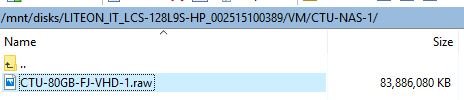
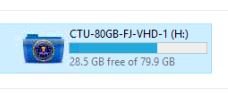
UPDATE: Seems Formatting my DISK from BTRFS to NTFS "may" of resolved my issue, as seen in Image, an hour between those time stamps and 0 Decrease in free space. Will report back when more time has passed.

-
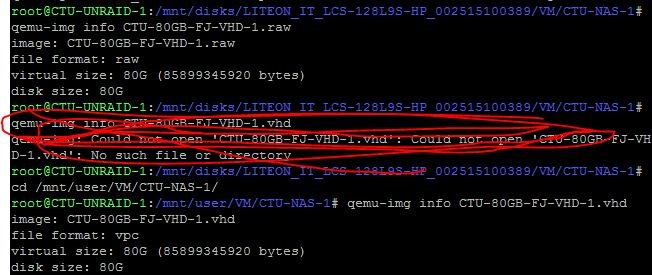
Hi John. Thanks ever so much for getting back to me. But as far as im aware. No, these are either VHD's build within Windows or .RAW Converted. in both use cases, the QEMU-IMG INFO show the same stats for both. So Physical and Virtual both being 80GB. Strange right? Thanks
-
Hi All. Tried looking around and couldn't seem to find anyone with the same issue as me. Got an 80Ish GB .IMG Virtual Disk. but for whatever reason. it seems to use more Disk Space than what it currently has Assigned to it. if that makes any sense? i have attached a Print Screen as for whatever reason. it seems to keep using space with no clear reason to how or why? could someone lend a hand and drop ideas by to why? It will simply sit there and use the remaining 26.2GB and still show a VHD IMG Disk size of 83.XGB.... Nothing else is using this SSD! *This will happily use ALL Remaining Disk Space but show a .img of 83GB and then Freeze/Pause the Box* - See Attachment showing space 5 Minutes after. (Also see New image showing space a few hours later into the evening. again, calculation only shows 80GB Used for VM Disk.) Thanks ever so much.