






nicecube
Members
-
Joined
-
Last visited
Everything posted by nicecube
-
Oh, I thought he was all in IT mode. I will check how to flash them if possible.
-
Good morning, thank you again for supporting me. I have 3 LSI cards when I bought it said it was flash in IT mode. I would like to leave them like that for now.
-
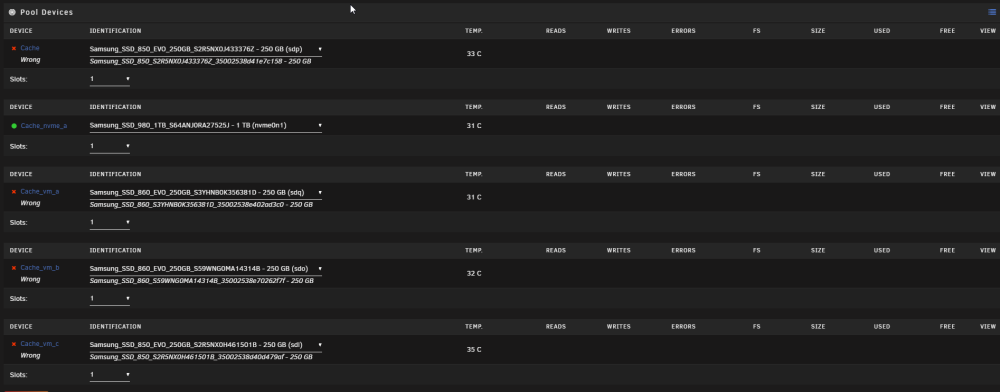
Hey everyone, I recently performed a major cleanup of my Unraid server, including rearranging some cables. However, when I started Unraid, I encountered an issue with my SSD CACHE drives. Although all the disks in my array are available, I received an error indicating a problem with 4 SSD CACHE drives. I tried selecting the correct disks (marked as 'missing'), but unfortunately, it didn't resolve the issue. I'm reaching out for ideas or suggestions to troubleshoot this problem. If anyone has faced a similar situation or has expertise in Unraid, your assistance would be greatly appreciated. Here are some additional details about my current setup: I'm open to any suggestions or potential solutions to resolve this situation. Thank you in advance for your help! tower-diagnostics-20230523-1618.zip
-
OK perfect i ll replace it as soon as i received it, do you have hint to help me rebuilt my vm i found my vmdk but i can't find the xml to reimport it
-
Thanks JorgeB and itimpi my array is started and all my docker are running, i loose my vms but i ll figure out how to reimport the disk in new vms. Before replacing my disk2 should i run a parity rebuilt just to be safe ?
-
Hi, the data rebuild was completed but the disk1 is Unmountable: Wrong or no file system What the next step I ll receive a new 6tb disk today to replace Disk2 tower-diagnostics-20230519-1029.zip
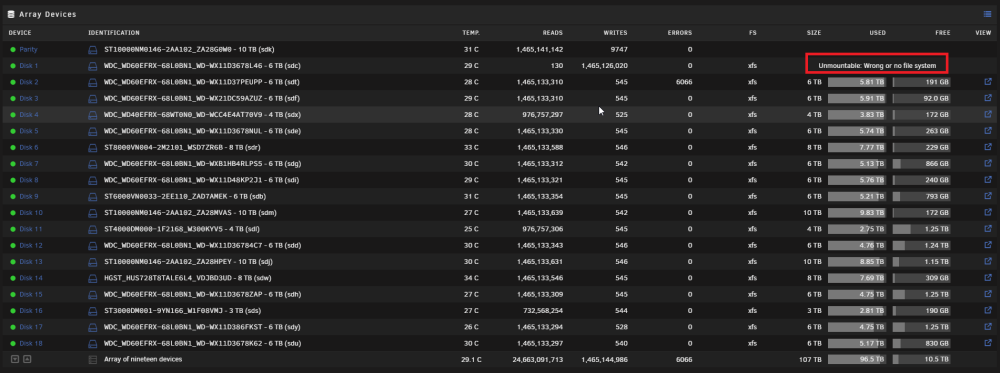
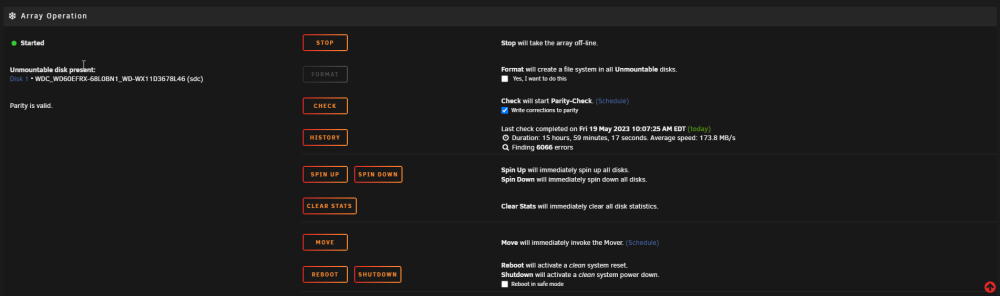 If you don't mind, can you give me the steps to follow I don't want to make mistakes Should I just select my new disk in disk1 and start the array? edit: its rebuilding right now thank for the help !tower-smart-20230518-1416.zip
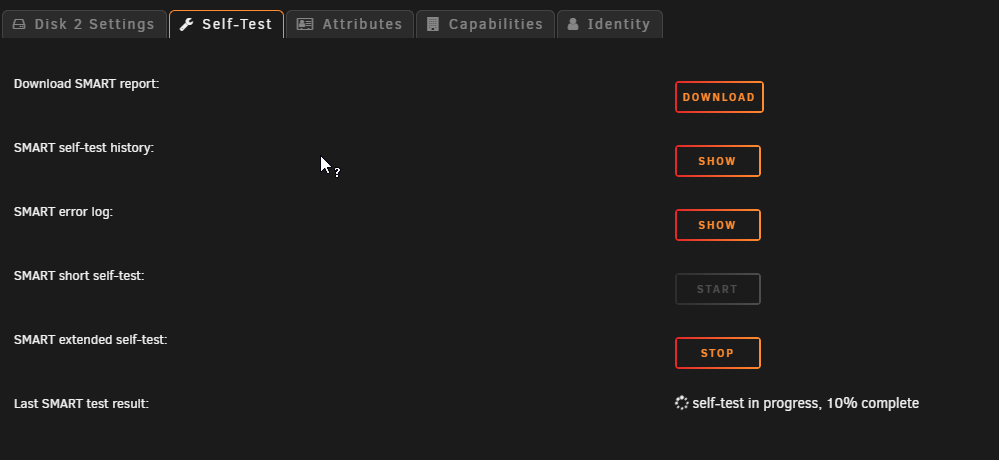
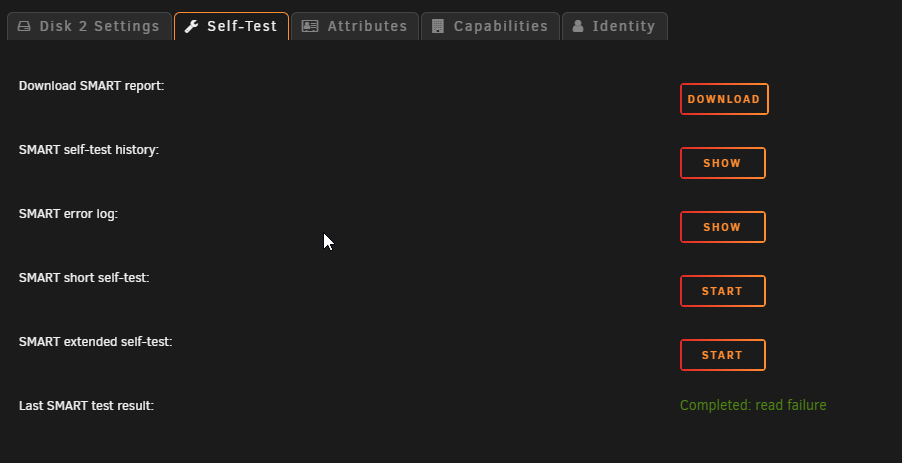 I started the self test but after 10 minutes it is still at 10% is it normally long?
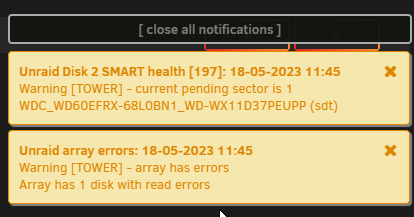
 I only had 1 spare disk and I used it to replace disk 1, I will have to order u another for disk 2 I included the new diagnostic tower-diagnostics-20230518-1158.zipPhase 1 - find and verify superblock... superblock read failed, offset 1099511623680, size 131072, ag 1, rval -1 fatal error -- Input/output error
 Do i need to add disk 1 to array to check the file system ? I replace that disk for a new one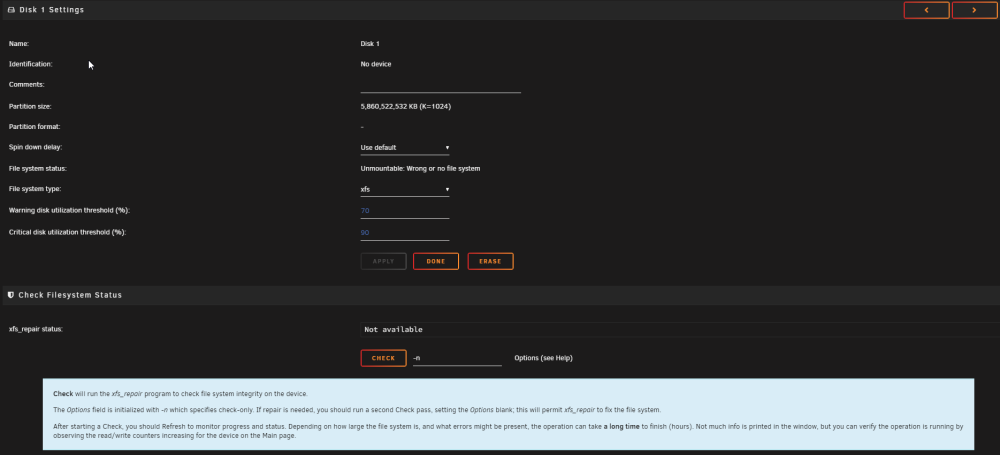
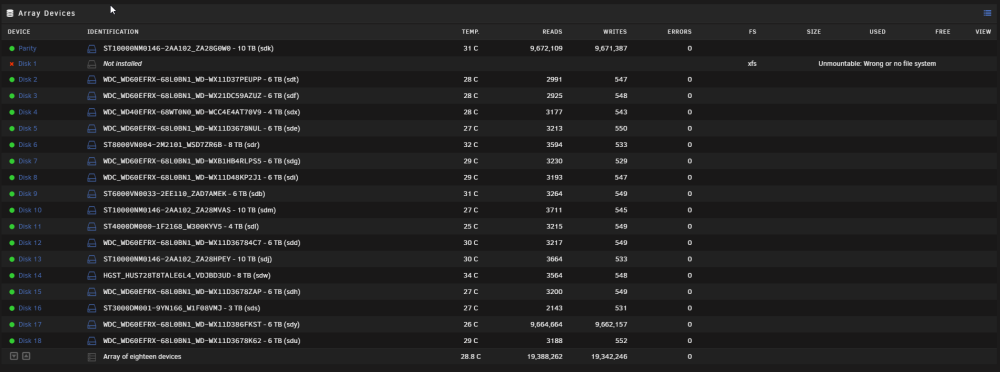 I started the array and it look like this: tower-diagnostics-20230518-0928.zip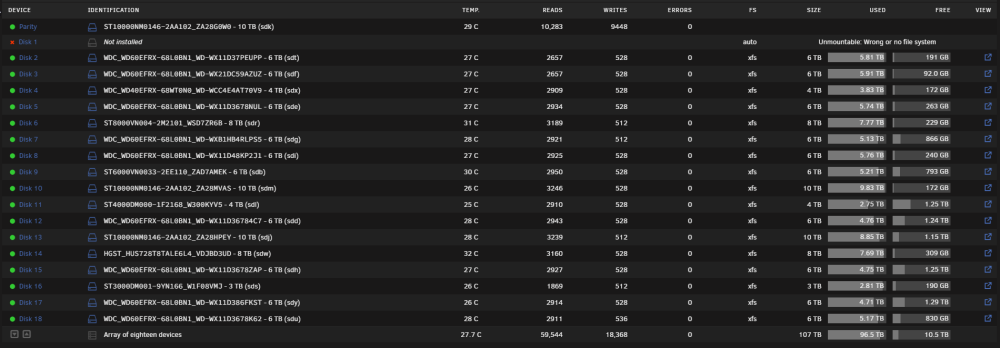
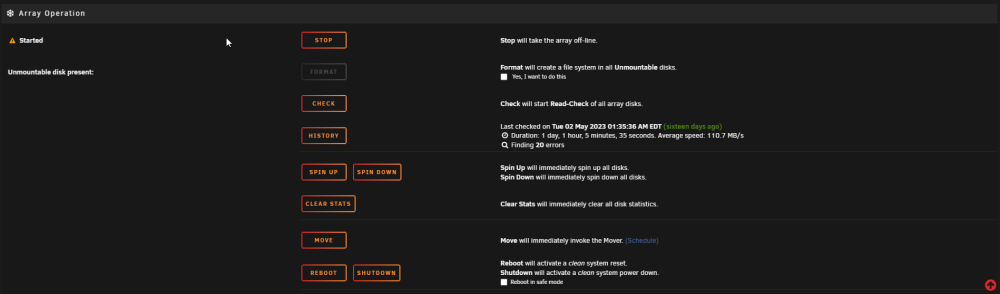 I followed the instructions until the step to stop the array and unassign disk 1 (i added a new 6TB drive in the server (Disk 1)). To start the array again I have this message with a check box I imagine that I must proceed ?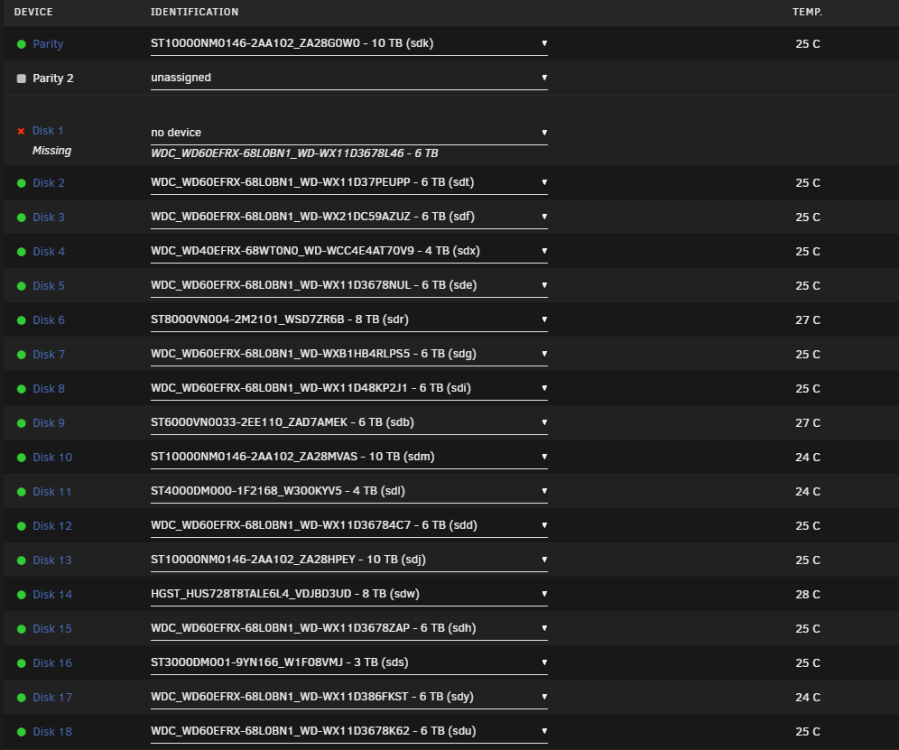
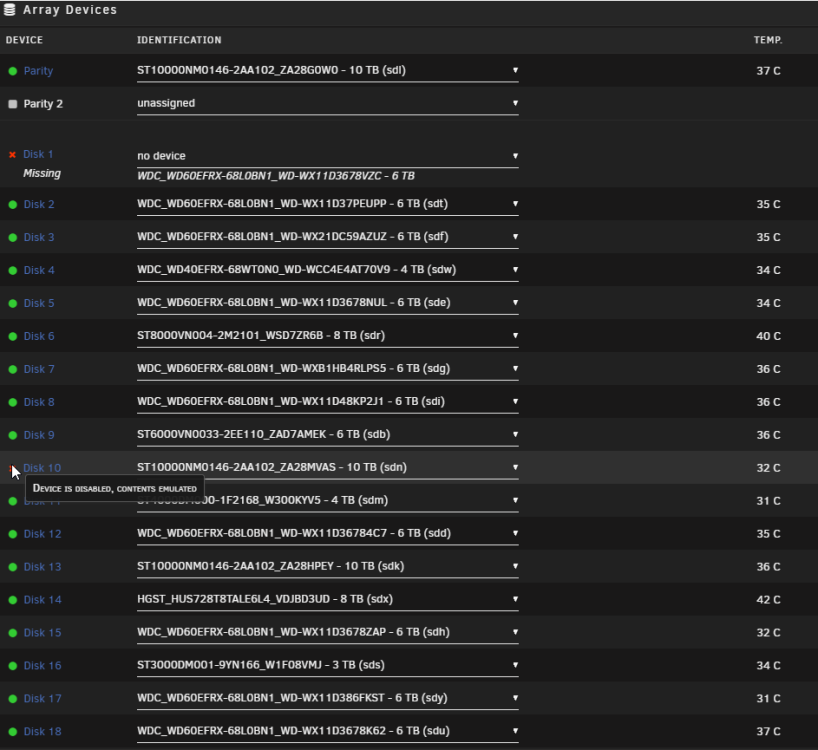
 I can afford to lose data it's only movies and series, I can download them again. What would be the best approach can you give me indications that I can follow to restart my array. Is there a way to force disk 10 online and try to rebuild disk 1. My english is not very good sorry if i misunderstoodAfter shutting down the server overnight, I restarted it the next morning and discovered that Disk 10 had been disabled. Despite leaving the server running all day, the issue persisted. When I powered it off in the evening and rebooted it the following morning, I noticed that two disks 1 were now missing. Disk 1 is clearly defective, emitting unusual noises and displaying signs of damage. While Disk 10 doesn't appear to be faulty, Unraid continues to disable it.Hello everyone, I'm experiencing a significant problem with my Unraid server. After a routine server reboot, my array refuses to start, and I have one disk that is not functioning as expected. Before the reboot, everything seemed to be working normally and no error indications were present. However, now one of my disks is missing and I'm unable to get it working. Additionally, another disk displays the status "Device is disabled, content emulated". I've tried to troubleshoot the issue myself but haven't been successful so far. I'm hoping someone from this community could possibly guide me through the steps to fix these issues. Moreover, if there's a way to reactivate Disk 10 while replacing Disk 1, that would be the most optimal solution for me. Any guidance on how I can achieve this would be incredibly helpful. I am ready to provide any further information required to diagnose the issue and find a suitable solution. I can remove Disk 1 and replacing it with a new one. I could attempt to recover the data from the removed disk and copy it back to the array later on. If anyone has any advice or suggestions regarding this approach, please let me know. Your input would be invaluable as I work to resolve these issues. An update on Disk 1: I connected it to my personal computer to check it, and by the sounds it's making, I'm afraid it might be dead. tower-diagnostics-20230516-1457.zip
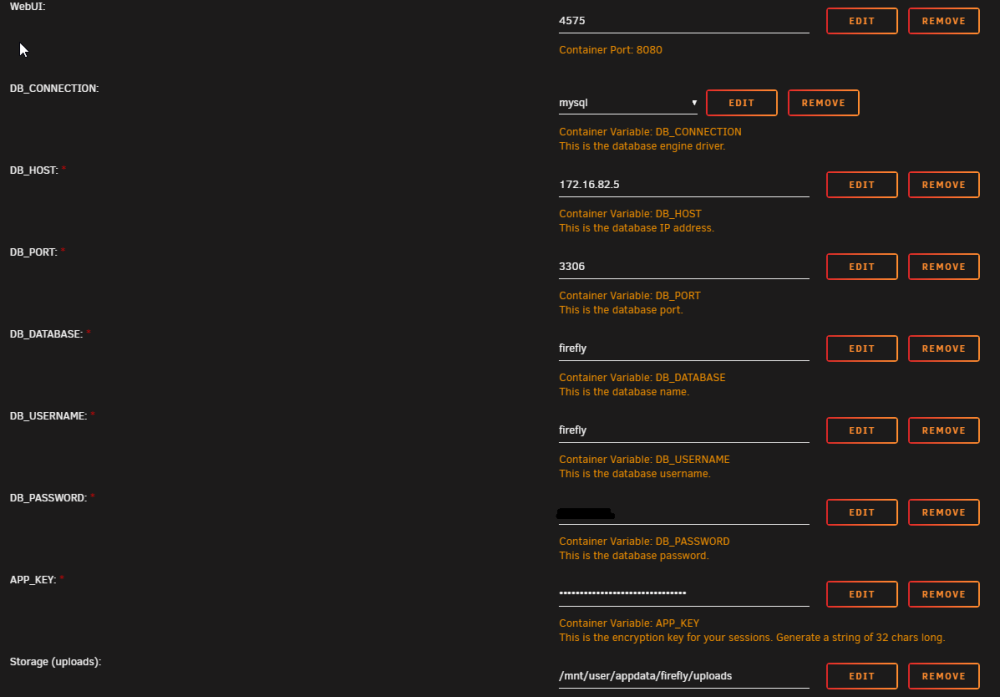
 As suggested, I've enabled the syslog server with the mirror to flash option. After doing so, I issued the reboot command and restarted the server. Unfortunately, the web interface has crashed yet again. I am at a bit of a loss as to what my next steps should be. I would greatly appreciate any further guidance or suggestions you might have for troubleshooting this issue. As a reminder, I am more than willing to provide any additional information or perform any tasks that could help in resolving this problem.Hello everyone, I am reaching out to this knowledgeable community in the hope of finding a solution to an ongoing issue with my Unraid system. I have been experiencing this problem for about a week now, wherein my web interface stops responding unexpectedly. What typically happens is that the system appears to be running fine, and then suddenly the web interface becomes unresponsive. I've had to resort to resetting the system twice to get it back up and running, which is far from ideal. While I've tried troubleshooting this issue myself, I am at a loss as to what might be causing this irregular behavior. I've checked the usual suspects: network connectivity, hardware issues, etc., but everything seems to be in order. As a part of this post, I have included diagnostic information to provide as much context as possible. I hope that someone here might be able to help me decipher this, and point me in the right direction to rectify this issue. Please find the attached diagnostics file below. Any insights, suggestions, or advice you could provide would be greatly appreciated. Thank you for taking the time to read this post. I look forward to any assistance that you can provide. tower-diagnostics-20230515-0627.zipHello, I installed Firefly but it does not work. I created a database in MariaDB. When I install Firefly I see in my database that all the tables have been created. When I try to connect in the web interface on the port mentioned in the configuration, I have a 500 error and I see things appearing in the docker log. https://pastebin.pl/view/88094c55
 Can you help me with this, I don't understand how I could have done this. I disabled and re-enabled docker and my image usage went from 83% to 13%I deleted my image last week, reinstalled my dockers with previous app and made sure all variables were outside of my docker img


Account
Navigation
Search
Configure browser push notifications
Chrome (Android)
- Tap the lock icon next to the address bar.
- Tap Permissions → Notifications.
- Adjust your preference.
Chrome (Desktop)
- Click the padlock icon in the address bar.
- Select Site settings.
- Find Notifications and adjust your preference.
Safari (iOS 16.4+)
- Ensure the site is installed via Add to Home Screen.
- Open Settings App → Notifications.
- Find your app name and adjust your preference.
Safari (macOS)
- Go to Safari → Preferences.
- Click the Websites tab.
- Select Notifications in the sidebar.
- Find this website and adjust your preference.
Edge (Android)
- Tap the lock icon next to the address bar.
- Tap Permissions.
- Find Notifications and adjust your preference.
Edge (Desktop)
- Click the padlock icon in the address bar.
- Click Permissions for this site.
- Find Notifications and adjust your preference.
Firefox (Android)
- Go to Settings → Site permissions.
- Tap Notifications.
- Find this site in the list and adjust your preference.
Firefox (Desktop)
- Open Firefox Settings.
- Search for Notifications.
- Find this site in the list and adjust your preference.