





parisv
Members
-
Joined
-
Last visited
Everything posted by parisv
-
oh yeah I think that was to get the igpu working correctly wasn't it? I have a seperate gpu now so not using it anymore so can't confirm if that works or not.
-
installed both bios and BMC update, 12 hours ago, all seems fine so far.
-
I have a windows vm with a nvidia 3070 passed through to it, I want to add a 1660 super. When I try to start the vm I get this error: internal error: qemu unexpectedly closed the monitor: 2021-11-02T22:10:45.645683Z qemu-system-x86_64: -device vfio-pci,host=0000:03:00.0,id=hostdev0,bus=pci.0,addr=0x6: vfio 0000:03:00.0: group 17 is not viable Please ensure all devices within the iommu_group are bound to their vfio bus driver. In tools system devices I can see this group groups 17 And here is all the info from system devices: CI Devices and IOMMU Groups IOMMU group 0: [8086:3ec6] 00:00.0 Host bridge: Intel Corporation 8th Gen Core Processor Host Bridge/DRAM Registers (rev 07) IOMMU group 1: [8086:1901] 00:01.0 PCI bridge: Intel Corporation 6th-10th Gen Core Processor PCIe Controller (x16) (rev 07) [10de:2484] 01:00.0 VGA compatible controller: NVIDIA Corporation GA104 [GeForce RTX 3070] (rev a1) [10de:228b] 01:00.1 Audio device: NVIDIA Corporation GA104 High Definition Audio Controller (rev a1) IOMMU group 2: [8086:3e96] 00:02.0 Display controller: Intel Corporation CoffeeLake-S GT2 [UHD Graphics P630] IOMMU group 3: [8086:1911] 00:08.0 System peripheral: Intel Corporation Xeon E3-1200 v5/v6 / E3-1500 v5 / 6th/7th/8th Gen Core Processor Gaussian Mixture Model IOMMU group 4: [8086:a379] 00:12.0 Signal processing controller: Intel Corporation Cannon Lake PCH Thermal Controller (rev 10) IOMMU group 5: [8086:a36d] 00:14.0 USB controller: Intel Corporation Cannon Lake PCH USB 3.1 xHCI Host Controller (rev 10) Bus 001 Device 001: ID 1d6b:0002 Linux Foundation 2.0 root hub Bus 001 Device 002: ID 0781:5530 SanDisk Corp. Cruzer Bus 001 Device 003: ID 046b:ff01 American Megatrends, Inc. Virtual Hub Bus 001 Device 004: ID 046b:ffb0 American Megatrends, Inc. Virtual Ethernet Bus 001 Device 005: ID 046b:ff10 American Megatrends, Inc. Virtual Keyboard and Mouse Bus 002 Device 001: ID 1d6b:0003 Linux Foundation 3.0 root hub [8086:a36f] 00:14.2 RAM memory: Intel Corporation Cannon Lake PCH Shared SRAM (rev 10) IOMMU group 6: [8086:a368] 00:15.0 Serial bus controller [0c80]: Intel Corporation Cannon Lake PCH Serial IO I2C Controller #0 (rev 10) [8086:a369] 00:15.1 Serial bus controller [0c80]: Intel Corporation Cannon Lake PCH Serial IO I2C Controller #1 (rev 10) IOMMU group 7: [8086:a360] 00:16.0 Communication controller: Intel Corporation Cannon Lake PCH HECI Controller (rev 10) [8086:a361] 00:16.1 Communication controller: Intel Corporation Device a361 (rev 10) [8086:a364] 00:16.4 Communication controller: Intel Corporation Cannon Lake PCH HECI Controller #2 (rev 10) IOMMU group 8: [8086:a352] 00:17.0 SATA controller: Intel Corporation Cannon Lake PCH SATA AHCI Controller (rev 10) [3:0:0:0] disk ATA WDC WD80EZAZ-11T 0A83 /dev/sdb 8.00TB [4:0:0:0] disk ATA WDC WD80EZAZ-11T 0A83 /dev/sdc 8.00TB [5:0:0:0] disk ATA WDC WD80EZAZ-11T 0A83 /dev/sdd 8.00TB [6:0:0:0] disk ATA WDC WD80EZAZ-11T 0A83 /dev/sde 8.00TB [7:0:0:0] disk ATA CT120BX500SSD1 R013 /dev/sdf 120GB IOMMU group 9: [8086:a340] 00:1b.0 PCI bridge: Intel Corporation Cannon Lake PCH PCI Express Root Port #17 (rev f0) IOMMU group 10: [8086:a32c] 00:1b.4 PCI bridge: Intel Corporation Cannon Lake PCH PCI Express Root Port #21 (rev f0) IOMMU group 11: [8086:a338] 00:1c.0 PCI bridge: Intel Corporation Cannon Lake PCH PCI Express Root Port #1 (rev f0) IOMMU group 12: [8086:a330] 00:1d.0 PCI bridge: Intel Corporation Cannon Lake PCH PCI Express Root Port #9 (rev f0) IOMMU group 13: [8086:a331] 00:1d.1 PCI bridge: Intel Corporation Cannon Lake PCH PCI Express Root Port #10 (rev f0) IOMMU group 14: [8086:a332] 00:1d.2 PCI bridge: Intel Corporation Cannon Lake PCH PCI Express Root Port #11 (rev f0) IOMMU group 15: [8086:a328] 00:1e.0 Communication controller: Intel Corporation Cannon Lake PCH Serial IO UART Host Controller (rev 10) IOMMU group 16: [8086:a309] 00:1f.0 ISA bridge: Intel Corporation Cannon Point-LP LPC Controller (rev 10) [8086:a323] 00:1f.4 SMBus: Intel Corporation Cannon Lake PCH SMBus Controller (rev 10) [8086:a324] 00:1f.5 Serial bus controller [0c80]: Intel Corporation Cannon Lake PCH SPI Controller (rev 10) IOMMU group 17: [10de:21c4] 03:00.0 VGA compatible controller: NVIDIA Corporation TU116 [GeForce GTX 1660 SUPER] (rev a1) [10de:1aeb] 03:00.1 Audio device: NVIDIA Corporation TU116 High Definition Audio Controller (rev a1) [10de:1aec] 03:00.2 USB controller: NVIDIA Corporation TU116 USB 3.1 Host Controller (rev a1) Bus 003 Device 001: ID 1d6b:0002 Linux Foundation 2.0 root hub Bus 004 Device 001: ID 1d6b:0003 Linux Foundation 3.0 root hub [10de:1aed] 03:00.3 Serial bus controller [0c80]: NVIDIA Corporation TU116 USB Type-C UCSI Controller (rev a1) IOMMU group 18: [144d:a808] 04:00.0 Non-Volatile memory controller: Samsung Electronics Co Ltd NVMe SSD Controller SM981/PM981/PM983 [N:0:4:1] disk Samsung SSD 970 EVO Plus 1TB__1 /dev/nvme0n1 1.00TB IOMMU group 19: [8086:1533] 05:00.0 Ethernet controller: Intel Corporation I210 Gigabit Network Connection (rev 03) IOMMU group 20: [1a03:1150] 06:00.0 PCI bridge: ASPEED Technology, Inc. AST1150 PCI-to-PCI Bridge (rev 04) [1a03:2000] 07:00.0 VGA compatible controller: ASPEED Technology, Inc. ASPEED Graphics Family (rev 41) IOMMU group 21: [8086:1533] 08:00.0 Ethernet controller: Intel Corporation I210 Gigabit Network Connection (rev 03) CPU Thread Pairings Pair 1: cpu 0 / cpu 6 Pair 2: cpu 1 / cpu 7 Pair 3: cpu 2 / cpu 8 Pair 4: cpu 3 / cpu 9 Pair 5: cpu 4 / cpu 10 Pair 6: cpu 5 / cpu 11 USB Devices Bus 001 Device 001: ID 1d6b:0002 Linux Foundation 2.0 root hub Bus 001 Device 002: ID 0781:5530 SanDisk Corp. Cruzer Bus 001 Device 003: ID 046b:ff01 American Megatrends, Inc. Virtual Hub Bus 001 Device 004: ID 046b:ffb0 American Megatrends, Inc. Virtual Ethernet Bus 001 Device 005: ID 046b:ff10 American Megatrends, Inc. Virtual Keyboard and Mouse Bus 002 Device 001: ID 1d6b:0003 Linux Foundation 3.0 root hub Bus 003 Device 001: ID 1d6b:0002 Linux Foundation 2.0 root hub Bus 004 Device 001: ID 1d6b:0003 Linux Foundation 3.0 root hub SCSI Devices [0:0:0:0] disk SanDisk Cruzer 1.26 /dev/sda 8.00GB [3:0:0:0] disk ATA WDC WD80EZAZ-11T 0A83 /dev/sdb 8.00TB [4:0:0:0] disk ATA WDC WD80EZAZ-11T 0A83 /dev/sdc 8.00TB [5:0:0:0] disk ATA WDC WD80EZAZ-11T 0A83 /dev/sdd 8.00TB [6:0:0:0] disk ATA WDC WD80EZAZ-11T 0A83 /dev/sde 8.00TB [7:0:0:0] disk ATA CT120BX500SSD1 R013 /dev/sdf 120GB [N:0:4:1] disk Samsung SSD 970 EVO Plus 1TB__1 /dev/nvme0n1 1.00TB what can I do to get the 1660 working?

-
where do you get the download from?
-
That was a really annoying issue for me, I bought this motherboard mainly for the fact of the kvm as it’s running headless. Although since moving from Ubuntu to unraid I’ve hardly needed to use it.
-
My board is currently reporting as hot from ipmi ipmi plugin Also I'm using a Fractal design meshify 2 which has a smart hub where I connect all the fans to including the 4 pin cpu fan then it connects to cpu_fan1. Problem is it's reporting as 0rpm and the red light next to cpu_fan1 on the motherboard is flashing. The fans which are plugged into the hub are spinning.
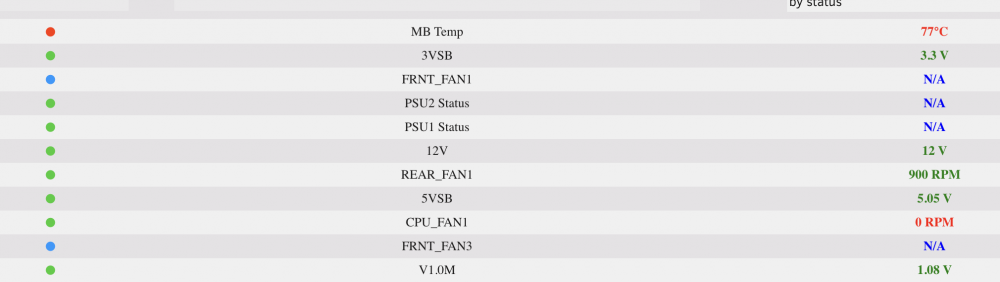
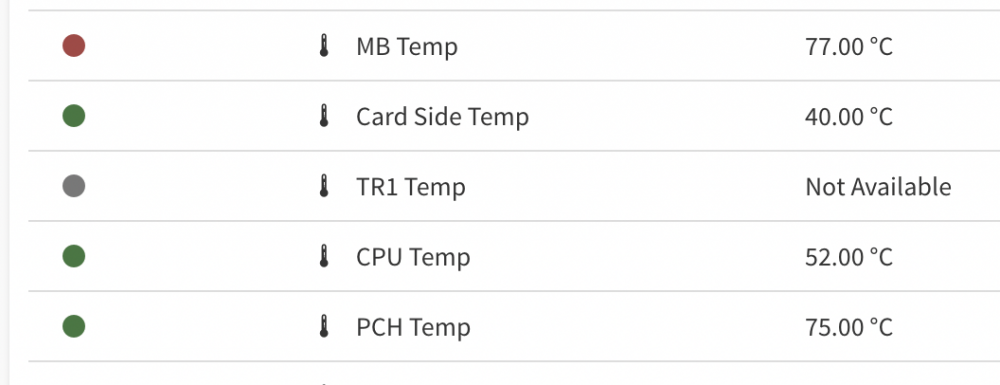
-
Are you able to see your cpu temp and fan speed on the unraid dashboard? I get:
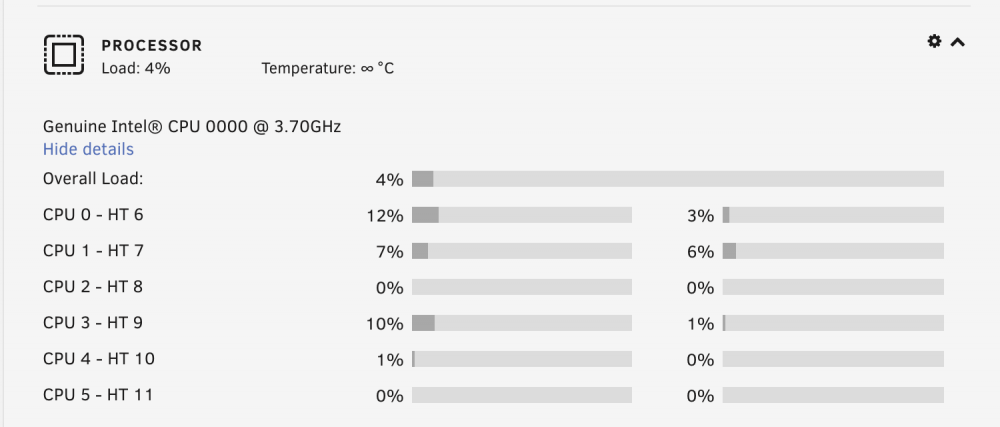
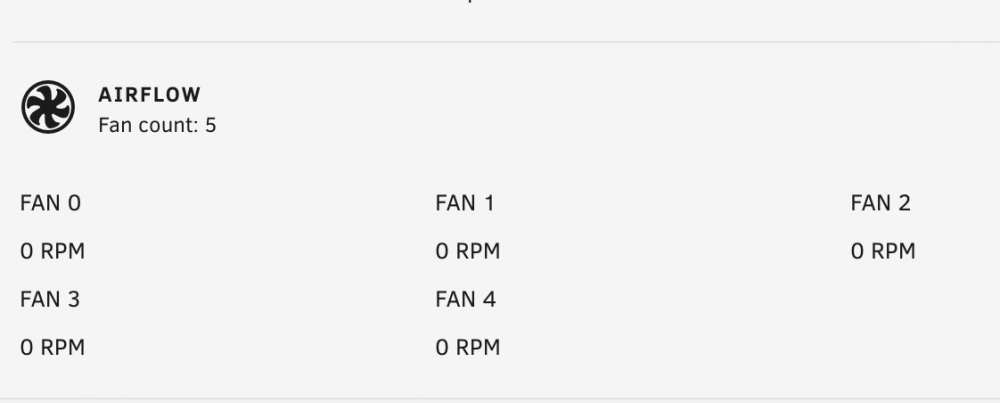
-
I can't seem to boot anymore. Bios picked up the usb ok if I select boot it can see the usb. I've tried copying the files from one usb to another then running the make boot batch file but still same issue. Error code on motherboard says A2 which means it can't find boot device. It's odd it just gets to the screen where is says press f2 for bios f11 boot menu and stays there. If I manually select boot device nothing happens. If I put the usb in another machine it loads the boot menu fine. I've also tried a windows usb iso too and same thing it just won't boot from usb I've tried different usb sockets too. edit- working now it’s because I had a monitor plugged in. Doesn’t seem to boot with it in as I have the onboard graphics force enabled for Plex transcoding. I then got a pci error with a graphics card plugged in so I had to disable the boot inventory. Now passed through a 3070 to a window vm fine.
-
our boards don't fit full size gpus there's a heatsink in the way of the pcie 3 x 16 slot. can use a rise cable and a vertical mount adapter if you have the right case.
-
will the nvidia 3000 and AMD 6000 series work ok with our motherboards (E3C246D4U)? might buy one to crypto mine since the server is on 24/7
-
It should be using the gpu though?
-
Jus upgraded, all looking good so far. Just reading this: https://wiki.unraid.net/Unraid_OS_6.9.0#GPU_Driver_Integration now I remember I had to follow this to get h/w transcoding done on plex. Not sure if I should undo this an enable the gpu driver in the first link?
-
anyone upgraded unraid to 6.9 yet? I'm taking the plunge now.....
-
ah ok I was wondering if it could be set on the motherboard h/w instead of software but I guess really same outcome. do you still use one of those ports for the ipmi or do you use the dedicated nic for that because at the moment mine is via eth0
-
If I wanted to pair 2 nics is that possible? I have a switch where I can set an lacp trunk.
-
where can I download the 2.34 bios from? @Hoopster which settings did you have to change? Thanks
-
the E-2246G is worth a look at too.
-
Yeah the motherboard was really hard to get. I got mine from [email protected] Sign up to stock alerts on https://www.lambda-tek.com/ they get them from time to time.
-
thanks for sharing.
-
ooh so now they've added this on the official firmware? At last!! @int2e Where did you get this firmware from it doesn't show for me on their website. Did this reset any of your existing settings?
-
Really odd. I don't know why they just don't put this on the public version and default it to disabled then give the users the choice to turn it on?
-
I don’t understand why they can’t just have this feature in the public bios but have it disabled by default?
-
I've set the vm to use the ASPEED graphics. Windows didn't h/w manager needed the driver so I used this one from here: https://downloadcenter.intel.com/download/29123/ASPEED-Onboard-Video-Driver-for-Windows-

-
Found the issue. I set my windows VM to use the graphics card and had it set to auto start. Once this is started /dev/dri on unraid disappears.

-
No nothings change on my server. Regardless of plex I don't understand why modeprobe is not picking up the gpu? root@tower:~# sudo lshw -C video | grep product: product: HD Graphics P630 product: ASPEED Graphics Family root@tower:~# lspci | grep VGA 05:00.0 VGA compatible controller: ASPEED Technology, Inc. ASPEED Graphics Family (rev 41)




