




Skip to content
View in the app

A better way to browse. Learn more.

Unraid

A full-screen app on your home screen with push notifications, badges and more.

To install this app on iOS and iPadOS
  1. Tap the Share icon in Safari
  2. Scroll the menu and tap Add to Home Screen.
  3. Tap Add in the top-right corner.
To install this app on Android
  1. Tap the 3-dot menu (⋮) in the top-right corner of the browser.
  2. Tap Add to Home screen or Install app.
  3. Confirm by tapping Install.

Megalo

Members
  • Joined

  • Last visited

  1. Hi, Same problem for me A French user
  2. Hi, I use unraid 6.3.5. I installed daapd with community applications. I created file.remote (with advice name and 4 digit pin) and copied it to music folder. log says : [ LOG] remote: Read Remote pairing data (name 'ttt', pin '8817') from /music/tiphone.remote [ LOG] remote: Pairing succeeded with Remote 'ttt' (id EAD31632-BA3C-4D2A-AC23-0559AD9B26C3), GUID: 2304A2D27F40B5B4 (ttt is iPhone name, only for test) iPhone remote add only a logo without name and i can't select it (at the top right)
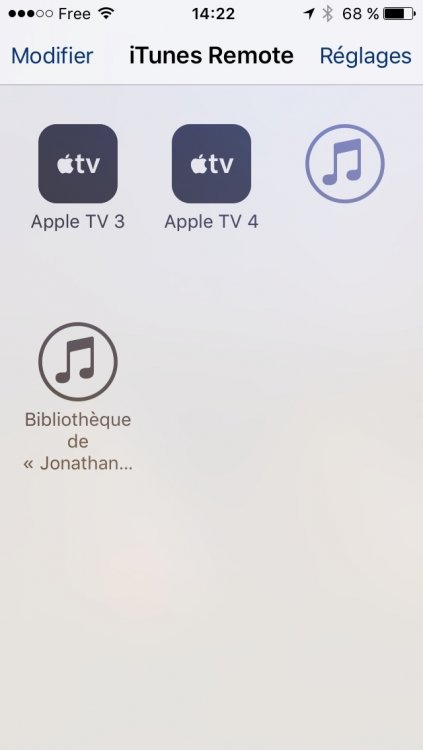
  3. Hi, Sorry for my bad english, I'm french. I install daapd, I see shared library on mac iTunes but, when I pair daapd with iPhone remote, I got library on iPhone without name (just iTunes logo) and I can't select it. Can you help me ? Thank you Joanthan

Account

Navigation

Search

Search

Configure browser push notifications

Chrome (Android)
  1. Tap the lock icon next to the address bar.
  2. Tap Permissions → Notifications.
  3. Adjust your preference.
Chrome (Desktop)
  1. Click the padlock icon in the address bar.
  2. Select Site settings.
  3. Find Notifications and adjust your preference.