Skip to content
View in the app

A better way to browse. Learn more.

Unraid

A full-screen app on your home screen with push notifications, badges and more.

To install this app on iOS and iPadOS
  1. Tap the Share icon in Safari
  2. Scroll the menu and tap Add to Home Screen.
  3. Tap Add in the top-right corner.
To install this app on Android
  1. Tap the 3-dot menu (⋮) in the top-right corner of the browser.
  2. Tap Add to Home screen or Install app.
  3. Confirm by tapping Install.

bobalachabbs

Members
  • Joined

  • Last visited

Everything posted by bobalachabbs

  1. I can't get the Web UI to pull up, but my PIA VPN is working normally via Privoxy. I checked the logs for the Docker and everything seems to be in order. I then looked at qBittorrent's logs and it said that it wasn't able to map a port via uPnP. The only thing different about my setup vs. last week is that I just upgraded my router to a box running pfSense over the weekend and I didn't have uPnP enabled on it like it was with my previous router, so I enabled that. Now the qBittorrent logs look good, it even added a torrent from Sonarr per the log, but I still can't pull up the Web UI. I'm at kind of a loss here. It could be some other setting within pfSense that I'm unaware of, hopefully there's another power user here with a bit more familiarity with pfSense and this docker that could help me out. If there's any kind of log or anything that would help to post, let me know. Edit: I ended up using binhex's privoxy VPN docker to route the traffic through and used linuxserver's qbittorent docker as I couldn't get binhex's rtorrent or deluge dockers to work either. I'm sure it's something specific to my setup, but at least I'm up and running again.
  2. Sorry for my delayed response, but Codeh's fix also worked for me, just needed to change to https:// with a security exception. Thanks!
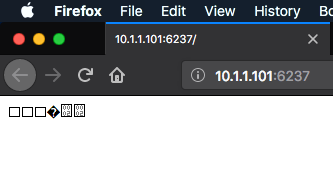
  3. I'm having an interesting issue - I've run unBalance a few times on my main server and it's worked great, but I'm setting up a new server for a friend and I can't get it to run - all I get is the attached screenshot when I try to pull up the UI - any thoughts? I'm trying to access this on my Mac, but I get the same result on Ubuntu as well (Firefox both times).

Account

Navigation

Search

Search

Configure browser push notifications

Chrome (Android)
  1. Tap the lock icon next to the address bar.
  2. Tap Permissions → Notifications.
  3. Adjust your preference.
Chrome (Desktop)
  1. Click the padlock icon in the address bar.
  2. Select Site settings.
  3. Find Notifications and adjust your preference.