Leandres
Members
-
Joined
-
Last visited
-
What is the scope on this?
-
I'm using several WireGuard tunnels, and noticed the option "Local tunnel firewall" isn't respected/working. I've tested this on several of my clients. Using this function to allow only one IP adres of the subnet is not resulting in a satisfied way of working since the client can still access all other machines in the same subnet. This makes WG less secure than I want. Anyone has a solution or is this a bug in unRAID ?
-
I've tried via WiFi hotspot / mobile internet no difference. Port forwarding checked and verified. Deleted the tunnel (as shown in the logs) and rebuild it. Also reconfiged the client etc. Also tried connect to internal WG server address. No handshake. I'm lost. I will try again from scratch later on. Edit: I've rebooted the host, deleted all the WG tunnels and set them up again. Now it's working as expected. Maybe a glitch somewhere.
-
Tnx for your help. See the logfile attached. wg-quick.txt
-
I'm really frustrated at the moment. A few days of troubleshooting and I cannot figure out why unraid isn't working with multiple wireguard tunnels anymore. This worked before, but not anymore. For me that is. Unraid version: 6.12.10 I have a primairy wg0 tunnel with a few peers working fine. I also had a wg1 tunnel which I had as a backup, so it worked, but I don't know anymore the last time I used it. But it worked. For an other project I created wg2, but then I found out the handshake could not be made. For days I'm trying over and over again. Checking client peers with wifi, hotspots etc to create other environments, but it won't let me connect to it. When I create a peer in wg0 the client instant connects to the tunnel and is working as expected. But any other new tunnel doens't seem to work. Port forwarding in the router is working well etc. Debugged almost everything but I'm stuck... Is this a known bug? Others experiencing the same issues? Any idea's?
-
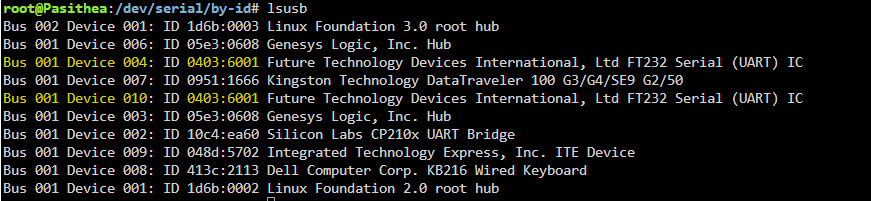
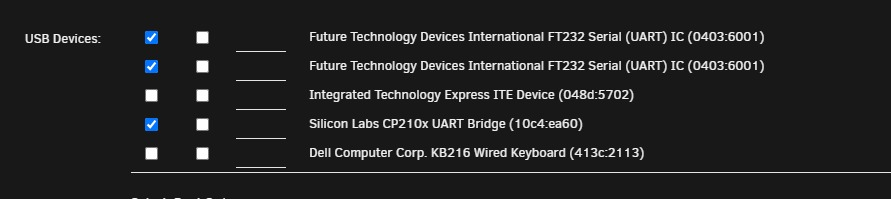
Since I don't need the PCIe USB card I removed it. Somehow I can now do ls -l on /dev/serial/by-id. So that probleem seems solved for now. But a new weird problem appeared: An USB device which worked perfectly and super stable and plugged in one of the standard USB ports now show up twice. This problem leads to not beeing able to passthrough the USB device into a VM: And if I want to select one, after updating the template both checkboxes are marked which prevents the VM to start..... Never seen this behavior before.

-
@SimonF It is an USB PCIe card (extender). root@Pasithea:~# lsusb -vvs 001:006 Bus 001 Device 006: ID 05e3:0608 Genesys Logic, Inc. Hub Device Descriptor: bLength 18 bDescriptorType 1 bcdUSB 2.00 bDeviceClass 9 Hub bDeviceSubClass 0 bDeviceProtocol 1 Single TT bMaxPacketSize0 64 idVendor 0x05e3 Genesys Logic, Inc. idProduct 0x0608 Hub bcdDevice 60.90 iManufacturer 0 iProduct 1 USB2.0 Hub iSerial 0 bNumConfigurations 1 Configuration Descriptor: bLength 9 bDescriptorType 2 wTotalLength 0x0019 bNumInterfaces 1 bConfigurationValue 1 iConfiguration 0 bmAttributes 0xe0 Self Powered Remote Wakeup MaxPower 100mA Interface Descriptor: bLength 9 bDescriptorType 4 bInterfaceNumber 0 bAlternateSetting 0 bNumEndpoints 1 bInterfaceClass 9 Hub bInterfaceSubClass 0 bInterfaceProtocol 0 Full speed (or root) hub iInterface 0 Endpoint Descriptor: bLength 7 bDescriptorType 5 bEndpointAddress 0x81 EP 1 IN bmAttributes 3 Transfer Type Interrupt Synch Type None Usage Type Data wMaxPacketSize 0x0001 1x 1 bytes bInterval 12 Hub Descriptor: bLength 9 bDescriptorType 41 nNbrPorts 4 wHubCharacteristic 0x00e9 Per-port power switching Per-port overcurrent protection TT think time 32 FS bits Port indicators bPwrOn2PwrGood 50 * 2 milli seconds bHubContrCurrent 100 milli Ampere DeviceRemovable 0x00 PortPwrCtrlMask 0xff Hub Port Status: Port 1: 0000.0100 power Port 2: 0000.0100 power Port 3: 0000.0100 power Port 4: 0000.0100 power Device Qualifier (for other device speed): bLength 10 bDescriptorType 6 bcdUSB 2.00 bDeviceClass 9 Hub bDeviceSubClass 0 bDeviceProtocol 0 Full speed (or root) hub bMaxPacketSize0 64 bNumConfigurations 1 can't get debug descriptor: Resource temporarily unavailable Device Status: 0x0001 Self Powered
-
I just checked whether Legacy USB is enabled in the BIOS, in case that could be the issue but it isn't since it's enabled:
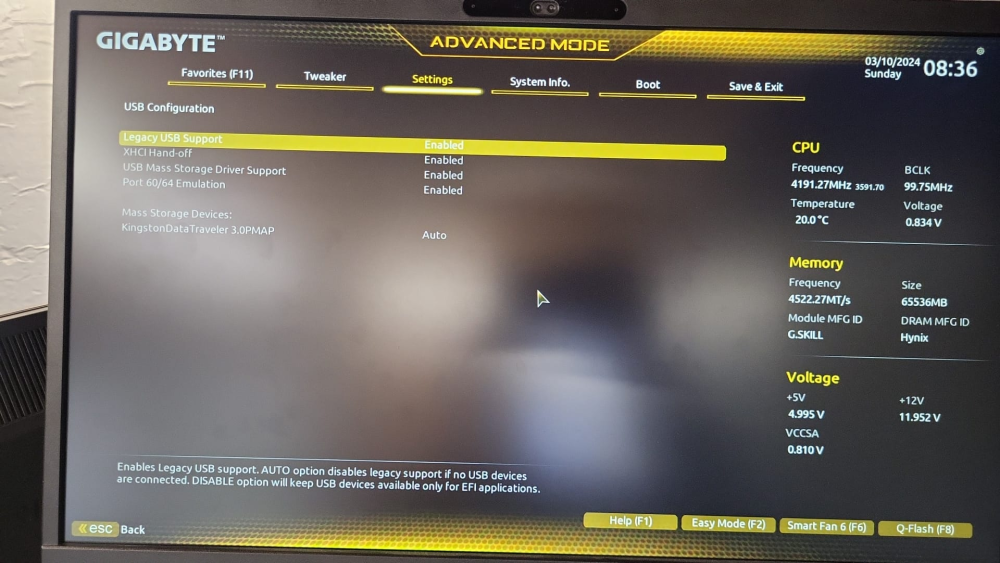
-
I'm trying to forward an USB device into my docker. But somehow I do not have /dev/ttyUSB* devices. Neither /dev/ttyACM*. Trying to passthrough by-serial like others in the support threads suggests but: Passing through the USB device into VM's is no problem. So the devices are available and can be used. What is going on here?

-
I have the same problem
-
Is this fixed yet? I'm experiencing this also.
-
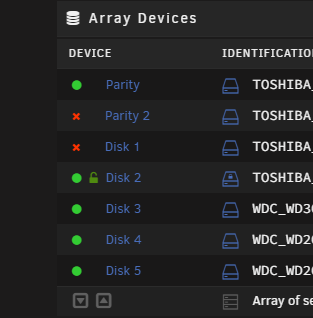
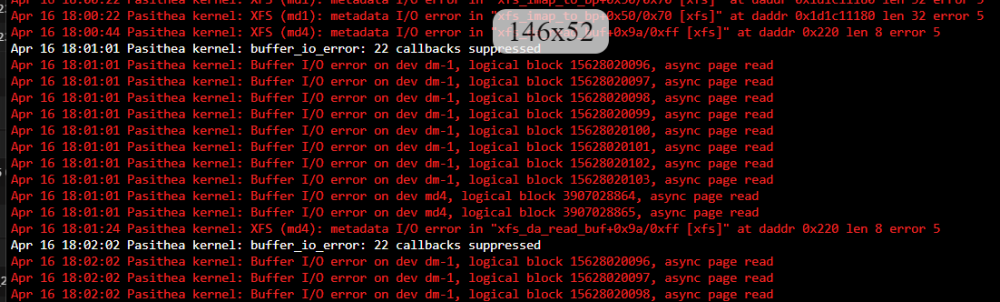
I've upgraded my server hardware, after that I booted and I was able to start the array without any problems. Which I had expected since I'm a happy unRAID user for 8 years now. But I wanted to tweak some power optimization settings into the BIOS so I shut down the server and tweaked some settings. After I restarted my server my 2nd parity disk was disabled and also an other disk in the array. The log giving a lot of errors and starting the array to rebuild disks isn't possible also. The data of my other shares aren't available also. Can someone help me out what to do? unraid-diagnostics-20230416-1721.zip