





mrbens
Members
-
Joined
-
Last visited
Everything posted by mrbens
-
Thanks JorgeB. All 6 mobo SATA ports were showing as IDE in the BIOS. Pretty sure they were set to AHCI previously. I've corrected that and checked the cables are firmly in. Started preclearing it but got loads of errors. Attached diagnostics again. Disk is now showing in Historical Devices list. Example logs: Dec 7 02:00:25 Tower kernel: blk_update_request: I/O error, dev sdr, sector 12085568 op 0x0:(READ) flags 0x80700 phys_seg 24 prio class 0 Dec 7 02:00:25 Tower kernel: sd 10:0:0:0: [sdr] tag#4 UNKNOWN(0x2003) Result: hostbyte=0x00 driverbyte=DRIVER_OK cmd_age=92s Dec 7 02:00:25 Tower kernel: sd 10:0:0:0: [sdr] tag#4 Sense Key : 0x2 [current] Dec 7 02:00:25 Tower kernel: sd 10:0:0:0: [sdr] tag#4 ASC=0x4 ASCQ=0x21 Dec 7 02:00:25 Tower kernel: sd 10:0:0:0: [sdr] tag#4 CDB: opcode=0x88 88 00 00 00 00 00 00 b8 6a 00 00 00 05 40 00 00 Dec 7 02:00:25 Tower kernel: blk_update_request: I/O error, dev sdr, sector 12087808 op 0x0:(READ) flags 0x80000 phys_seg 64 prio class 0 Dec 7 02:00:25 Tower kernel: blk_update_request: I/O error, dev sdr, sector 12084224 op 0x0:(READ) flags 0x0 phys_seg 1 prio class 0 Dec 7 02:00:25 Tower kernel: Buffer I/O error on dev sdr, logical block 1510528, async page read Dec 7 02:00:33 Tower preclear_disk_Z840TQGD[16639]: Pre-Read: dd output: dd: error reading '/dev/sdr': Input/output error Dec 7 02:00:33 Tower preclear_disk_Z840TQGD[16639]: Pre-Read: dd output: 2950+1 records in Dec 7 02:00:33 Tower preclear_disk_Z840TQGD[16639]: Pre-Read: dd output: 2950+1 records out Dec 7 02:00:34 Tower preclear_disk_Z840TQGD[16639]: Pre-Read: dd output: 6187122688 bytes (6.2 GB, 5.8 GiB) copied, 181.216 s, 34.1 MB/s Dec 7 02:00:35 Tower preclear_disk_Z840TQGD[16639]: Pre-read: pre-read verification failed! Dec 7 02:00:39 Tower preclear_disk_Z840TQGD[16639]: /usr/local/emhttp/plugins/preclear.disk/script/preclear_disk.sh: line 481: /tmp/.preclear/sdr/dd_output_complete: No such file or directory Dec 7 02:00:40 Tower preclear_disk_Z840TQGD[16639]: /usr/local/emhttp/plugins/preclear.disk/script/preclear_disk.sh: line 483: /tmp/.preclear/sdr/dd_output: No such file or directory tower-diagnostics-20221207-0205 (after starting preclear).zip
-
Turned my server on today and straight away disk 4 was disabled after 1872 read errors. SMART report won't run as it says "A mandatory smart command failed. exiting. To continue, add one or more '-T permissive' options." Attached diagnostics. Could it be dodgy cable or disk needs replacing? Would I be ok to try pre-clear the disk and re-add it as disk4 if it passes? It's not showing up in preclear at the moment, but I assume I'll need to stop the array and remove it from slot 4 assignment first. Thanks for any help. tower-diagnostics-20221206-1622.zip
-
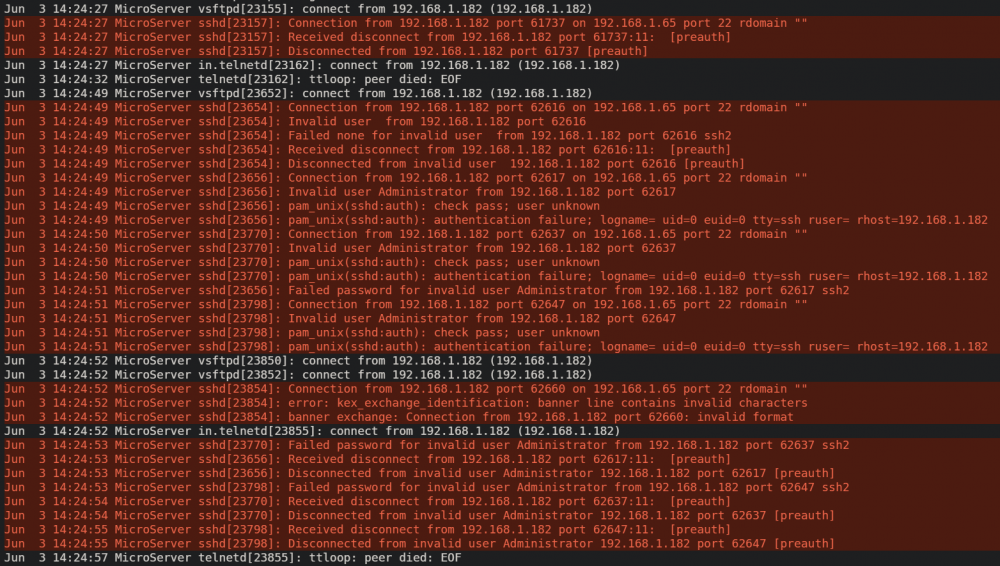
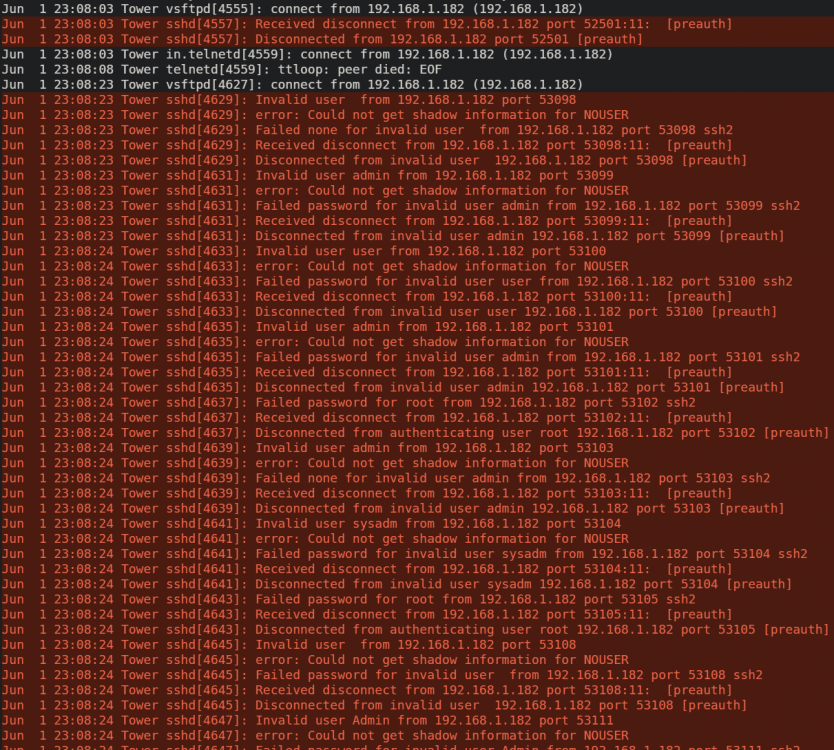
Hi, bit concerned about these ssh attempt logs I've seen. Logs on both of my unraid servers show these attempts at the same times on 1st and 3rd of June. The IP is my flat mate. Don't think they would have been using a script or tool to try gain access. Could their PC have been infected? Just want to get some advice before I mention it to them as I don't really know them that well. No other similar logs previously this year or since. Attached full diagnostics from both servers. Thanks. tower-diagnostics-20220614-0211.zip microserver-diagnostics-20220614-0212.zip
-
Thank you. Yes they both show the same device letters. ddrescue is running again and has resumed where it left off.

-
Thanks again. I got this far before it stopped: root@Tower:~# ddrescue -f /dev/sdd /dev/sdl /boot/ddrescue.log GNU ddrescue 1.23 Press Ctrl-C to interrupt ipos: 1327 GB, non-trimmed: 58475 MB, current rate: 0 B/s opos: 1327 GB, non-scraped: 0 B, average rate: 53796 kB/s non-tried: 1672 GB, bad-sector: 0 B, error rate: 2370 MB/s rescued: 1269 GB, bad areas: 0, run time: 6h 33m 12s pct rescued: 42.29%, read errors: 892328, remaining time: n/a time since last successful read: 39s Copying non-tried blocks... Pass 5 (forwards) ddrescue: Input file disappeared: No such file or directory Both disks are still showing under Unassigned Devices. Should I try running the same command again to see if it resumes?
-
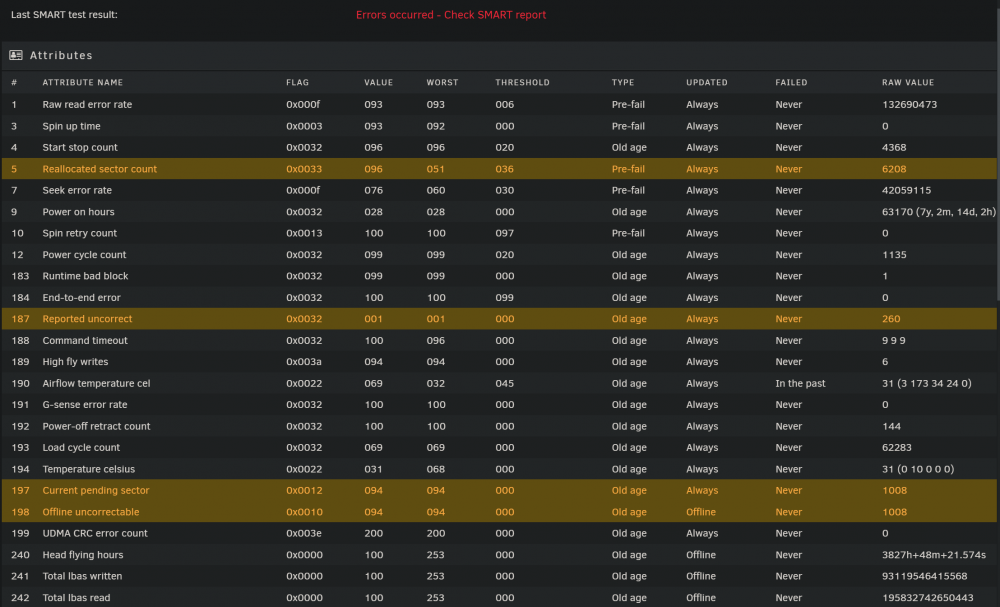
I'm going to try ddrescue on the disk 7 that was previously disabled due to errors. Current SMART report: It doesn't show a file system and mount is grayed out. When the array is stopped it does show the disk as being available to re-add to the array but I guess that's not a good idea. The other unassigned disk sdl is a spare previously used in the array that I rebuilt with a larger disk and still has the data on. What's the best way to try ddrescue of sdd onto sdl please? Should I preclear sdl and add it to the array to do it that way to save having to copy the recovered data over or better to leave it unassigned without preclearing and copy any data it can recover onto the array manually after? If leaving unmounted is this definitely the correct command: ddrescue -f /dev/sdd /dev/sdl /boot/ddrescue.log Thanks

-
Thanks JorgeB
-
Thanks JorgeB, I'll try ddrescue. I only got a notification of disk 7 being disabled, nothing for disk 1. What's the best way to start the array and build parity from the remaining disks please?
-
Thanks for the reply. The SMART test fails at 10%. Tried twice. Attached the output. Short test also won't run and says "Errors occurred - Check SMART report". tower-smart-20210912-1530.zip
-
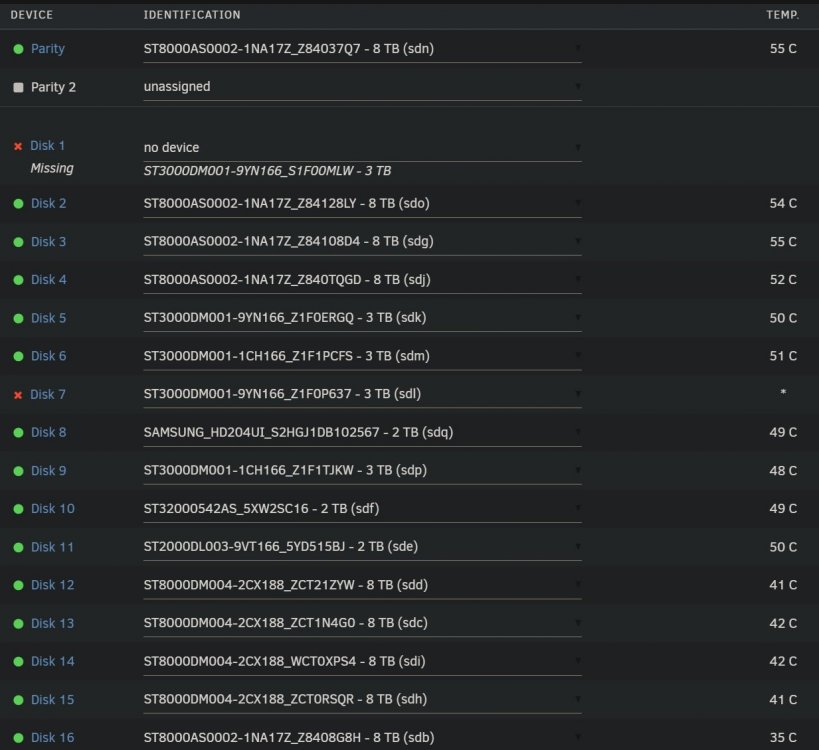
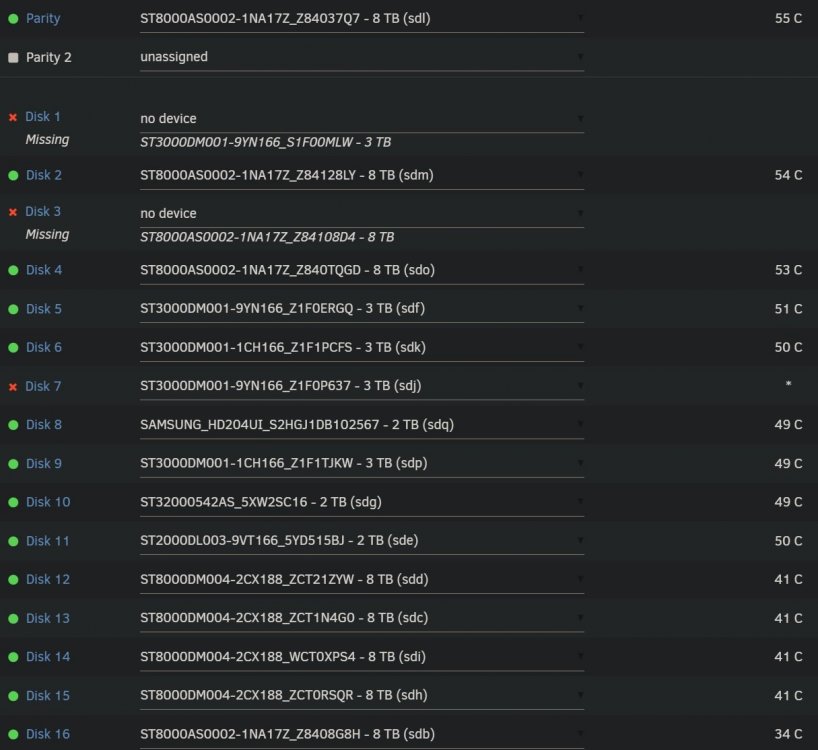
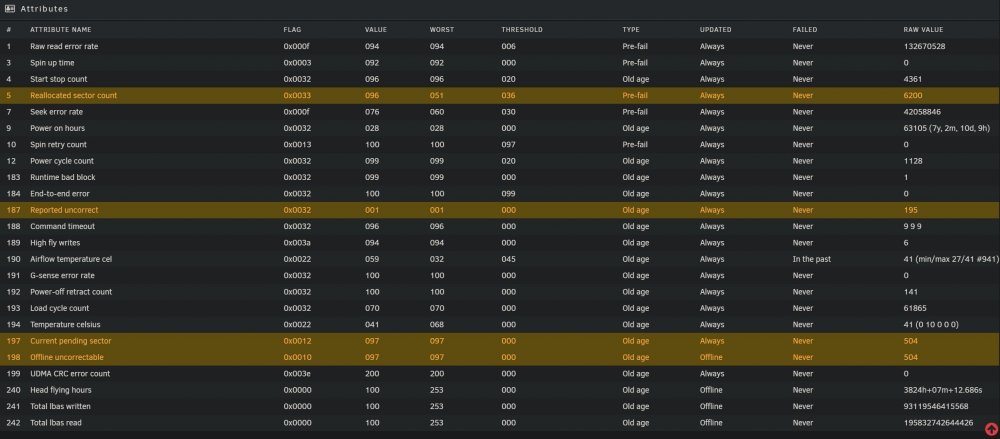
Hello, in need of assistance please. Attached diagnostics from time of issue before reboot and today. Had an error pop up saying disk 7 failed. Saved diagnostic logs and rebooted. Plan was to try a preclear of disk 7 to see if I could reintroduce it again. Syslog is full of disk 1 errors but can't see anything for disk 7. Disk 1 then showed missing after reboot and has been missing since so can't start the server or try rebuild either disk. Further reboot showed disk 3 also missing but that's been showing up ok again since that one time. Struggling to get the server to see disk 1. Clicking 'no device' doesn't show any disks in the drop down menu. Swapped round SATA cables between disk 1 and disk 2 (both go into same 2 port SATA card) but disk 1 still shows missing. Swapped round SATA cables between disk 1 and parity (parity goes straight into motherboard) and disk 1 still shows missing. Replaced the 4 port SATA power splitter cable that goes into parity, disk 1, 2 & 3 and disk 1 still shows missing. Swapped PSU SATA power cable that goes into the 4x SATA splitter with another splitter but disk 1 still missing. Connected a PSU SATA power cable without a splitter to disk 1 and disk 1 still missing. Disk 7 SMART data: Disk 7 SMART overall-health: Passed When the server powers up there is a hard disk clicking sound for a few seconds which is probably from disk 1 as it happens when disk 7 power cable is removed before booting. I wonder if disk 7 might be OK to reintroduce somehow so I can rebuild disk 1? Is there a way to try recover from this without losing all the data on both disks please? Thanks, Ben tower-diagnostics-20210816-0608 [before reboot].zip tower-diagnostics-20210911-1400 [latest info].zip
-
Removed both unmenu lines from the go file and rebooted however trying to manually start cache_dirs from telnet gives the same result:
-
The /boot/packages folder contains unmenu items. Can't remember the specific reason it's in there. I've just noticed there's a newer unMENU 1.6. Updated it but I doubt that's related to cache-dirs. What are people typing that have it working on 6.0-beta6 please? EDIT: Removed the boot/packages line and rebooted the server and unmenu wouldn't load. Re-added it and unmenu loaded again.
-
You have it running under 6b6? If so, what did you have to do to get it working? I would love to know this too please. I have tried launching it from telnet after the server has booted as suggested by others however it says: My go script is: What should our go scripts say now on 6.0-beta6 please? Or if it won't work from go what should we type at the telnet prompt?


