





Meph
Members
-
Joined
-
Last visited
-
I removed the USB and put it in my work laptop. Copied the config folder from the USB to my local computer. Downloaded the USB creator tool, put 7.3.1 software on it. When that was done i moved the config folder back to the USB stick and then booted the server. It came up without any issues! :) Problem solved for my part.
-
Yeah, server is located at my work.. But i will go there tomorrow.. So i will fix it that way :) Thx.
-
Upgrading to 7.3.1 from 7.2.4 I have the same issue.. It showed by the web interface not coming up after upgrade, but i could reach the server via SSH (server is at a remote location). This can be seen in syslog: Aug 2 12:55:22 Tower emhttpd: online: SanDisk_Ultra_Fit_4C530001100922112482-0:0 (sde) 512 60063744 => no partitions Is there a way to format it the correct way in Unraid via SSH? ... Just realized the array is not running so no disks available so i guess not?. hehe..
-
Just for info.. I have the same problem, will test this solution.. Upgraded to 7.3.1 and webgui does not show up. I can still access the server via SSH. This is seen in the syslog: Aug 2 12:55:22 Tower emhttpd: online: SanDisk_Ultra_Fit_4C530001100922112482-0:0 (sde) 512 60063744 => no partitions
-
I tried to restore a backup to the USB stick. But when booting the Unraid menu showed up and countdown 5 secs.. then failed to boot and went back to 5 secs again. Since im pressed for time today i applied 6.10.3 software to the USB stick instead and then copied the /config directory from the backup to the stick.. I hope that was the right thing to do? Anyway.. system started up and it seems fine. I started the array and now a parity check started automatically.. Everything looks good This was quite a trip ... and all because i did not remember that i placed the Unraid USB INSIDE the server maybe 5-6 years ago... Thanks a lot for the support and help trying to fix my server! @JonathanM @trurl @JorgeB
-
I made 2 bootable USB sticks with Firmware update and other tools.. Both USB sticks could not boot.. So something is very wrong with the server .. AND.... As a last resort i decided to remove the BIOS battery to reset the BIOS.. and ... what did i discover... An internal USB drive in the server with UNRAID on it... Feeling so stupid right now... 🤣 🥵 Tried to repair the stick in windows.. Failed.. I will try to write a backup to it and then try to boot it.. (externally) this time .. haha Strange thing is when i boot other USB sticks i do not get the Unraid boot screen but it say that it could not find the boot image and stuff like that.. so that internal USB seems to interfere with the external USB ports.... More updates later... lol update1: I can now suddenly mount ISO images remotely via Remote Console (iLO) .. So i took the oportunity to upgrade all firmware and intelligent provisioning software on the server .. After that is done i will try to boot the "restore backup" i did on the USB stick... Im aware of that the stick might be broken so i might have to replace it later.. But just want to try
-
I will update all Firmware on the server as a last resort.. Will update you with results in this thread.. If that do not help i will give up and get a new server instead.. It has been up and running for many years with Unraid without any issues.. Only issue is that the new server will probably have 2,5" disks instead of 3,5" ... I will have to mount the old disks with an USB dock to tranfer the data to the new server i guess... (plugin removable devices)
-
There is no UEFI boot on my server. Googled a bit.. UEFI came for Generation 9 servers. This server is a Proliant DL380e Gen8. Also i did not find any settings for it in BIOS.
-
I need to check this.. But i suspect a hardware fault on the server maybe USB controller is faulty or something.. Will get back with results of bios check luckely i can do this remote since server is at my work and im working from home now...
-
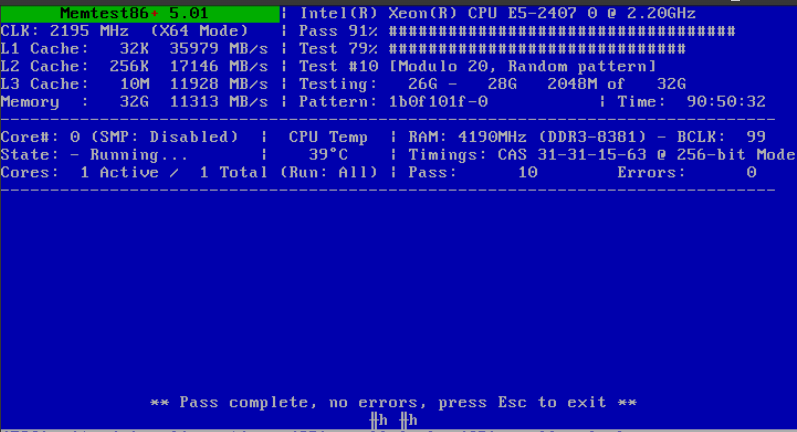
Memtest has been running for almost 91 hours now.. No errors.. 10 passes completed..
-
-
-
Ok... This is interesting... I tried a USB stick that failed in my Fileserver in another server and it booted right up... So nothing wrong with the media? For some reason the fileserver seems to think that the USB sticks are corrupted?
-
Tried a 3rd USB.. Exactly the same issue... Thing is this server has been working fine before with unraid.. and i have now tried so many different ways of creating the USB.. I cannot understand what the issue is.... Used 3 different USB sticks Used 2 different computers to generate the USB Used both manual install method and used Unraid.USB.Creator.Win32-2.1.exe Tried booting from 4 different USB slots on the server Tried 6.9.2 release. That did boot up but complained about read only file system.. I was able to insert another USB stick and run fsck /dev/sdh1 on that one and chose to copy original to backup system.. But that did not solve it either.. I have also updated the BIOS on the server from P73 08/02/2014 to 05/24/2019.. (Server is Proliant DL380e Gen8) with ILO4 2.80 (Jan 25 2022) I will now check BIOS settings on the server to see if i can adjust something there...
-
I have used 2 different flash drives.. Same issues.. i will try a 3rd and 4th..

