





minhquan07
Members
-
Joined
-
Last visited
-
thanks, this solved it!
-
Gotcha, here's the diagnostics file tower-diagnostics-20240113-0923.zip
-
I recently had a power outage and my UPS died on my. My disk 2 is now displaying Unmountable: Unsupported or no file system. Not sure how to go about fixing the issue (sorry I'm new to this). I downloaded smart report. Please help tower-smart-20240112-2223.zip
-
Recently I have to restart sonarr and radarr daily for downloaded files to be moved. When I go to the activities tab in each docker, I am unable to select the manual option. If I restart the docker then the files get moved and renamed. Is there something wrong with my dockers? tower-diagnostics-20220812-0909.zip
-
Hello, I've upgraded to 6.10.2 and for some reason the nvidia driver isn't detecting the 2 GPUs I have. Under the system devices they are detected though. Any advice how to fix this? tower-diagnostics-20220529-1049 (1).zip

-
I upgraded to 6.10.1 and now my two GPUs are missing. I checked under system devices and they show up under IOMMU group 19 and 20, but under the NVIDIA driver it's empty. Any help would be much appreciated tower-diagnostics-20220529-1049.zip
-
I see, thank you.
-
When I go to the cache -> file system type: -> options are only auto, btrfs, btrfs - encripted is there another way of changing the file system?
-
sorry this is the one with the 3 cache drives tower-diagnostics-20220520-1004.zip
-
tower-diagnostics-20220520-1002.zip
-
What if I have 3 cache drives as a pool under btrfs and I'm getting the "unmountable: Invalid pool config"?
-
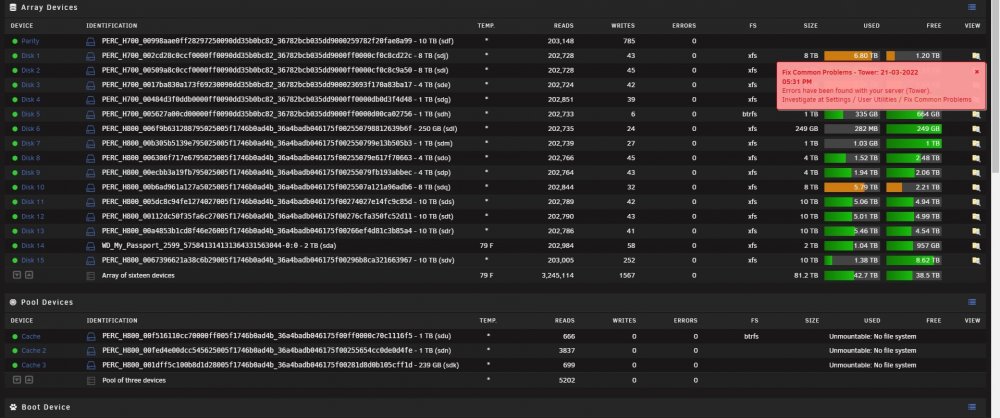
I had a bad upgrade to unraid 6.10.0-rc4, and during so my flash drive failed. Luckily I backed it up and I was able to get unraid 6.9.2 back up. The only problem is that my cache pool is showing up unmountable: no file system. Should I just format the drives and start over? tower-diagnostics-20220321-1725.zip
-
Is there a reason it had to be usb2 port and not the same port the flash was originally plugged into?
-
So I tried making a new flash drive using local zip with the flash backup file and unable to access the web gui. I made a new flash drive using stable 6.9.2, then copied the config file over to the new flash drive and I’m getting the same error…this is driving me crazy lol. I’m gonna order a new flash drive and see if maybe I just have bad usb flash drives update, I got the new flash and it seem to have worked. Thank you
-
I did backup the flash drive, but am having issues with it. Its not allowing me to login, I keep getting an ip of 169.


