





PeeBee
Members
-
Joined
-
Last visited
Everything posted by PeeBee
-
Problem: Internal Server Error When Opening WebUI This problem started a few months ago but it hasn't been a priority to fix because everything still syncs fine to my other computers. When I open the WebUI I get an Internal Server Error. The error then states "The server was unable to complete your request". I made a video of the problem, shown below. Any thoughts? (diagnostics attached) tower-diagnostics-20200219-2126.zip
-
Are you connecting to a USB 3 port? Have you tried it on a USB 2 port instead? I have one device that only works on USB 2, so I wonder if that might also be your problem.
-
I saw that you uploaded a new UD update. It fixed the problem! I guess I can return the external drive I ordered to back up the Drobo before deleting that extra partition. It seems to work just fine the way it is. Thank you so much! I really appreciate the time you took to diagnose and fix this. The UnRAID community is luck to have you in it.

-
Screenshot attached.

-
No luck. See attached diagnostics. tower-diagnostics-20191220-1717.zip
-
I'll watch for the update and let you know how it works. Thanks for the amazing service!
-
I hooked the Drobo up to a PC and it took at least two minutes to show up. That would confirm what you are suspecting, that it's timing out while mounting.
-
Will do, thanks.
-
It's strange that it's been working for over a year and then stopped suddenly with one the updates. Did you shorten the timeout period for mounting? Was that the only significant thing that changed that could have affected it?
-
Hmm, shows for me. You might need to refresh. Here's the direct link to where I posted it: I've also uploaded it to Dropbox, if you're still having troubles: https://www.dropbox.com/s/q60375scvs8g42j/tower-diagnostics-20191219-1642.zip?dl=0
-
Done! (Attached to my post)
-
I have a Drobo installed on my UnRAID server via USB. The problem is, about two weeks ago, after an Unassigned Devices update that prompted me to restart the server (not sure which version this was), my Drobo would no longer mount. My UD plugin is up-to-date and I have tried rebooting the server, to no avail. Any hints on how I can get this working, short of moving the Drobo to another computer? Thanks. tower-diagnostics-20191219-1642.zip
-
Found it... Good catch, thanks. Some users remarked that Marvell may have patched this problem in later versions of its firmware. I'll give it a shot and report back.
-
Thank you to those that replied about me using external USB enclosure for parity drives. I've ordered a PCIe SATA card so I can use the drives internally.
-
It's an old machine that can't recognize drives bigger than ~2 TB. I didn't think a SATA controller would get around that problem, but you think it will? I will definitely get a SATA controller if that's the case. What's the problem with using USB 3 drives for parity? Is it a speed issue or something else? (For my reference only; I'm not disputing you.)
-
Thank you, that helps me tremendously. Like I mentioned, I'm a noob to unRAID so the concept of dockers and how they fit in is completely alien to me. Before I give you the /dev/disk/by-id, I should mention that I now have one of my two 6 TB drives mounted as a parity drive. I was able to do this by taking the array offline and mounting it under the Array Devices section of the Main tab. You'll now see my old 2 TB parity drive in the unassigned section as well as the 6 TB drive which UD can't recognize. I plan on mounting the 2nd 6 TB drive as a parity drive as well but I wanted to give you an opportunity to continue troubleshooting why the drive isn't being recognized by UD (if you want). Here is the result of ls -l /dev/disk/by-id: root@Tower:/dev/disk/by-id# ls -l total 0 lrwxrwxrwx 1 root root 9 Jan 9 17:21 ata-ST1500DM003-9YN16G_W240RMHQ -> ../../sde lrwxrwxrwx 1 root root 10 Jan 9 17:21 ata-ST1500DM003-9YN16G_W240RMHQ-part1 -> ../../sde1 lrwxrwxrwx 1 root root 9 Jan 9 17:21 ata-ST2000DL003-9VT166_6YD06G63 -> ../../sdd lrwxrwxrwx 1 root root 10 Jan 9 17:21 ata-ST2000DL003-9VT166_6YD06G63-part1 -> ../../sdd1 lrwxrwxrwx 1 root root 9 Jan 9 17:21 ata-ST31000333AS_9TE20Q9W -> ../../sda lrwxrwxrwx 1 root root 10 Jan 9 17:21 ata-ST31000333AS_9TE20Q9W-part1 -> ../../sda1 lrwxrwxrwx 1 root root 9 Jan 9 17:21 ata-Samsung_SSD_850_EVO_500GB_S3PTNF0JB81726B -> ../../sdb lrwxrwxrwx 1 root root 10 Jan 9 17:21 ata-Samsung_SSD_850_EVO_500GB_S3PTNF0JB81726B-part1 -> ../../sdb1 lrwxrwxrwx 1 root root 9 Jan 8 17:36 ata-TSSTcorp_CDDVDW_TS-H653N -> ../../sr0 lrwxrwxrwx 1 root root 9 Jan 9 17:21 usb-SanDisk_Cruzer_Fit_4C530001281025115022-0:0 -> ../../sdc lrwxrwxrwx 1 root root 10 Jan 9 17:21 usb-SanDisk_Cruzer_Fit_4C530001281025115022-0:0-part1 -> ../../sdc1 lrwxrwxrwx 1 root root 9 Jan 9 17:57 usb-WDC_WD60_02FZWX-00GBGB0_000000000000-0:0 -> ../../sdf lrwxrwxrwx 1 root root 9 Jan 9 17:21 usb-WDC_WD60_02FZWX-00GBGB0_000000000000-0:1 -> ../../sdg lrwxrwxrwx 1 root root 10 Jan 9 17:21 usb-WDC_WD60_02FZWX-00GBGB0_000000000000-0:1-part1 -> ../../sdg1 lrwxrwxrwx 1 root root 9 Jan 9 17:21 wwn-0x10612510827581820928x -> ../../sdd lrwxrwxrwx 1 root root 10 Jan 9 17:21 wwn-0x10612510827581820928x-part1 -> ../../sdd1 lrwxrwxrwx 1 root root 9 Jan 9 17:21 wwn-0x11153183416998973440x -> ../../sda lrwxrwxrwx 1 root root 10 Jan 9 17:21 wwn-0x11153183416998973440x-part1 -> ../../sda1 lrwxrwxrwx 1 root root 9 Jan 9 17:21 wwn-0x14622698090324119554x -> ../../sdb lrwxrwxrwx 1 root root 10 Jan 9 17:21 wwn-0x14622698090324119554x-part1 -> ../../sdb1 lrwxrwxrwx 1 root root 9 Jan 9 17:21 wwn-0x2843550472478937088x -> ../../sde lrwxrwxrwx 1 root root 10 Jan 9 17:21 wwn-0x2843550472478937088x-part1 -> ../../sde1
-
I did the volume mappings because of this tutorial that I watched when I installed Unassigned Devices and Krusader as part of my unRAID installation: Video link: https://www.youtube.com/watch?v=I0XCFPAsWZE Title: Easily move, copy and sync files to unRAID, within unRAID and from unRAID using Krusader 0:00 Intro 0:36 Krusader Intro and Overview 1:53 unRAID File System Overview and USB Flash Drive Overview 3:20 Unassigned Devices Installation 3:59 Krusader Installation >> 4:10 /UNRAID and /UNASSIGNED volume mappings happen here << 6:02 Directories Overview 7:20 Flash Drive Backup 8:00 Moving data from unassigned drive to server <the rest of the video not catalogued> I don't see how these mappings affect /dev/disk though. What might have affected this??? BTW thanks so much for your support. I see that you are helping more than just me!
-
I updated to 2018.01.08a, shut down the server and restarted it with the drives removed. I then plugged in the drives and UD reported them, just like before. ls /dev: ls -l /dev/disk/by-id doesn't work on my system because there's no /dev/disk folder. (Is that because of the volume mappings?)


-
Another quick screencast for you: https://youtu.be/8qPEz5MxIt8. Here's the error message in UD: Warning: Illegal string offset 'ID_SERIAL_SHORT' in /usr/local/emhttp/plugins/unassigned.devices/include/lib.php on line 1290 Warning: Illegal string offset 'ID_MODEL' in /usr/local/emhttp/plugins/unassigned.devices/include/lib.php on line 1291 Warning: Illegal string offset 'DEVTYPE' in /usr/local/emhttp/plugins/unassigned.devices/include/lib.php on line 1302 Warning: syntax error, unexpected '=' in Unknown on line 14 in /usr/local/emhttp/plugins/unassigned.devices/include/lib.php on line 1279 Warning: syntax error, unexpected '=' in Unknown on line 22 in /usr/local/emhttp/plugins/unassigned.devices/include/lib.php on line 1279 Warning: syntax error, unexpected '=' in Unknown on line 28 in /usr/local/emhttp/plugins/unassigned.devices/include/lib.php on line 1279 Diagnostics attached. I'll repeat this test tonight with just one drive installed in the enclosure to see how it behaves differently. Thanks for all your support on this. It's very appreciated. tower-diagnostics-20180108-0724.zip
-
This is something I found in volume mappings. I'm new to this so I'm not sure how the mappings occur. /UNRAID ⇔ /mnt/ /nobody/.kde ⇔ /mnt/user/appdata/kde /UNASSIGNED ⇔ /mnt/disks/ /FLASH ⇔ /boot/
-
Another screencast for you. In it I have turned off the external USB drive enclosure and turned it back on. I am able to mount the drives with UD but not unmount them. Here's a screencast demonstrating this: https://youtu.be/MDQNY35Zq3A As requested, the results of mount: /dev/loop0 on / type btrfs (rw,relatime,space_cache,subvolid=311,subvol=/btrfs/subvolumes/74<snip>73) proc on /proc type proc (rw,nosuid,nodev,noexec,relatime) tmpfs on /dev type tmpfs (rw,nosuid,mode=755) devpts on /dev/pts type devpts (rw,nosuid,noexec,relatime,gid=5,mode=620,ptmxmode=666) sysfs on /sys type sysfs (ro,nosuid,nodev,noexec,relatime) tmpfs on /sys/fs/cgroup type tmpfs (ro,nosuid,nodev,noexec,relatime,mode=755) cpuset on /sys/fs/cgroup/cpuset type cgroup (ro,nosuid,nodev,noexec,relatime,cpuset) cpu on /sys/fs/cgroup/cpu type cgroup (ro,nosuid,nodev,noexec,relatime,cpu) cpuacct on /sys/fs/cgroup/cpuacct type cgroup (ro,nosuid,nodev,noexec,relatime,cpuacct) blkio on /sys/fs/cgroup/blkio type cgroup (ro,nosuid,nodev,noexec,relatime,blkio) memory on /sys/fs/cgroup/memory type cgroup (ro,nosuid,nodev,noexec,relatime,memory) devices on /sys/fs/cgroup/devices type cgroup (ro,nosuid,nodev,noexec,relatime,devices) freezer on /sys/fs/cgroup/freezer type cgroup (ro,nosuid,nodev,noexec,relatime,freezer) net_cls on /sys/fs/cgroup/net_cls type cgroup (ro,nosuid,nodev,noexec,relatime,net_cls) perf_event on /sys/fs/cgroup/perf_event type cgroup (ro,nosuid,nodev,noexec,relatime,perf_event) pids on /sys/fs/cgroup/pids type cgroup (ro,nosuid,nodev,noexec,relatime,pids) mqueue on /dev/mqueue type mqueue (rw,nosuid,nodev,noexec,relatime) rootfs on /UNASSIGNED type rootfs (rw,size=6111816k,nr_inodes=1527954) rootfs on /UNRAID type rootfs (rw,size=6111816k,nr_inodes=1527954) /dev/md1 on /UNRAID/disk1 type xfs (rw,noatime,nodiratime,attr2,inode64,noquota) /dev/md2 on /UNRAID/disk2 type xfs (rw,noatime,nodiratime,attr2,inode64,noquota) /dev/sdb1 on /UNRAID/cache type btrfs (rw,noatime,nodiratime,ssd,space_cache,subvolid=5,subvol=/) shfs on /UNRAID/user0 type fuse.shfs (rw,nosuid,nodev,noatime,user_id=0,group_id=0,allow_other) shfs on /UNRAID/user type fuse.shfs (rw,nosuid,nodev,noatime,user_id=0,group_id=0,allow_other) /dev/sdc1 on /FLASH type vfat (rw,noatime,nodiratime,fmask=0000,dmask=0000,allow_utime=0022,codepage=437,iocharset=iso8859-1,shortname=mixed,errors=remount-ro) shfs on /nobody/.kde type fuse.shfs (rw,nosuid,nodev,noatime,user_id=0,group_id=0,allow_other) /dev/loop0 on /etc/resolv.conf type btrfs (rw,relatime,space_cache,subvolid=5,subvol=/containers/81<snip>15/resolv.conf) /dev/loop0 on /etc/hostname type btrfs (rw,relatime,space_cache,subvolid=5,subvol=/containers/81<snip>15/hostname) /dev/loop0 on /etc/hosts type btrfs (rw,relatime,space_cache,subvolid=5,subvol=/containers/81<snip>15/hosts) shm on /dev/shm type tmpfs (rw,nosuid,nodev,noexec,relatime,size=65536k) proc on /proc/bus type proc (ro,nosuid,nodev,noexec,relatime) proc on /proc/fs type proc (ro,nosuid,nodev,noexec,relatime) proc on /proc/irq type proc (ro,nosuid,nodev,noexec,relatime) proc on /proc/sys type proc (ro,nosuid,nodev,noexec,relatime) proc on /proc/sysrq-trigger type proc (ro,nosuid,nodev,noexec,relatime) tmpfs on /proc/kcore type tmpfs (rw,nosuid,mode=755) tmpfs on /proc/timer_list type tmpfs (rw,nosuid,mode=755)
-
Thanks. I've updated UD to the latest version but I still get the error. See the details in this screencast: https://youtu.be/zhiYnhxgoOs The unassigned.devices.cfg file is empty.
-
It says I'm running version 2017.12.30 and that it's up-to-date, but I see from other users that they have a more current version. Why does mine say that it's up-to-date? Diagnostics attached. tower-diagnostics-20180107-1915.zip

-
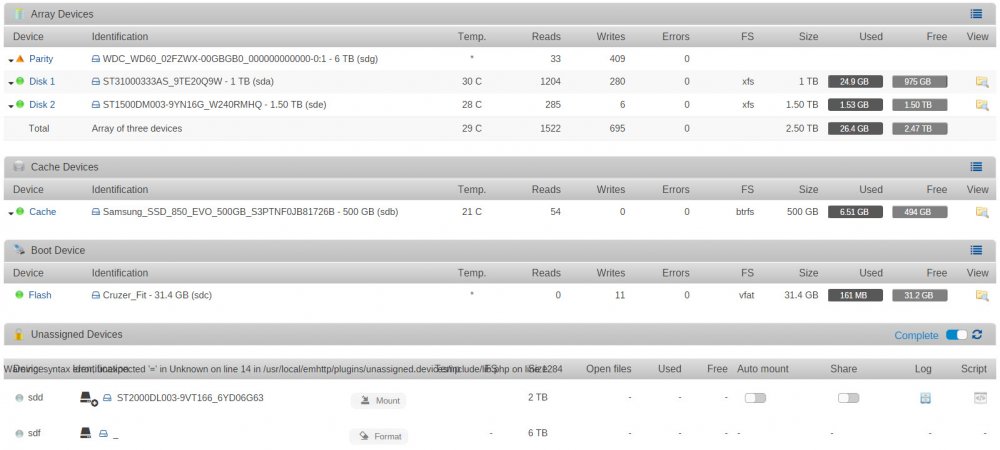
Hi everyone. I'm a total noob to unRAID and am trying it out as a NAS alternative and a location to store my backups. I previously posted my problem here but it was recommended to post in this thread instead. I've managed to scrounge up an HP dual-Xeon computer that I'd like to use as an unRAID server (it's a monster!). So far I have it working with a 500 GB SSD cache drive, a 2 TB parity drive, and two 2 TB array drives. I have Shares configured on it so I can access it from the PCs in my house for media sharing and backing up to. Here's my problem: The motherboard is an old one, so it doesn't see SATA drives bigger than about 2 TB. To get around this limit, I'm attempting to use a pair of 6 TB drives in a Vantec NexStar MX USB RAID box, with the box configured so the drives are treated individually (not RAID or JBOD). UnRAID sees the drives and lets me mount them, but there doesn't see to be any way to format them. In addition, I'm getting this error message overlaid on the Unassigned Devices section of the Main page. Warning: syntax error, unexpected '=' in Unknown on line 14 in /usr/local/emhttp/plugins/unassigned.devices/include/lib.php on line 1399 Warning: syntax error, unexpected '=' in Unknown on line 22 in /usr/local/emhttp/plugins/unassigned.devices/include/lib.php on line 1399 Warning: syntax error, unexpected '=' in Unknown on line 28 in /usr/local/emhttp/plugins/unassigned.devices/include/lib.php on line 1399 Warning: syntax error, unexpected '=' in Unknown on line 14 in /usr/local/emhttp/plugins/unassigned.devices/include/lib.php on line 1399 Warning: Illegal string offset 'DEVTYPE' in /usr/local/emhttp/plugins/unassigned.devices/include/lib.php on line 1422 Warning: syntax error, unexpected '=' in Unknown on line 28 in /usr/local/emhttp/plugins/unassigned.devices/include/lib.php on line 1399 I've attached a screenshot showing what it looks like. Have I run into a limitation with unRAID or am I doing something wrong? Any help would be appreciated. Thanks!



