






prongATO
Members
-
Joined
-
Last visited
Everything posted by prongATO
-
I have another test to verify it's a software issue. After it completed a rebuild and full parity check with no issues. I figured I could go ahead and shrink the array (taking out disk 16). When it was rebooted into non-safe mode, I removed disk 16 and started to rebuild the parity drive. After about 20%, disk 5 reported 5 errors. I stopped rebuilding parity and rebooted into safe mode. I'm attempting to rebuild the parity drive this way in safe mode. If this works with no errors, then we will know, for sure, that it's a software issue causing the errors. That would be the BEST solution, as far as I'm concerned. I'll still do the hardware thing we've spoken privately about though, too great a price to pass up. THANK YOU for even thinking it could be a software issue since I've been chasing hardware for the last 3 months. Disk 5 is connected to the on-board LBA card, port 3. I'm a dope, I completely forgot to grab the diagnostics before I rebooted into safe mode.
-
Parity check completed with no errors on safe mode. Diagnostics attached. mrpunrfsx1-diagnostics-20240906-1349.zip
-
Disk rebuilt with no issues, rebooted into safe mode with GUI support and am running a parity check. Here are the diagnostics from that reboot. I performed both short and long SMART tests on disk 12, just to be safe. (They both came back clean) mrpunrfsx1-diagnostics-20240905-1312.zip
-
Roger that, I didn't even consider that it could be a software issue. Do you want me to proceed with your stress tests you mentioned in your previous post? I stopped the array earlier, changed the data for drive 12 from the LBA card channel 7 to one of the ports on the motherboard (non LBA). It's currently rebuilding the drive with no errors.
-
I can't figure out what triggers the errors. I honestly thought that it might have been the backplane of the HDD cage being dirty. The server hadn't made it completely through a parity check in months, until the other day. When this problem started, a drive would report errors and I'd rebuild it and it'd be fine for a few months. Then it got to a few weeks, now it's a few days. I went through my normal hardware troubleshooting and replaced the breakout cables, then the LBA card, then the processor, then the power supply and cables. Really the only thing left is the motherboard. I have a bid on a used Supermicro X10SRL-F and will see in a few days if I can get it.
-
Okay, taking your advice here. After the latest errors on disk 12, I switched the data connection from the LBA card and switched it to a SATA port on the motherboard. Performing rebuild now. None of this makes any sense. For two days it was hooked up to the LBA card and successfully did a full parity check with no problems. Then, what looks like during the mover script, it has errors early this morning.
-
Well, unfortunately I woke up to more errors today. Still disk 12. mrpunrfsx1-diagnostics-20240904-0835.zip
-
I'm VERY encouraged by today's results; parity check finished in just over 13 hours with no errors. I removed the 5 in 3 cage that was connected to the most errors, completely cleaned the whole device out, checked all the solder joints, replaced the fan with a Noctua fan that can now run 24/7 to keep the drives cooler and reassembled the unit. Again I'm not sure if it was some dust that got into the SATA ports on the backplane of the 5 in 3 or if it was flashing both LBA (onboard and PCIE) with the 20.00.07.00 firmware and updating the BIOS or the work I did on the cages (I took cage 4 apart and cleaned it earlier too) but everything seems to be running fine now. No more random disk errors in the bottom two 5 in 3 cages. I'm going to do the fan modification to the other cages in the coming weeks as well as cleaning all of them thoroughly too. I'll give it a week or two and if the system continues to run well, I'll close this as solved and reference cleaning the cages and updating the firmware on the cards as the solution. Thank you to every one that's helped me with this process. Latest diagnostics attached for reference. mrpunrfsx1-diagnostics-20240903-2114.zip
-
Fingers crossed, I started the parity check last night and it's 75% done with no errors. Surely this all didn't happen because of a dirty 5 in 3 cage?! Yeah, it was a bit dusty and I took it COMPLETELY apart to clean it (complete tear down, clean and reassemble). Maybe the firmware flashes and bios for the LBAs helped also. Diagnostics attached for reference mrpunrfsx1-diagnostics-20240903-1457.zip
-
diagnostics from the latest boot for reference. mrpunrfsx1-diagnostics-20240902-2010.zipThey're both flashed to IT mode and both are the flashed to the most stable version 20.00.07.00 firmware and the bios has been updated
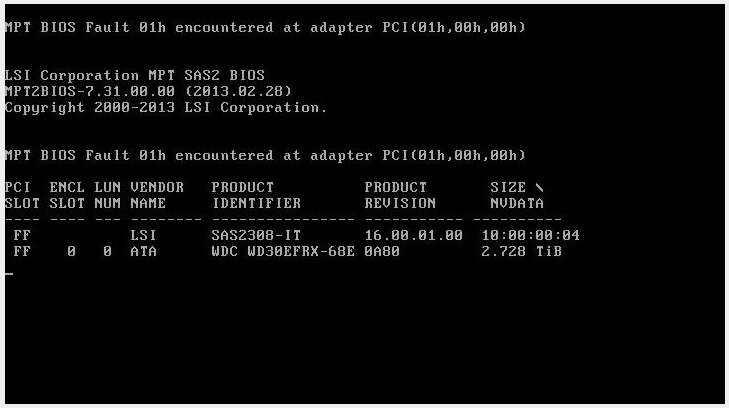
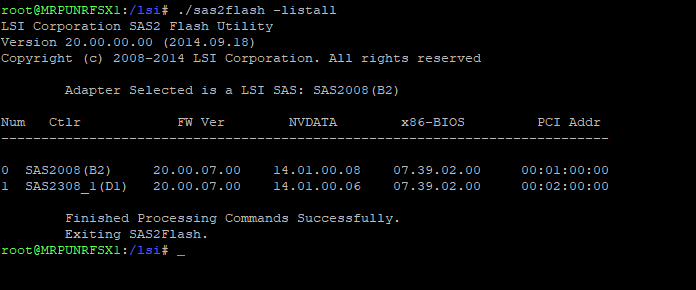 yes, there are two discrete controllers. The 9211 and 2308. I'm flashing them with updated firmware now.I thought that was the issue at first, overall with all this, I've had most of the errors on the LBA card, that's why I replaced it already but the error we got on disk 16 was connected to the MB at the time.I have all 8 populated on the LBA card. There is also an LBA card built into the MB. All are full at the moment. On a reboot the error is clearedJust noticed this on a reboot
 @Vr2Io do you want me to start another parity check to see if we can force another error? I might be able to pull full diagnostics if one comes up.While the memtest was running I removed the 3rd 5 in 3 and thoroughly cleaned it out. I ordered a new fan to put in it and will likely do that for all 4 cages if it works well. After I reinstalled the 5 in 3 it rebuilt disk 12 with no issue. I still have the server in a state were I can service the cages. I will stress test it to see if we can make it error again on Wednesday. Right now, the parity is valid and the array is green. Diagnostics from the latest boot attached. (no disk errors, so far) mrpunrfsx1-diagnostics-20240902-1825.zipFirst, man, your drives get toasty! The highest I’ve ever seen any drive in my system is 38c. I’ll get started on your suggestions tomorrow. I decided to let the memtest run overnight, just to be safe.I'll let it run for 4 passes plus. Since the server had been down all day, I might as well let it run until we're satisfied that there will be no found errors. I'll post a screenshot of the test screen before I stop.Roger that, I'll make sure to supply a diagnostics after every change from this point forward. How many passes until we're satisfied with the memtest? It's through 3 passes and 54% on the 4th, all good.And to recap, before asking for assistance I've already replaced: LBA Card Power Supply and PS cables Processor LBA Card break out cables different drives (which we see now it is not drive specific) Other than it being the motherboard (God, I hope not), I'm not sure what else it could be. I am going to revisit my power cabling and possibly switch to doing a discrete SATA cable (one cable with two connectors) to each 5 in 3 and double Molex (1 discrete cable for two cages)And yes, as soon as the disk drops out of the array from errors, it’s immediately picked up by unassigned devices.




Account
Navigation
Search
Configure browser push notifications
Chrome (Android)
- Tap the lock icon next to the address bar.
- Tap Permissions → Notifications.
- Adjust your preference.
Chrome (Desktop)
- Click the padlock icon in the address bar.
- Select Site settings.
- Find Notifications and adjust your preference.
Safari (iOS 16.4+)
- Ensure the site is installed via Add to Home Screen.
- Open Settings App → Notifications.
- Find your app name and adjust your preference.
Safari (macOS)
- Go to Safari → Preferences.
- Click the Websites tab.
- Select Notifications in the sidebar.
- Find this website and adjust your preference.
Edge (Android)
- Tap the lock icon next to the address bar.
- Tap Permissions.
- Find Notifications and adjust your preference.
Edge (Desktop)
- Click the padlock icon in the address bar.
- Click Permissions for this site.
- Find Notifications and adjust your preference.
Firefox (Android)
- Go to Settings → Site permissions.
- Tap Notifications.
- Find this site in the list and adjust your preference.
Firefox (Desktop)
- Open Firefox Settings.
- Search for Notifications.
- Find this site in the list and adjust your preference.