






prongATO
Members
-
Joined
-
Last visited
Everything posted by prongATO
-
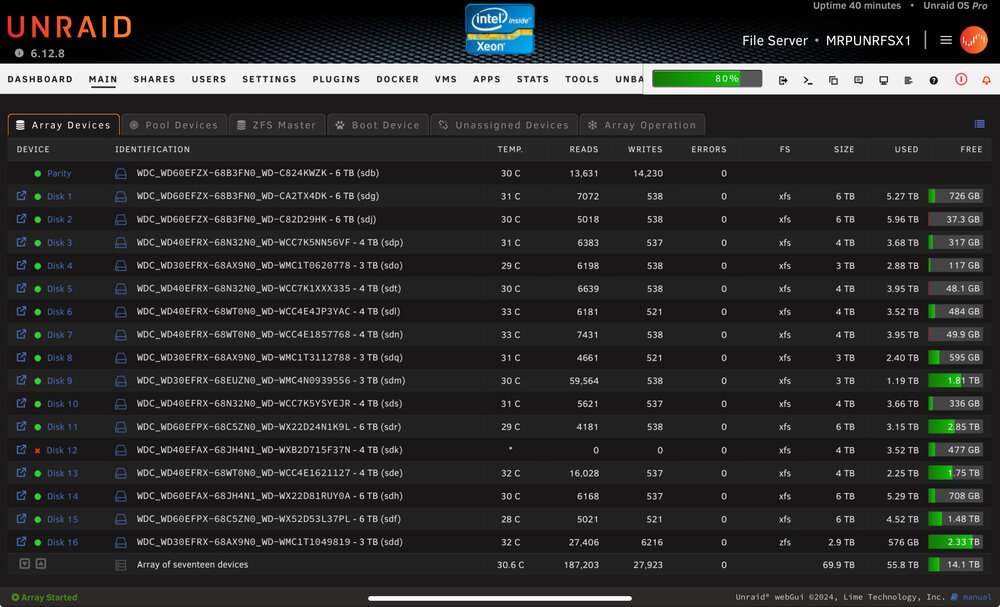
Not sure if this makes any difference but I didn’t try to rebuild disk 12, the dashboard shows 0 errors, yet the http locked up anyway. mrpunrfsx1-diagnostics-20240831-0250.zip
-
Tried rebuilding disk 12, I am back where I started. I’m about to just give up and throw this thing out the window. i am just going to let it run with the disabled disk 12 so I can sleep. Every time I try to rebuild the drive and get an error, the whole http interface locks up. So, this is now the third different disk that has supposedly had errors since I started this thread. (15, 16 and now 14) all different sizes and all have clean SMART reports. mrpunrfsx1-diagnostics-20240831-0155.zip
-
well, $hit.. Diagnostics attached. Happened during a parity check. Now it's disk 12 is it just a coincidence that the amount of errors are always divisible by 1024? mrpunrfsx1-diagnostics-20240831-0114.zip
-
I went ahead and started a parity check today since I realized the 1st will be in another day. I want to let the system hammer the drives for a day or so to make sure everything is copacetic with power/error issues now. If the parity check completes and I successfully downsize the array, removing disk 16, I will mark this as solved. @Vr2Io and @JorgeB, thank you both so much for your help with all of this. I know it was a bunch of trial and error but it was really nice to have two different perspectives while attempting to solve the issues.
-
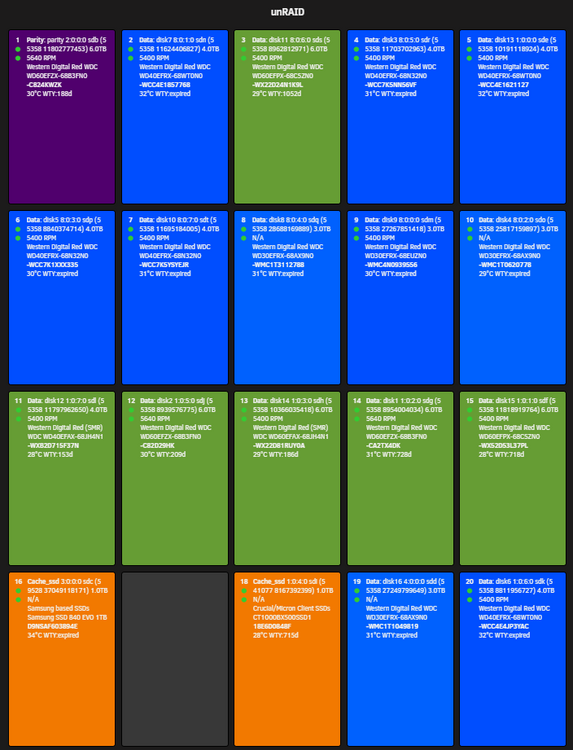
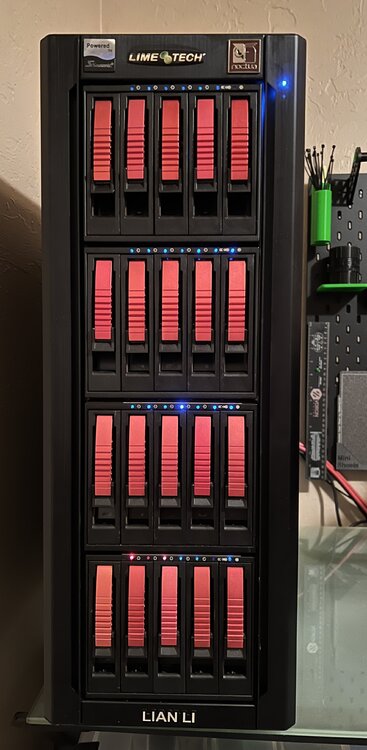
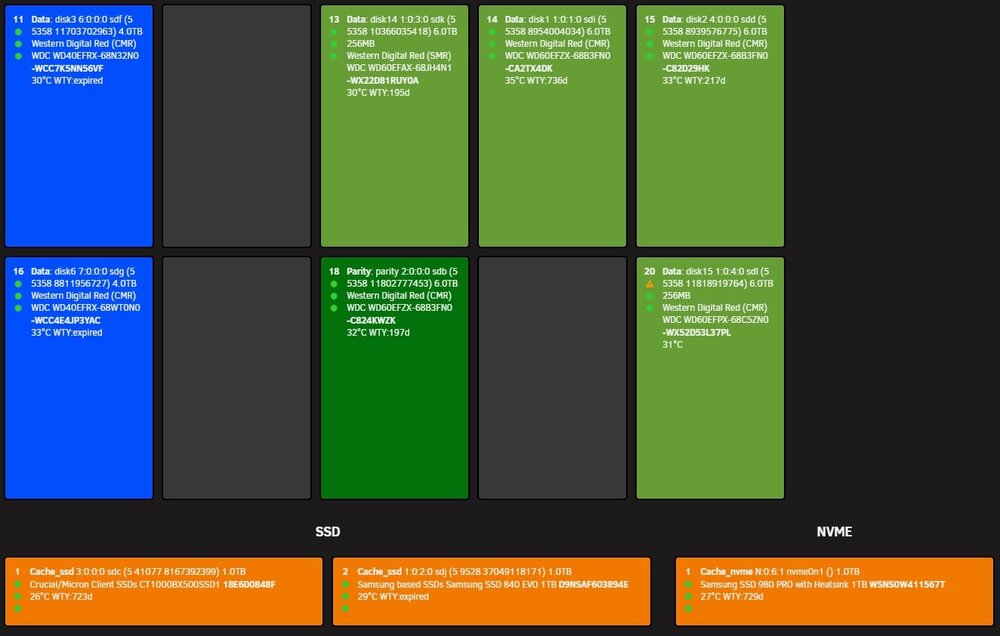
I just finished reconfiguring everything inside. Since I only have 6 ports on the power supply for SATA/Molex cables, I used 4 or the ports to run dual Molex connectors to each cage. I moved the SATA SSDs into cage 4 instead of having them inside the case on a bracket. I used the remaining two SATA/Molex power ports on the power supply to run a SATA power connection to two cages, then the other to the other two. Since I know I'm going to start reducing the number of drives I have in my system to avoid future power considerations, I don't feel it's inefficient to use some of the trays for SSDs now. (see attached pic of the new layout, the only drive missing is the NVMe that's on a PCIE addon card) I am going to start getting 12TB drives, starting with the parity drive, of course. Then I'll start moving data off some of the old 3TB and 4TB drives and reallocating the 6TB drives to replace the others. I want to stay below 15 total HDD in the system from now on. I wanted to get everything squared-away before midnight tonight, when my monthly parity check runs. I'm considering shrinking the array (removing disk 16 [3TB] because it's only there for ZFS replication and snapshots)
-
I am 100% the nic issue is a cable. I was a dummy and left the patch cables hanging off the connector. They are really nice certified Cat6A patch cables, so I used some zip ties and added support for the cables instead of just letting the weight of the 10' cables just hang off the network connectors.
-
IMO, it is the mostly likely solution. When I took disk 15 out of the 5 in 3 and hooked it directly to a standalone SATA power connection on the new 850W PS, it rebuilt with no issues when I couldn’t get it to rebuild before. None of the issues started until I started adding drives to the 4th cage in my system. So, it stands to reason that the more drives I added the more power starved they became, which it looks like, can cause unraid to report errors.
-
I rearranged some drives, changed the power to one connection PS to two moles per cage. Then the last two ports I ran a SATA power connection to two cages her port. Drive 16 rebuilt no problem. Do you think it was just that as I kept putting more and more drives in, the power just couldn't keep up? I am going to remove disk 16 soon because it’s onky there for ZFS replication of my other ZFS drives. Follow this guide? https://docs.unraid.net/legacy/FAQ/shrink-array/ I think diagnostics look good. I am going to let the server run for a few days before I try to shrink the array. I don’t want any errors to pop up while that’s happening. mrpunrfsx1-diagnostics-20240830-0115.zip
-
yup chose the wrong file, I'll fix it. Thanks for the heads-up
-
Well, that didn’t last long. At about 3:45, drive 16 reported errors again. I have reboot because this happens quite a bit but this segfault normally happens during a rebuild rather than an initial error, hopefully you can see the “segfault at IP” error and when that happens it partially locks up the http interface. Nothing I try to do involving the array will work when this specific set of errors occur. I didn’t have time to change the cage today but will tomorrow. I also find it interesting that it’s disk 16 again with errors. (ZFS disk just for automated backups of my other ZFS files) diagnostics attached. any ideas or insight? mrpunrfsx1-diagnostics-20240828-0400.zip
-
Okay, this is getting annoying. This has been the first time my array has been healthy in weeks and the drives refuse to spin down. As soon as I spin them down, something emhttpd reads the smart and spins them back up. I disabled enable spin up groups but some odd things coming up in the log. mrpunrfsx1-diagnostics-20240826-1957.zip
-
I'll re-cable the PS when I install the other cage today. I previously had SATA cables and Molex for each cage. The array is good, for now. Disk 16 finished rebuilding with no issues and the extended offline test was good. In all my years working in IT, intermittent issues are always the hardest to figure out. I don't have enough experience with linux/unix to even begin to track these down, I have a rudimentary knowledge, at best.
-
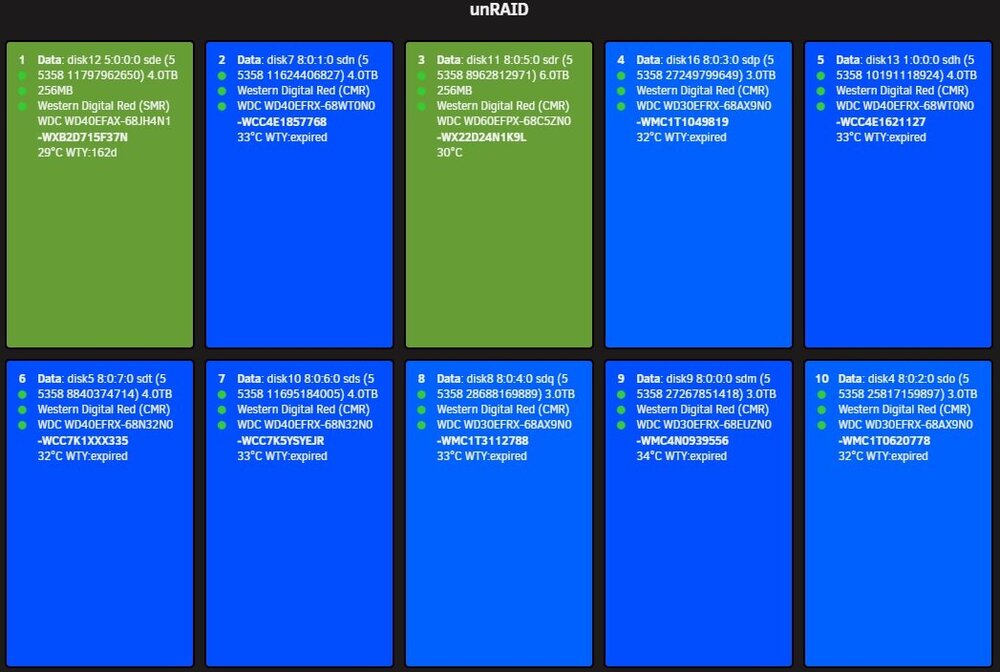
I'm running 4 cables one for each cage and each one has two Molex connectors per cage. I have a 5th going to the SATA SSDs. I over-specified the wattage for the new power supply when I went with 850W. The previous model was 660W. I can't really remove all the cages because I wouldn't have enough room for the 17 3.5" HDD I currently have in the system. I think I'm going to get a 10 or 12TB drive when I have the funds and replace the parity first. Then I'll start replacing the 3 and 4TB drives with 10s or 12s and reduce the number of drives in my system. As soon as disk 16 finishes rebuilding and I have a healthy array, I'm going to replace the 5 in 3 that was having the issues. The mind boggling thing is that my parity drive is ALSO in the same cage, so again, none of this makes any sense. See the attached images for the layout of my drives in the cages. the NVMe SSD is in an addon card and the SATA SSDs are attached to a card that sits in an open pci slot but isn't "plugged in" so I didn't have to use up spots in the 5 in 3s. Green: drive under warranty Blue: drive out of warranty Dark Green: Parity Orange: SSD/NVMe
-
Well, with the drive outside the case but connected, disk 15 finished rebuilding. Then disk 16 reported errors and has been disabled. It's in a completely different cage, cage 1 and is connected to the on-motherboard LBA. As 15 finished rebuilding, I had to reboot the server because I couldn't reach the web interface. Disk 16 is ZFS and is only in the array for backups of my ZFS drives (cache_ssd and cache_nvme) and is only 3TB. I'm still a bit confused as to what is causing all these errors. Since disk 16 is in a completely different 5 in 3 and isn't on the same LBA, I'm at a loss even more than I was before. I should have tried to get the diagnostics from the command line but my IPMI wasn't working and the web interface wouldn't load after the errors on disk 16 showed up. I was able to SSH to the server and perform a graceful shutdown, though.
-
I'm going to wait and see if my hunch is right. I have a couple of extra 5 in 3 cages on-hand, so if it finishes rebuilding disk 15 while it's running on the desk next to the server, I'll swap out the cage and see if the errors pop up again with a different 5 in 3.
-
Okay, I re-cabled the entire system. Since I replaced the Seasonic with another Seasonic, the ports for the various cables matched so I didn't replace all the power cabling but I went ahead and did that today, paying special attention to the power cables to the 5 in 3 cages. After doing that, I tried to rebuild the drive, it had errors again. I've tried multiple drives in two different cages and 4 different slots in the system, I have four 5 in 3 cages in the case. I decided to take those out of the equation. With the new power supply I have an extra SATA power port (6x instead of 5x) so I've hooked the drive up directly to the LBA card and on its own power cable and attempting to rebuild the data in a configuration that removes the cages from the path. I'll let you know if it makes any difference and post the diagnostics if it doesn't.
-
Unfortunately, I've already tried a new disk. I had ordered another 6TB WD Red Plus and it went through a full preclear successfully (WD60EFPX-68C5ZN0_WD-WX22D24N1K9L). Before I used it to upgrade disk 11 from 3TB to 6TB I tried it as a replacement for disk 15 and it exhibited the same behavior. I'm completely at a loss for what the heck is going on. I have 4 other disks attached to the same LBA, 3 HDD and 1 SSD and none of them seem to have any issues. I've been thinking that when I have the money, since this disk is part of my TV Series share, I could get 2 new 6TB disks and replace a 3TB and 4TB disk and move all the data from disk 15 to those disks and then shrink the array, removing disk 15. I've replaced just about everything else I can think of and nothing has worked.
-
Figured I’d give it another shot, same result. Sometimes it rebuilds the data, only to error out a few days later. Sometimes it starts a rebuild and doesn’t finish, sometimes it starts a rebuild and errors out immediately. mrpunrfsx1-diagnostics-20240824-1144.zip
-
I also tested my RAM with the memory test plugin. I left the array stopped and tested 2 loops of 30GB, finding no errors.
-
I just finished an extended offline test, no errors. mrpunrfsx1-diagnostics-20240824-0955.zip
-
No joy on the new PS. Downgraded to 6.12.8 because I thought that might make a difference but nope. Thus far, I've tried replacing the following to solve this issue: Power supply (Seasonic 660W to Seasonic 850W) CPU (Xeon 1275v3 to Xeon 1285v3) LBA card (LSI 9207 to 9211) LBA breakout cables the HDD (whatever drive installed as 15 always ends up with write errors) Installed a fan blowing directly on the LBA card heatsink At this point, I have no ideas left to try. mrpunrfsx1-diagnostics-20240823-1710.zip
-
My apologies. I rolled back the unRaid version to 6.12.8 and was trying to rebuild the drive again but it just encountered more errors on disk 15. Full diagnostics are attached. Is it odd that the amount of errors are always 1024? The new Seasonic Prime Gold 850W PS has been installed and I'm attempting to rebuild drive 15 again. mrpunrfsx1-diagnostics-20240823-1359.zip
-
Here’s the updated syslog. It had errors, just like I figured. mrpunrfsx1-syslog-20240822-1943.zip
-
Yes, I know that, I stated that in my message. I saw some weird errors at the end of the syslog I don’t understand, it will eventually happen again. The drive is being rebuilt, it fails with errors 80% of the time and I was going to wait until I saw another error and the drive was disabled but thought someone might be able to glean something from the errors that are there.
-
My setup is in a tower case with 5 case/CPU fans, a Supermicro X10SL7-F motherboard, 32GB Crucial/Micron ECC RAM, Xeon 1285v3 CPU, 4 iStarUSA 5 in 3s to total a possible 20 HDD (17 slots are filled) and I have two SATA SSD running cache_ssd and all my dockers and processing is done on an NVMe drive installed in a add on card in a slot. It currently has a 650W Seasonic PSU but it’s 10 years old. I’ve been chasing this problem for months now. Drive 15 is my second youngest drive in the system, it’s just over year old. Drive 15 periodically reports errors but every SMART test run, comes back clean. I’ve replaced the breakout cables for the LBA card, I’ve replaced the LBA card, I’ve replaced the CPU, I even tried a new drive in different slots and got the same errors. I installed an additional fan blowing directly on the heatsink of the LBA card. I ordered a new power supply that will be here tomorrow, that’s the last thing I can think of that may be the issue. drive 15 is the drive that keeps reporting errors. I’ve tried it in two different 5 in 3 enclosures, every free slot with the same results. Sometimes, after I try to rebuild the data from parity, it will finish and be okay for a week or two then reports errors again. Sometimes, the rebuilds fail, it reports errors, disables the drive, then it shows up on unassigned devices. I am currently trying to rebuild the drive again and was waiting to see if it would error out again but noticed some weird things in the syslog, so I decided to go ahead and make a post. Could all of this be because of a failing PSU? I usually am able to solve any issues by referencing others posts and have waited to post this but I need some help. mrpunrfsx1-syslog-20240822-1943.zip





