






CiaoCiao
Members
-
Joined
-
Last visited
-
Hi, I (think I) have an R8168 NIC on my Gigabyte X570 UD (V1.0) motherboard. In Network Settings, I see both eth0 and et1 which have the same MAC address, which seems odd to me. I tried installing the appropriate drivers plugin but then when my server boots up its quite slow and after about 2 minutes after logging into it from a web browser (so while it's still busy starting everything) it becomes unresponsive and then unavailable on the network. I have temporarily uninstalled this drivers plugin and everything works again (except I still see eth0 and eth1 and WOL is not working). My initial aim was to make WOL usable. Have I done something wrong? Thank you in advance.
-
Hi, I am very late to this discussion and am very new to mining too. I have pinned 5 of the 6 physical cores of my Ryzen 2600 to the XMRig Docker container, and let it run for a while, but I am seeing the same behaviour as what you mentioned, with a ridiculiously low hashrate of around 2000 to 2800H/s whereas a Ryzen 2600 would normally run at over 10 kH/s. The power draw to the wall did increase significantly (around 120W to the wall vs 37W when idling) so the thing is definitely running, and all of the cores I have pinned to this Docker container are shown as running at 100% in Unraid's dashboard. There must be something I'm missing here. Could someone please help me? Thank you in advance.
-
Hello there, I have tried to apply the latest update to this container multiple times, and everytime it seems to through the process successfully but then I check for updates and I am suggested to do the same update again. Is there something I am doing wrong? Thank you in advance.
-
Hello everyone, I have one Docker container that behaves weirdly regarding updates. In the Docker tab, when I check for updates, it tells me there are a few containers to update. I click on "update all" and wait for all of the updates to be applied. Once finished (successfully according to the window), I close the window and the page sort of refreshes (with the Unraid logo waving in the middle for a second). All of my Docker containers are updated except for the Home Assistant container which still mentions "update available". I've read some previous threads where for some people the update was not being downloaded at all. From what I see I am under the impression that my server does download the necessary files but that for some reason, either the container is updated but Docker is sort of "unaware" of it, or it simply does not/cannot apply the update. This Docker container (Home Assistant) is "stock" in that I have not altered the image in any way. I marked this as an annoyance since for now Home Assistant is still working but I'm hoping that I will eventually be able to apply updates to this Docker container again. I just added the diagostics file to this post. Here are a few screenshots : tower-diagnostics-20200702-1809.zip
-
Hi there! And thank you for creating this Docker container or making it compatible with Unraid! I am having a problem getting the API key from Home Assistant. I followed your advice @SpaceInvaderOne on assigning the DeConz container a static IP address, and now DeConz is automagically detected by Home Assistant when adding the corresponding integration, but then at the next step when I go to the advanced settings of DeConz to unlock the Gateway for 60 seconds, and go back to Home Assistant to press "Submit", Home Assistant can't get the API key. Is there a tweak to make to some settings to get this to work? Edit : got it to work. The problem I was having was the two Docker containers were set to use two different networks. By settign both to br0 and assigning each one a static local IP of my choice, everything worked just fine. I think it's weird that Home Assistant was detecting the Conbee2 gateway but couldn't "speak" with it because of the different network settings. I am quite a beginner regarding networking in Unraid so it may very well seem obvious for some other folks. Anyway, I hope this helps someone eventually.
-
Hi, Is it possible, while using nginx as a reverse proxy, to forward traffic to a VM in Unraid depending on the subdomain the client requested?
-
It's me again! So now everything is working fine with the reverse proxy. Yet there is one more thing I would like it to do. I have an Ubuntu VM I would like the reverse proxy to forward the traffic when people access a certain subdomain. I have allocated the Ubuntu VM a static local IP and I would like to redirect anyone accessing the specific subdomain to this VM's local IP on a certain port. I'm pretty sure this is possible but I have not found how.
-
Thank you very much! I tweaked a few things I also had made mistakes on as well and now everything is working fine, I'm just getting the "Server ready" message
-
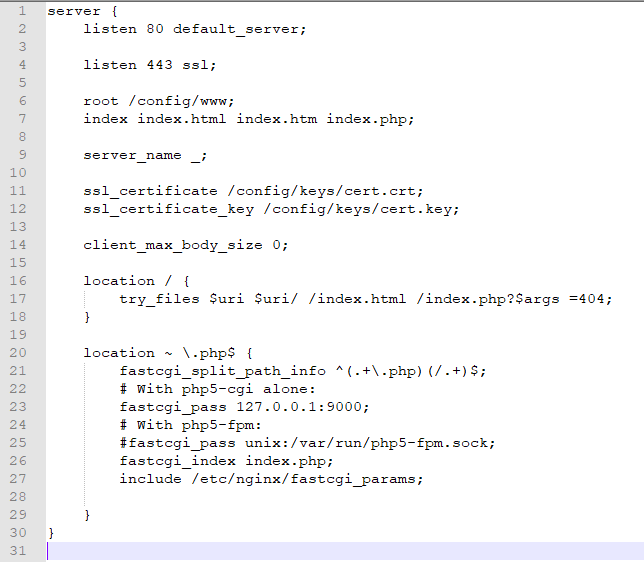
Well I must admit I was terribly confused. Thank you very very much for explaining this to me. So I actually was so confused I was messing with the "default" config file from the Nginx container I used previously to troubleshoot the port forwarding of my router... instead of the "default" config file of letsencrypt! lol So now I have found the right one and here is what the content of the right "default" config file looks like : server { listen 443 ssl default_server; listen 80 default_server; root /config/www; index index.html index.htm index.php; server_name domainname.net; ssl_certificate /config/keys/letsencrypt/fullchain.pem; ssl_certificate_key /config/keys/letsencrypt/privkey.pem; ssl_dhparam /config/nginx/dhparams.pem; ssl_ciphers 'manymanythings here'; ssl_prefer_server_ciphers on; client_max_body_size 0; location / { include /config/nginx/proxy.conf; proxy_pass 192.168.0.16:444; } location ~ /netdata/(?<ndpath>.*) { proxy_set_header X-Forwarded-Host $host; proxy_set_header X-Forwarded-Server $host; proxy_set_header X-Forwarded-For $proxy_add_x_forwarded_for; proxy_pass http://backend/$ndpath$is_args$args; proxy_http_version 1.1; proxy_pass_request_headers on; proxy_set_header Connection "keep-alive"; proxy_store off; } } So line 19 reads : proxy_pass 192.168.0.16:444; Out of curiosity I tried forwarding the port 444 to my Unraid server but the error line 19 in the "Default" config file did not go away from the logs and keeps repeating after "Server ready".
-
So I tried to go to the specified file. First, instead of this file path which is specified in the error message : I find the "default" file under config/appdata/nginx/nginx/site-confs Then, when I go to line 19 of this file, it's a blank line : Also, isn't it weird that this file specifies ports 80 and 443 when I actually set up different ports in the template? And yet I'm still getting the "Server ready" message? I'm confused as to what I should do to solve this issue.
-
Hello and thank you for this link. I finally figured out how to redirect the ports properly. So now in the Letsencrypt container logs I get "server ready". But there seem to be two issues : The Letsencrypt container is only present in the Dashboard tab, not in the Docker tab. Is that normal?! In the logs, after the "Server ready" line, I get a never ending repetition of the following line :
-
Hello everyone, I am setting up Letsencrypt following SpaceInvaderOne's video tutorial. I am having a hard time getting the validation process to pass successfully. I own a domain name and my IP is static, so I did not enter "duckdns.org" in the container settings since this would be useless. I entered my custom domain name instead. Also, I have already created two subdomains which are pointing at my public static IP. The HTPP and HTTPS ports I entered in the container template before installing are forwarded to my Unraid server's local static IP. I should probably also mention I think it is weird that the Letsencrypt container is displayed in the Dashboard tab but not in the Docker tab... Could you please give me a hint as to what to check or change to get this to work? Thank you in advance. Here are the logs :
-
Hello, I am trying to install Nextcloud for the first time. I already installed MariaDB. So to setup Nextcloud I enter a user name and a password, then drop down the toggle menu to enter my MariaDB user and password, enter myip:thenextcloudport Then I uncheck the "install recommended apps" and click enter and after about 15 seconds I get a 504 : Gateway Time-out error message. If I go back to the same URL, it takes me to the exact same setup page, as if I hadn't done anything. The MariaDB user and password seem to be correct since I can log into MariaDB using mysql -uusername -p How do I get Nextcloud to take what I typed in into account? Edit : I was doing it wrong. In the MariaDB toggle menu, in localhost, I was typing my server's localip : the port of the nextcloud container, but the right port was the one of the MariaDB container. I had to restart the container after I entered everything correctly and now I can log into the admin account.
-
-
Thank you this also solved the issue for me.



