






Awooiel
Members
-
Joined
-
Last visited
-
How do I enable outbound lan so my services in the vpn container can access services outside of it on the lan? Also is there an option for port forwarding so I can get improved torrent p2p performance?
-
Has anyone had any updates on this? I own two Highpoint 750's, both not working in the newer unraid
-
Hello, so I have unRaid on a few servers, I want to connect them with 10gig LC fiber cables. They are HPE Proliant servers and they have these slots called Flex which fits these cards called FlexFabric cards, I would rather use them over my PCie slots to save the room, also they are much cheaper than pcie networking. However I am not sure about compatibility. This is an example of one I was looking at. Would this work with unraid? Couldn't find much information on compatibility. https://www.ebay.ca/itm/HP-HPE-FLEXFABRIC-10GB-Dual-Port-556FLR-SFP-732454-001-764460-001-727060-B21-/133967136392?mkcid=16&mkevt=1&_trksid=p2349624.m46890.l6249&mkrid=711-127632-2357-0
-
Awooiel changed their profile photo
-
All you need are some portable plots and you're good to go. Make sure they are plotted with the correct farmer_pk, pool_contract_address keys. You can find this in the bottom of the plotman.yaml file.
-
Edited : Figured out the problem. Thank you Didn't realize there were three thing I had to put in. Had the farmer address missing. -t -e controller_host=10.0.0.100 -e farmer_address=10.0.0.100 -e worker_address=10.0.0.90
-
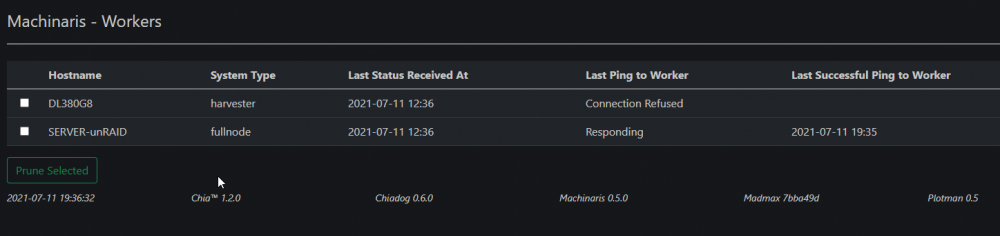
I added -e controller_host=10.0.0.100 to extra parameters and I now get this but it doesn't work still.
-
I am setting up a remote harvester on an unraid machine using this container. Everytime I start the container the farmer_peer host seems to reset to null and wont connect to my full node running on another machine in the lan. I already imported the ssl keys and everything else. I am having trouble with this. I am running the machinaris:develop container harvester: chia_ssl_ca: crt: config/ssl/ca/chia_ca.crt key: config/ssl/ca/chia_ca.key farmer_peer: host: 'null' port: 8447
-
I had it capitalized. I removed them in the container name and in the script for it then it started working.
-
The auto restart user script has never worked for me. I have several containers routed through the network, it only ever restarts one of them. I get this error. Everything works properly the way it should except for the auto restarting. Return low-level information on Docker objects date: option requires an argument -- 'd' Try 'date --help' for more information. 2021-07-03 20:41:53 | Failed to get status of passthroughvpn container id . 2021-07-03 20:41:53 | Obtaining the new Docker id, the container most likely updated or did rebuild. 2021-07-03 20:42:03 | Restarting Jackett (Container ID 2bd5d4e6b5927707b846cbf0e0e007c5315f0c74139df5a4643ce97695cd397f) 2bd5d4e6b5927707b846cbf0e0e007c5315f0c74139df5a4643ce97695cd397f Error: No such object: 791a198e943ca7428dc7d23a5a5fefb1a02661414e6b2374effacba71fa5b20f date: option requires an argument -- 'd' Try 'date --help' for more information. 2021-07-03 20:53:39 | Failed to get status of passthroughvpn container id 791a198e943ca7428dc7d23a5a5fefb1a02661414e6b2374effacba71fa5b20f. 2021-07-03 20:53:39 | Obtaining the new Docker id, the container most likely updated or did rebuild. Error: No such object: PassThroughVPN "docker inspect" requires at least 1 argument. See 'docker inspect --help'. Usage: docker inspect [OPTIONS] NAME|ID [NAME|ID...]
-
The update you did today seems to have broken it, nothing can connect now. There is nothing in logs that indicates any issues. All I get is this when I hit test on an indexer




