





Dr_Pippin
Members
-
Joined
-
Last visited
Everything posted by Dr_Pippin
-
Can you share how you installed darkness falls in the container?
-
You were 100% correct. I didn't know about steam's server browser, but that worked perfectly for me connecting over my local IP and my external IP from within my house.
-
First off, I'd like to apologize for not saying thank you to ich777 first prior to asking for help. This is a great community and members like ich777's willingness to create such dockers and maintain them is very much appreciated. Thank you. Should the log not be longer? Mine gets to there and that's it, but the logs I'd seen other people post seemed to have much more in them. Even when I left the docker running overnight, there was nothing more added to the log. I changed to 1 as you directed and I'm still not able to connect. As for why I changed it (and why likely others have, too) is I misinterpreted the description for that value and thought that was how you made it a community server, which I didn't want. I thought public=community. I am attempting to connect to port 2457. If we pretend my server's static IP is 192.168.1.10, then I'm entering 192.168.1.10:2457 in Valheim when I click "Join IP". Is there anything else you can suggest I check or change? I will try deleting the docker and the appdata folders and starting over, but I'm not optimistic at this point that I'll have a different outcome. One more bit of info, when I attempt to connect I get a "connecting" screen for ~8 seconds, then I get a "disconnected" message. Not sure if that's unique to anything, or if that's the generic fail screen. EDIT: On my local network, if I ONLY enter the IP address (and not a port number) I can connect to the server. When I add a port number that's when I get can't connect and get the "disconnected" message.
-
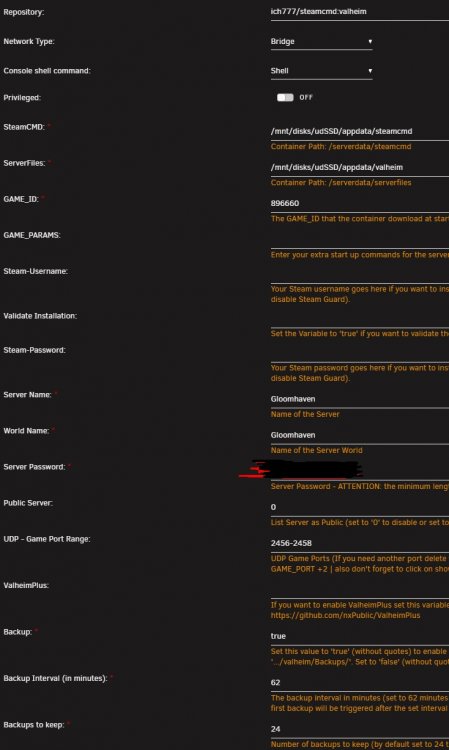
I have been struggling to get the Valheim docker working. I *think* I followed the setup guide properly, but I am unable to connect to my dedicated server on my home network. I've attached screenshot of my docker settings. I've also quoted a copy of the entire log, which appears to be showing something weird that I didn't seen anyone else mention (6th line from the bottom):
-
Did you ever have any success with fixing this? I'm getting that error now and haven't found an answer yet.

