





BBLV
Members
-
Joined
-
Last visited
Everything posted by BBLV
-
Here you go. core.conf
-
I noticed this line in the log, might have something to do with this issue but I don't know where to start to try to correct it: 2019-10-09 10:10:02,871 DEBG 'watchdog-script' stdout output: [info] Deluge listening interface IP 0.0.0.0 and VPN provider IP 10.xxx.xxx.x different, marking for reconfigure
-
Still stuck at that same "Waiting for Deluge process to start listening on port 58846..." line.
-
Username has been static, but the password has changed a number of times as it's generated every time I pull down a new config file or change the static IP's port through Windscribe. Supervisor file is attached. supervisord 10-9-2019.txt
-
No, besides the one hyphen in the username, all characters in user & pass are standard letters and numbers.
-
My VPN-provided username has a hyphen in it. Could that be causing an issue with Deluge 2.0?
-
Manually re-entered my VPN's user/pass and no change. Still can't connect to webui.
-
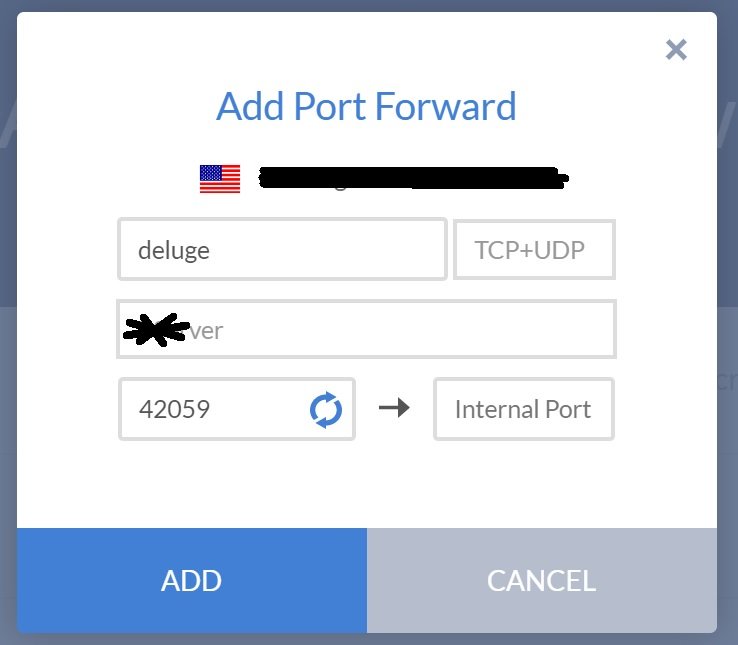
Port not IP of course. I can select my own internal port when creating the port forward via windscribe (per that screenshot), but I cannot access the Deluge webui so no way to change that within the Deluge settings...
-
I guess I'm confused.. what port # and where am I supposed to set it in the container? I still haven't been able to connect to the webui since updating to Deluge 2.0, so I'm troubleshooting everything I can think of. Here is a screenshot of my port forward creation for Windscribe. I can pick my own internal IP, should this not be 58946? That's what I used prior to Deluge 2.0 and it worked, but not after updating to 2.0. Nothing else was changed and my webui is still broken.
-
Windscribe confirmed that their implementation of OpenVPN is the AES-256-CBC cipher. Is this the issue?
-
Do you know what the minimum cipher requirements are with the newer version of OpenVPN you've integrated? Would like to know exactly what I'm asking Windscribe to confirm... Thanks again!
-
Rebooted my server and now I'm getting the same errors and web ui won't load... I'm at a loss.
-
Anyone have any tips to get delugesiphon working with the Deluge 2.0 update?
-
For whatever reason, I had to create a new OpenVPN config file through my Static IP provider and loading that into the container fixed it. What I find extremely odd is that literally no other changes were made beyond updating the container to Deluge v2.
-
I updated the container for the first time in months (since updating from OS 6.6.x to 6.7) and suddenly I cannot connect to the web GUI. Is there something obvious that I'm missing? Potentially a permission issue for the openvpn folder for credentials.conf? Not sure where to go from here.. This is what I'm seeing in my log repeatedly: 2019-09-28 15:18:18,909 DEBG 'start-script' stdout output: Sat Sep 28 15:18:18 2019 SIGTERM[soft,auth-failure] received, process exiting 2019-09-28 15:18:47,756 DEBG 'start-script' stdout output: [warn] OpenVPN process terminated, restarting OpenVPN... 2019-09-28 15:18:47,763 DEBG 'start-script' stdout output: Sat Sep 28 15:18:47 2019 WARNING: file 'credentials.conf' is group or others accessible Sat Sep 28 15:18:47 2019 OpenVPN 2.4.7 [git:makepkg/2b8aec62d5db2c17+] x86_64-pc-linux-gnu [SSL (OpenSSL)] [LZO] [LZ4] [EPOLL] [PKCS11] [MH/PKTINFO] [AEAD] built on Feb 19 2019 Sat Sep 28 15:18:47 2019 library versions: OpenSSL 1.1.1d 10 Sep 2019, LZO 2.10 2019-09-28 15:18:47,764 DEBG 'start-script' stdout output: [info] OpenVPN restarted 2019-09-28 15:18:47,764 DEBG 'start-script' stdout output: Sat Sep 28 15:18:47 2019 NOTE: the current --script-security setting may allow this configuration to call user-defined scripts 2019-09-28 15:18:47,764 DEBG 'start-script' stdout output: Sat Sep 28 15:18:47 2019 Outgoing Control Channel Authentication: Using 512 bit message hash 'SHA512' for HMAC authentication Sat Sep 28 15:18:47 2019 Incoming Control Channel Authentication: Using 512 bit message hash 'SHA512' for HMAC authentication 2019-09-28 15:18:47,764 DEBG 'start-script' stdout output: Sat Sep 28 15:18:47 2019 TCP/UDP: Preserving recently used remote address: [AF_INET]198.52.38.195:443 Sat Sep 28 15:18:47 2019 UDP link local: (not bound) Sat Sep 28 15:18:47 2019 UDP link remote: [AF_INET]198.52.38.195:443 2019-09-28 15:18:47,848 DEBG 'start-script' stdout output: Sat Sep 28 15:18:47 2019 VERIFY OK: depth=1, C=CA, ST=ON, L=Toronto, O=Windscribe Limited, OU=Operations, CN=Windscribe Node CA 2019-09-28 15:18:47,848 DEBG 'start-script' stdout output: Sat Sep 28 15:18:47 2019 VERIFY KU OK Sat Sep 28 15:18:47 2019 Validating certificate extended key usage Sat Sep 28 15:18:47 2019 ++ Certificate has EKU (str) TLS Web Server Authentication, expects TLS Web Server Authentication Sat Sep 28 15:18:47 2019 VERIFY EKU OK Sat Sep 28 15:18:47 2019 VERIFY OK: depth=0, C=CA, ST=ON, O=Windscribe Limited, OU=Operations, CN=Windscribe Node Server 4096 2019-09-28 15:18:47,882 DEBG 'start-script' stdout output: Sat Sep 28 15:18:47 2019 WARNING: 'link-mtu' is used inconsistently, local='link-mtu 1602', remote='link-mtu 1550' Sat Sep 28 15:18:47 2019 WARNING: 'cipher' is used inconsistently, local='cipher AES-256-CBC', remote='cipher AES-256-GCM' Sat Sep 28 15:18:47 2019 WARNING: 'auth' is used inconsistently, local='auth SHA512', remote='auth [null-digest]' Sat Sep 28 15:18:47 2019 Control Channel: TLSv1.2, cipher TLSv1.2 ECDHE-RSA-AES256-GCM-SHA384, 4096 bit RSA Sat Sep 28 15:18:47 2019 [Windscribe Node Server 4096] Peer Connection Initiated with [AF_INET]198.52.38.195:443 2019-09-28 15:18:49,057 DEBG 'start-script' stdout output: Sat Sep 28 15:18:49 2019 AUTH: Received control message: AUTH_FAILED Sat Sep 28 15:18:49 2019 SIGTERM[soft,auth-failure] received, process exiting
-
So changing my data target folder to the new drive killed my seeding from the old drive, as expected... Now I'm forced to copy the old 5TB drive's contents to the new 10TB drive and will worry about this again when this new drive is near full. By then maybe it will be time to buy a new 10TB drive to replace my current dual 6TB parity drives and move the Deluge data folder to its own share on the array.
-
Not a bad idea. Can't remember where I originally read that UD was the way to go, but your method makes a lot of sense.
-
I wanted to keep the seeding going 24/7 and didn't want to constantly spin up the array drives, hence the usage of unassigned devices for Deluge. I don't want to replace the existing 5TB drive and don't necessarily want to combine the drives, just want to add additional storage space but continue to seed from both drives. My preclear should be done tomorrow on this new 10TB drive and I'll try my method mentioned above and comment back on how it works out.
-
I'm adding a new 10TB UD drive to my existing 5TB UD drive that's full. New drive is currently in preclear, prepping for additional seeding space. What's best practice for adding additional storage space to Deluge without disturbing what's preexisting? Edit: thinking this through further, if I simply change the Downloads folder to the new drive and changing nothing else I should be fine (i.e. continue to seed existing Linux distros from the existing full disk).. new disk isn't finished preclearing or I'd test...
-
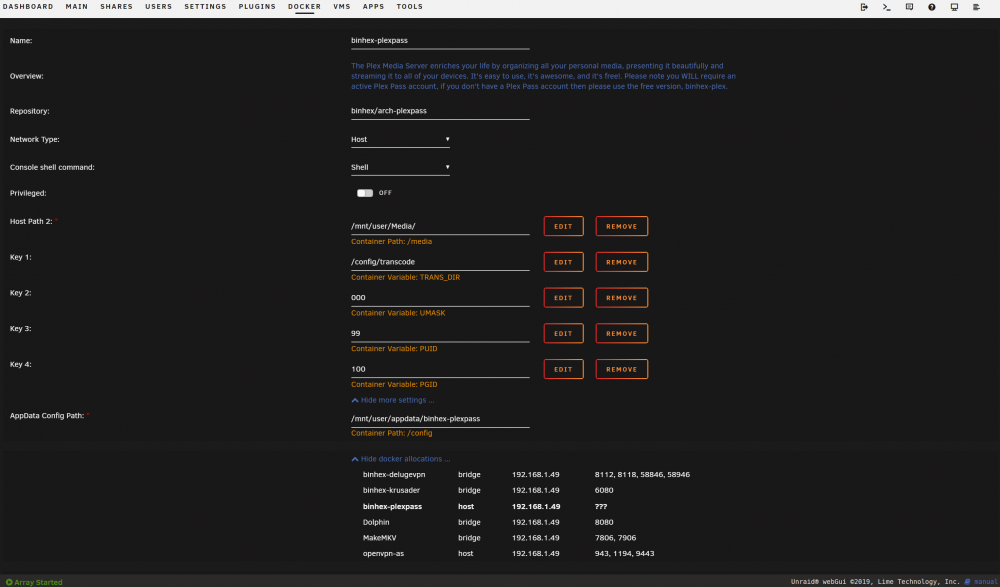
Rebuilt my libraries and still cannot access from my media players. Here are my docker settings. I'm banging my head on the wall again... Wish I never updated to 6.7.0. Nothing but problems since.
-
Network type was still set as host. Only thing I can gather from Googling is database corruption, which is surprisingly common! What can I do proactively to avoid future db corruption? I stopped the Plex Pass docker, deleted the entire Plex Media Server folder, rebooted the Unraid server, fired up the Plex Pass docker, and rebuilt my libraries. Currently scanning media files, hopefully this corrects my issue, but I'd obviously like to avoid this in the future.
-
Same here.... I can access the Plex web GUI just fine, but the dashboard says it's not accessible and my AppleTV/ShieldTV cannot reach the server. Edit: I even reverted back to 6.6.7 and my Plex is still f'd. I'm not even able to access my libraries from the Plex web GUI. Any ideas what is causing this and what we can do to fix it ASAP? Edit 2: Oddly, it appears that I can access my music library just fine from the web GUI, but all video libraries are now giving me the "There was an unexpected error loading this library" error from the web GUI and my media players on the network (AppleTV/ShieldTV) can't see the server whatsoever...
-
Anyone else having trouble with the docker after updating to 6.7.0? I updated Unraid, but the Deluge docker keeps saying "update ready", but when I hit "apply update", it checks a few things but doesn't pull any new data and I can't get to the web GUI. Everything was working perfectly prior to updating from 6.6.7 to 6.7.0. Any tips? I've restarted twice and tried applying update each time with no success. Edit: Appears something broke my network connection, although I didn't change anything when updating Unraid to 6.7.0?? I'm getting the error: "Interface Ethernet Port 1 is down. Check cable!"
-
Edit: Disregard - spelling issue in my volume mapping! I need a coffee LOL
-
Thanks for the link. I read that entire thread three times last night as I was troubleshooting Krusader and Unassigned Devices and was still a little lost. I've never delt with Linux prior to unRAID, but learning quickly. It took some trial and error to understand volume mapping and I think I finally have it down.

