bonzovt
Members
-
Joined
-
Last visited
-
Fingers crossed I found the culprit. I always assumed that if there truly was a RAM issue that somehow Unraid would make it known, not just within a VM. All of a sudden yesterday though, firefox kept giving me crashed tab errors very frequently. In searching for what could be the culprit, I saw RAM and using Memtest86+ mentioned, so booted up to the Unraid boot screen and selected the Memtest option. Sure enough, failures right off the bat. Went through the process of testing 1 chip at a time. 2 of them were fine, 1 errored out immediately just like the initial test and with just the last one, the server wouldn't even boot up properly. Has been fairly stable with just the 2 good chips in and waiting on replacements 🤞
-
I've been having issues getting my long running Win11 VM to install the latest 2023-11 and 2023-12 Cumulative Update properly. No matter what I tried, it wouldn't install and recently started getting BSOD's. So in the meantime I reverted to a backup from a little while back and it is more stable, but still unable to run that latest update. I built a new VM from scratch to start standing up a new fresh image, but no matter what I try I don't seem to be having any luck getting an initial install to work. I've downloaded the latest build ISO and initially got a "this pc doesn't meet the minimum requirements" but then changed the Machine value from i440fx-7.2 to Q35-72 and got into the Win installer. Loaded the virtio drivers, selected the disk and it copied files, got to a point where it said it needed a reboot. After reboot now I'm just getting a BSOD reboot loop: Blue Screen 0xc0000021a - Your device ran into a problem and needs to restart Is it possible that with the latest Win11 build there is some specific VM configuration that is required to get Win11 to run properly?
-
My Windows VM powered off randomly, today. Powered it back on in the Unraid gui and noticed this error in the syslog: Dec 8 08:55:07 unServer kernel: qemu-system-x86[12748]: segfault at 104219410 ip 000055c0589b7764 sp 000014bc31e83e00 error 4 in qemu-system-x86_64[55c05866b000+5c0000] likely on CPU 10 (core 4, socket 0) Any ideas on what this means?
-
New issue today, VM just powered off out of nowhere. Powered it back on in Unraid, noticed this in the syslog: Dec 8 08:55:07 unServer kernel: qemu-system-x86[12748]: segfault at 104219410 ip 000055c0589b7764 sp 000014bc31e83e00 error 4 in qemu-system-x86_64[55c05866b000+5c0000] likely on CPU 10 (core 4, socket 0)
-
Over the last handful of months or so I've noticed occasional BSOD's seemingly out of nowhere on my Win11 daily driver VM. I have an older Nvidia passthrough video adapter, everything had been pretty much working pretty cleanly for a while until I noticed a BSOD - Memory Management every so often. Over the last 4-5 weeks or so it seems to have been increasing and certainly over the last week, enough that it's caught my attention and made me realize it is time to do something. Doesn't appear to be any rhyme or reason when or why it happens and I realize that it could just be a Windows / VM issue, because I have no indication of anything unusual on the Unraid side of things. Windows event log is pretty generic, App Events just show: Fault bucket , type 0 Event Name: BlueScreen Response: Not available Cab Id: 0 Figured I would post in here to see if anyone has any ideas before I start thinking about maybe just starting fresh from my last clean build backup. Another thought I've had is using a linux distro. I'm not a linux expert but also don't shy away from it, although maybe about 1.5-2 years ago I messed with a few different distro's as a daily driver VM and feel like I ran into some issue where the OS would hibernate and I couldn't wake it up and had to hard reset the VM using Unraid or something along those lines. Been long enough ago that I don't remember why I abandoned that idea other than the few that I tried, incl Ubuntu, all had that issue and I just moved on. Maybe it was an older Unraid version or VM misconfig on my part, but I'd be interested to hear of anyone that has a stable distro recommendation that seems to work great as an Unraid VM.
-
Thanks!
-
Well ... that thought had crossed my mind, so I did turn it off, then flip the switch on the PSU itself for about 20 sec, turned it back on and walked away for a few hours. Just fired it up and thankfully the Intel Audio device is back. Any idea why/how??
-
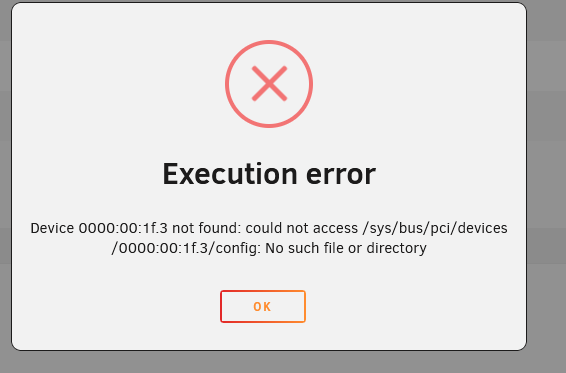
I've been using a Win VM as a daily driver for years. Today I got a BSOD out of nowhere and it rebooted on me. After it came up I no longer had audio. Rebooted the unraid server itself and then the VM wouldnt even power on due to a device missing error. I went into the VM settings and noticed that the option to select my onboard Intel audio was no longer there. I changed the value to something else and the VM powers on now, but I don't see any mention of the Intel audio at all in my system devices. This actually happened once a few months back and after doing a power off / power on the device came back. I've tried that again plus multiple reboots and nothing seems to be working. Anyone have thoughts on how to get the OS to see the onboard audio controller again?
-
Wow, remembered this post from way back in Feb. Bumping because it is happening again with the EXACT same errors in the log. Followed my own instructions but after a power off / on, still no Intel Audio device showing up anymore. Anyone have any thoughts?
-
that did it, thanks! also, the previous apps part of the apps page was a huge help. never had to use that before and it made reinstalling the apps a breeze.
-
Going down the rabbit hole ... rebooted and they all came back up OK. I manually clicked to update one of the containers and it got to 100% and then just hung and kept counting down saying waiting for response 10, waiting for response 9, --, --, over and over, back up to 10 and down in a continuous loop. I refreshed the page and then that container was stopped and when I try to update again I get the same error I've been discovering: "You have to remove (or rename) that container to be able to reuse that name. The command failed." I turned auto updates off because that seems to be what starts it, for some reason containers won't update properly and it is kicking them offline.
-
Over the past 1 - 2 weeks I've noticed that some apps will randomly just not work. The Unraid GUI shows them either started but launching them view Web GUI doesn't work, or if I stop the app it wont start up again and give "Error 403" or now even some are stopped and show that they have updates available, but I can start them at all and if I try to update it fails saying that container name is already in use or something like that. Yesterday I tried back revving my OS version, as I upgraded to the latest not too long ago and had not had this happen until recently, but today still am getting the same thing. Rebooting my server fixes it temporarily and it seems like maybe auto updates trying to apply is what kicks it into gear from working fine to being "hung." I uploaded server diags ... anyone run into this before? Server has otherwise been running pretty steady for years until this. unserver-diagnostics-20230419-1717.zip
-
Well, looks like power off / power on fixed the issue. For whatever reason reboots didn't cut it.
-
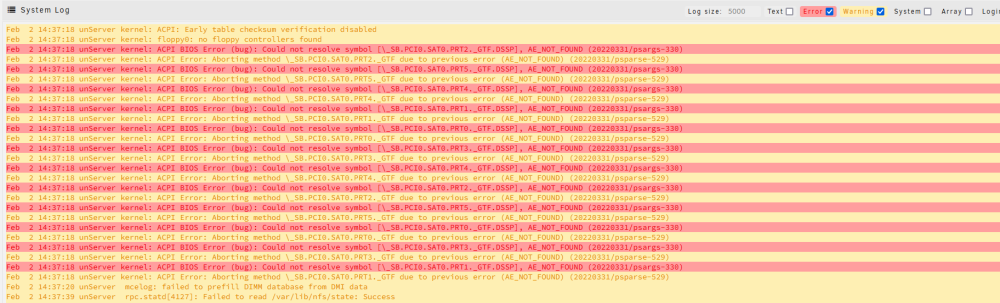
After rebooting the server itself, still no Intel audio for VMs ... these are the warnings/errors in the logs:
-
I've been using a Win VM as a daily driver for years. Fairly recently (4-5 weeks ago) built a new Win11 VM from scratch and have been using it like normal until today I got a BSOD out of nowhere and it rebooted on me. After it came up I no longer had audio. Rebooted the unraid server itself and then the VM wouldnt even power on due to this error: I went into the VM settings and noticed that the option to select my onboard Intel audio was no longer there. I changed the value to something else and the VM powers on now, but I don't see any mention of the Intel audio at all in my system devices. Any thoughts out there??