





Boo-urns
Members
-
Joined
-
Last visited
Everything posted by Boo-urns
-
Thanks for the explanation. By sub-interfaces do you mean, assigning VLANs to each port? I couldn't find a reference to that terminology. I have an R7000 running advanced Tomato as my main router and it supports VLAN port assignment. Obviously the EX7000 extender does not support VLAN or trunking, so I was looking into buying a cheap managed switch that supports trunking. The NETGEAR GS108E supports VLAN, but the datasheet says it doesn't support link aggregation/port trunking so I guess that's a no. The 16-port model support it, but only "Static Manual LAGs only". What does that mean? Do u know of a cheap switch or router that supports the functions you mentioned? If router, even better one that can run Tomato.
-
Sweet, will give this a crack when I get home. A further question: My network is set up with router, hardwired to a Netgear ex7000 extender acting as an AP/switch, with several devices including my unraid server wired to the ex7000. My router is running tomato firmware and can set up VLANs. When I set up the VLANs for the port the switch is running on, will that effectively place everything on that switch onto the isolated VLAN? Because as described in the tutorial, I'd like unraid on the main network (192.168.1.1), then certain dockers and VMs on their own isolated networks. Forgive the noobiness, I have only recently started learning about VLANs.
-
I'm attempting to follow @bonienl's instructions for setting up dockers and VMs on a seperate VLAN. The plan is: 192.168.1.1 - main network 192.168.5.0 - docker network However in Unraid VLAN settings, when trying to assign 192.168.5.0 (or anything 192.168.x.0), the routing table always assigns this to 192.168.0.0. Why is this? Additionally, setting the docker VLAN IPv4 to automatic, assigns an IP address, but does not show up in the docker network settings dropdown.
-
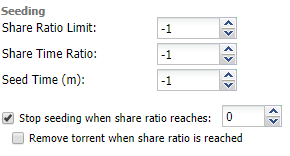
OK, so I have managed to get the files importing now, however now I am faced with another issue. Sonarr is not deleting the leftover files after importing. I have "Completed Download Handling" set to 'Remove' imported files. I also have hardlinking enabled. For testing purposes, i have set Deluge to the below, so it stops seeding shortly after completing: Sonarr imports the file, renames it and copies it to my 'Media' folder. However once the seeding stops, the torrents is deleted from Deluge but the files remain in the 'completed' folder. Any help?
-
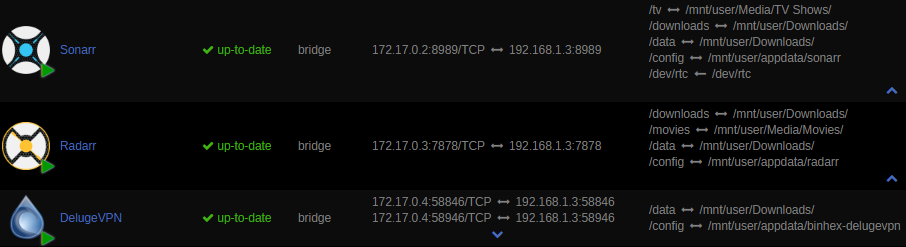
Isn't that exactly what i've got within Sonarr itself here? Being within Sonarr > Settings > Download Client > Advanced > Remote Path Mappings Or do I have to have these mappings set as Volume mappings in unraid, as I've now included below. If so, does the container path need to be data/completed or can it match DelugeVPN as just /data?. As far as I can understand, all 3 dockers should see /data as the same place, with /data/completed being within that. Apologies for beating a dead horse/topic, I just am having a hard time trying to figure out how what you're describing is different from what I already have. Thanks again Squid for the quick reply.

-
unRaid 6.5.2 Hi all, So i've been having an issue for a while with Sonarr (v.2.0.0.5163) not automatically importing/moving downloaded files (using DelugeVPN) from the 'completed' folder to the Media folder for Plex to pick up. I've read various threads about setting up Remote Path Mapping, which I have done. My downloads folder is /mnt/user/Downloads/. DelugeVPN sees this folder as /data/, Sonarr sees it as /downloads/. I've set up deluge to initially download to data/incomplete, then move to /data/completed when finished as per SpaceInvaderOne's vids. However when I automatically download a TV episode, the episode is not imported from /completed and moved, where I have both paths mapped to. As a side note, I have Radarr installed with the exact same permissions, remote path mappings and settings, and Radarr imports and moves the file from /completed fine. Also, manual importing works fine too. This is doing my head in. HELP!

