





MrBrac
Members
-
Joined
-
Last visited
Everything posted by MrBrac
-
fyi if anyone has a HP 220 LSI 9207-8i I was able to upgrade the firmware and bios of p20 with p14 linux sas2flash.
-
Disk 2 seems to be good
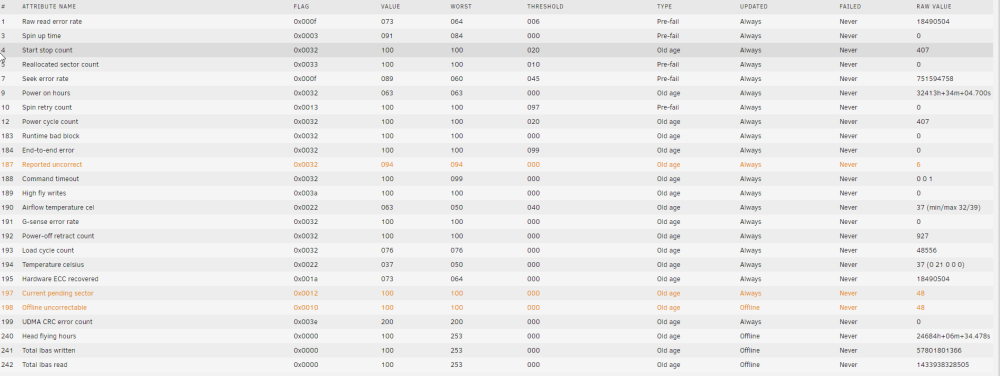
-
Here you go bracservultra-diagnostics-20220921-1836.zip
-
Ah I misunderstood you about removing 2 and 10. Is this what I am looking for size?
 something is making my docker img really big? Is there way to find culprit? root@BracServUltra:~# ls -la /mnt/user total 4 drwxrwxrwx 1 nobody users 195 Sep 21 17:37 ./ drwxr-xr-x 20 root root 400 Sep 21 17:27 ../ drwx------ 1 nobody users 43 Sep 5 16:13 .Trash-99/ drwxrwxrwx 1 nobody users 6 Aug 31 01:01 Backup/ drwxrwxrwx 1 nobody users 128 Sep 20 03:55 BracServ/ drwxrwxrwx 1 nobody users 116 Sep 21 09:31 BracServSSD/ drwxrwxrwx 1 nobody users 67 May 24 2018 Cloud9/ drwxrwxrwx 1 nobody users 19 Nov 23 2020 Code/ drwxrwxrwx 1 nobody users 79 Nov 19 2020 Emby/ drwxrwxrwx 1 nobody users 29 May 12 2018 Plex/ drwxrwxrwx 1 nobody users 44 Apr 8 2018 Programs/ drwxrwxrwx 1 nobody users 156 Sep 12 05:57 Retro/ drwxr--r-- 1 nobody users 4096 Aug 30 10:07 RocketFS/ drwxrwxrwx 1 mrbrac users 200 Mar 18 2018 Roms/ drwxrwxrwx 1 nobody users 24 Nov 20 2020 Steam/ drwxrwxrwx 1 nobody users 21 Jul 5 2018 T_Media/ drwxrwxrwx 1 nobody users 6 Nov 27 2021 Transcode/ drwxrwxrwx 1 nobody users 2016 Sep 21 16:13 appdata/ drwxrwxrwx 1 nobody users 24 Sep 12 19:30 domains/ drwxrwxrwx 1 nobody users 275 Sep 20 00:20 isos/ drwxrwxrwx 1 nobody users 6 Sep 10 12:52 nzbinter/I am doing that now rebuild parity. I know I dug the hole good.Yeah I did that new config
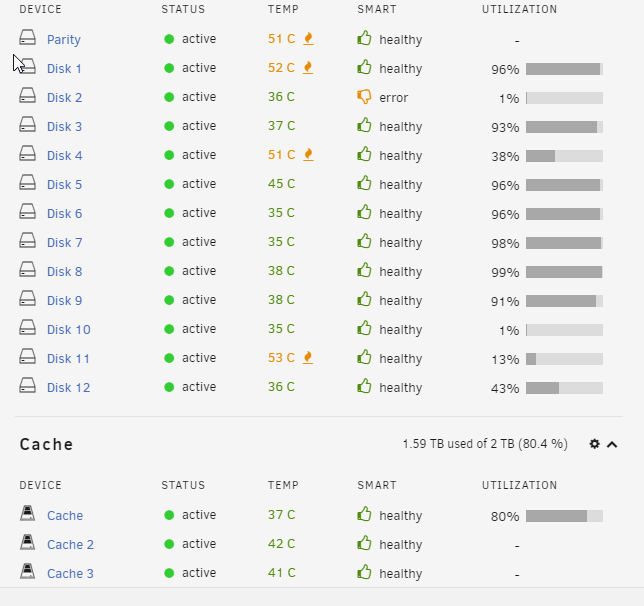 I swapped them in unraid Disk 10 was new and disk 2 was old. I swapped them in UI. Disk 2 first xfs repair lost 1.2 tb then 2nd xfs reapir lost all fs.I realized , I am using disk 11 at moment , I am gonna swap back 2 and 10.its possible to see disk 2 emulated contents?I found evidence to support the SAS card firmware could of caused a lot flags of failure. I am kinda scared to use disk 10 and 11. Maybe I will try and use them. If I set disk 2 to rebuild will I get my data back from my last parity. My last rebuild got stuck at 48% @trurl so i should swap 2 with 10 and 10 with 2. Then do parity rebuild?Well when I did parity check it started screaming errors on disk 2 and 10. I upgraded firmware on my hp 220. Amazon agreed to give me credit for 2 disks so I can buy 2 disks back. ATM bad spot with cash. Here is my logs if you can see anything. i was getting a lot IO errors and idk My mind been a mess with all my issues lol. @itimpi The 2nd disk is not really bad in that sense , its going bad. @trurl I never took disk 2 out I just swaped it with disk 10. So 2 = 10 10 = 2 bracservultra-diagnostics-20220921-1659.zipI had two bad disks , atm I am waiting to return and buy 2 new more disks. I lost the option to rebuild disk 2 which I lost 7 TB of data. My parity is still valid , so can I retrieve the data from parity when I get the new disk for 2 and 10?I fixed all these , issues , I updated my HP220 SAS card to latest p20 firmware. But my Disk 10 has like 950k errors now.Used NFS called it a day the hell with sambaI found some sata cables gonna do one last try for now. so far so good ATA 5.0 errors gone , share wont work still on my win 10 real pc. Gonna reset into non safe moode redo disk 10 bracservultra-diagnostics-20220901-1423.zipWell I found the DISK it is on my sata. I do not have cable at the moment I think or power. Is that holding back my shares. I can still connect on my VM.Sep 1 13:31:37 BracServUltra kernel: ata5: hard resetting link Sep 1 13:31:45 BracServUltra kernel: ata5: SATA link up 1.5 Gbps (SStatus 113 SControl 310) Sep 1 13:31:45 BracServUltra kernel: ata5.00: configured for UDMA/33 Sep 1 13:31:45 BracServUltra kernel: ata5: EH complete Sep 1 13:31:45 BracServUltra kernel: ata5.00: exception Emask 0x10 SAct 0x80f01fff SErr 0x90200 action 0xe frozen Sep 1 13:31:45 BracServUltra kernel: ata5.00: irq_stat 0x00400000, PHY RDY changed Sep 1 13:31:45 BracServUltra kernel: ata5: SError: { Persist PHYRdyChg 10B8B } Sep 1 13:31:45 BracServUltra kernel: ata5.00: failed command: READ FPDMA QUEUED Sep 1 13:31:45 BracServUltra kernel: ata5.00: cmd 60/60:00:10:57:bb/02:00:02:00:00/40 tag 0 ncq dma 311296 in Sep 1 13:31:45 BracServUltra kernel: res 40/00:60:d8:73:bb/00:00:02:00:00/40 Emask 0x10 (ATA bus error) Sep 1 13:31:45 BracServUltra kernel: ata5.00: status: { DRDY } Sep 1 13:31:45 BracServUltra kernel: ata5.00: failed command: READ FPDMA QUEUED Sep 1 13:31:45 BracServUltra kernel: ata5.00: cmd 60/00:08:70:59:bb/04:00:02:00:00/40 tag 1 ncq dma 524288 in Sep 1 13:31:45 BracServUltra kernel: res 40/00:60:d8:73:bb/00:00:02:00:00/40 Emask 0x10 (ATA bus error) Sep 1 13:31:45 BracServUltra kernel: ata5.00: status: { DRDY } Sep 1 13:31:45 BracServUltra kernel: ata5.00: failed command: READ FPDMA QUEUED Sep 1 13:31:45 BracServUltra kernel: ata5.00: cmd 60/58:10:70:5d:bb/01:00:02:00:00/40 tag 2 ncq dma 176128 in Sep 1 13:31:45 BracServUltra kernel: res 40/00:60:d8:73:bb/00:00:02:00:00/40 Emask 0x10 (ATA bus error) Sep 1 13:31:45 BracServUltra kernel: ata5.00: status: { DRDY } Sep 1 13:31:45 BracServUltra kernel: ata5.00: failed command: READ FPDMA QUEUED Sep 1 13:31:45 BracServUltra kernel: ata5.00: cmd 60/30:18:c8:5e:bb/01:00:02:00:00/40 tag 3 ncq dma 155648 in Sep 1 13:31:45 BracServUltra kernel: res 40/00:60:d8:73:bb/00:00:02:00:00/40 Emask 0x10 (ATA bus error) Sep 1 13:31:45 BracServUltra kernel: ata5.00: status: { DRDY } Sep 1 13:31:45 BracServUltra kernel: ata5.00: failed command: READ FPDMA QUEUED Sep 1 13:31:45 BracServUltra kernel: ata5.00: cmd 60/f0:20:f8:5f:bb/00:00:02:00:00/40 tag 4 ncq dma 122880 in Sep 1 13:31:45 BracServUltra kernel: res 40/00:60:d8:73:bb/00:00:02:00:00/40 Emask 0x10 (ATA bus error) Sep 1 13:31:45 BracServUltra kernel: ata5.00: status: { DRDY } Sep 1 13:31:45 BracServUltra kernel: ata5.00: failed command: READ FPDMA QUEUED Sep 1 13:31:45 BracServUltra kernel: ata5.00: cmd 60/40:28:e8:60:bb/01:00:02:00:00/40 tag 5 ncq dma 163840 in Sep 1 13:31:45 BracServUltra kernel: res 40/00:60:d8:73:bb/00:00:02:00:00/40 Emask 0x10 (ATA bus error) Sep 1 13:31:45 BracServUltra kernel: ata5.00: status: { DRDY } Sep 1 13:31:45 BracServUltra kernel: ata5.00: failed command: READ FPDMA QUEUED Sep 1 13:31:45 BracServUltra kernel: ata5.00: cmd 60/40:30:28:62:bb/03:00:02:00:00/40 tag 6 ncq dma 425984 in Sep 1 13:31:45 BracServUltra kernel: res 40/00:60:d8:73:bb/00:00:02:00:00/40 Emask 0x10 (ATA bus error) Sep 1 13:31:45 BracServUltra kernel: ata5.00: status: { DRDY } Sep 1 13:31:45 BracServUltra kernel: ata5.00: failed command: READ FPDMA QUEUED Sep 1 13:31:45 BracServUltra kernel: ata5.00: cmd 60/c0:38:68:65:bb/00:00:02:00:00/40 tag 7 ncq dma 98304 in Sep 1 13:31:45 BracServUltra kernel: res 40/00:60:d8:73:bb/00:00:02:00:00/40 Emask 0x10 (ATA bus error) Sep 1 13:31:45 BracServUltra kernel: ata5.00: status: { DRDY } Disk 12 keeps giving issues , is it cable or dud?I fixed the VM already its all grand! Ok so new DISK gonna be cleared for 10 replacement . Still shares should work but doesnt right?This is only drive I can rip out and replace it with does it look good too you?
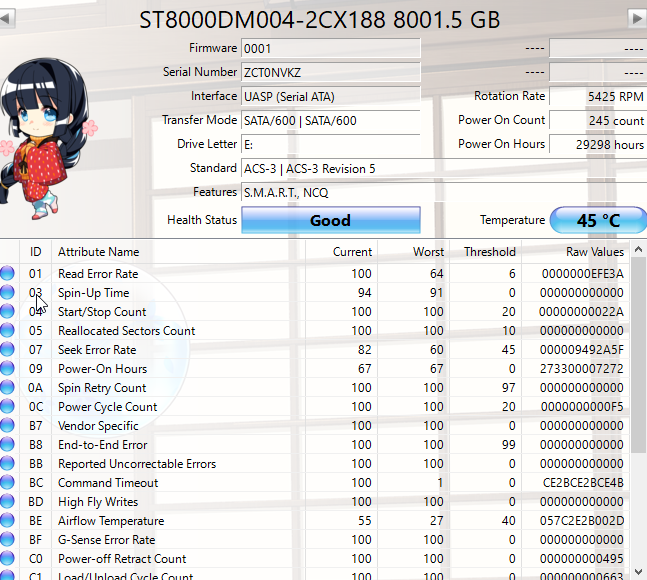 Fixed VM now. Just share issue and replace disk 10
 MY windows VM is running off a real M2. I need copy all my xml data right?Disk 10 is crap disk. I took it off, ATM I can live with losing disk 10. I already lost Disk 10 was really 4. I just want get my VM and shares working for now. I am so damn tired. I downgraded to latest stable as well. /dev/loop3 has errors.



