





enmesh-parisian-latest
Members
-
Joined
-
Last visited
Everything posted by enmesh-parisian-latest
-
This may sound odd, but could the error be linked to github being down? I noticed that while the error was spamming I couldn't load my plugins page, I looked into that further and found that could occur when github is down. 12h later, github is fine, plugins page can be accessed and errors have stopped. In addition, several people appear to get the error at the same time.
-
Having this problem too. Get an error every 1-2 seconds all day every day
-
Having same issue, set mover tuning to "very low / idle" I'm assuming the settings aren't applied to an existing mover session as plex is still inoperable. Thanks for the fast update to mover tuning, I noticed the "help" info for the two new settings hasn't been added yet.
-
Any idea when v1.48 will be available?
-
More than likely it's the chroma plugin, disable it (it does nothing) and try again. 90% sure it'll fix it.
-
Regarding the multiple library thing, there are a few ways of doing it. You could run two seperate beets containers and just call them like beet1 & beet2. The neater way would be just to have two seperate config files and use the -c flag to specify the config files: docker exec beets beet -c /config/config-v1.yaml import /downloads docker exec beets beet -c /config/config-v2.yaml import /downloads Inside the config files you can specify different musiclibrary.blb databases. I'm not sure how the state.pickle file would be affected by the two libraries, although you may be able to specify the state.pickle inside the config.
-
You're on your own with this one, I don't use a local MB server. If beets is being run as users:nobody and you've run DSNP, then there's no way it can be changing permissions outside its own user group. Check your container actually has the PUID and PGID set correctly. I suggest due to the volume random questions which you can find answers to already, I suggest you consult the documents. I had many similar questions when I was starting out with beets and received the RTFM suggestion many times. Every time I'd overlooked the clearly written answers already available to me. Really, the beets docs are very well written although you may need to read a few times for it to sink in. Due to the breadth of the possibilities we could be here for days.
-
Oh right sure, you can point beets at any folder you've mapped to it. so in this case you could set: copy: no move: no then you can run: beet import /libraryfolder/Abba-Album2 to specify the album you want included. Ok sure, I had my own MB server running at one point. I ended up removing it as I could never be sure if it was causing problems or not. Once the initial library scan is complete the scan times aren't that bad. Besides, I find discogs provides me with better matching anyway. I'd suggest putting the local MB server on the backburner until you have everything else working smoothly. You should only run DSNP if a container (or user) has been editing files as a user other than users:nobody, if beets is set correctly then check the app which is creating the files in the first place (downloader or file browser) As mentioned in the documents, beets has its limitations when it comes to perfect matching of releases. You can increase or lower the threshold before beets requires user input, I have mine set at 82% of a confident match, anything below will require me to manually match. Too many or too few tracks always triggers a manual import where I look up the id on discogs or MB then input manually. Look up the documentation on the fetchart plugin, you can be very specific about artwork sourcing. I don't use it myself rather relying on existing artwork in the folder. Not wanting to pass you off onto someone else, but I generally find the beets google groups to be very helpful technically when it comes to beets support. That's where I go for assistance.
-
Any data in the files id3 tags, folder names or any matched data from discogs, musicbrainz (or any other source via plugin) can be sent anywhere you like, be it a tag or a file/foldername. Just find the ID3 tag and apply it to the folder name Check out the docs, "The -L (--library) flag is also useful for retagging. Instead of listing paths you want to import on the command line, specify a query string that matches items from your library. In this case, the -s (singleton) flag controls whether the query matches individual items or full albums. If you want to retag your whole library, just supply a null query, which matches everything: beet import -L" I think that's what you mean? MBZ mirror? Make sure you're running beets as users:nobody, usually PUID/PGID of 99:100 in your beets container settings. Then make sure your data permissions are correct, the easiest way to do this is install the Fix Common Problems plugin then run Tools > Docker Safe New Perms. YW
-
Chroma is a pretty dodgy and unnecessary plugin in my opinion. Switch it off by deleting or commenting out the 'chroma' line under plugins in your config file
-
Again, I'm really no expert on the plugin, however common sense would suggest you isolate what the problem is by making sure you can convert to other formats, then work out why only m4a doesn't work (if that's the case).
-
I'm no expert in using the convert plugin, however I'd recommend trying different formats other than m4a. If others work but m4a doesn't then you may want to look at ffmpeg.
-
Hey Zozat, I suggest you experiment with trial and error. The config.yaml file can become very complicated, so I'd recommend starting with no plugins or any modfications. Make sure you can get a simple import from a source to destination before adding the convert plugin. Once you're happy with the way the data is being handled with a VERY simple config file, then add the plugin and fiddle with the settings. Please read the manual several times, there's always something to miss on first read: https://beets.readthedocs.io/en/v1.4.7/plugins/convert.html . Keep in mind that by default, the plugin depends on FFmpeg to transcode the audio, so you might want to install it. Here's a simple example for convert plugins: convert convert: auto: no dest: C:/Transcodes never_convert_lossy_files: yes quiet: false formats: flac: command: ffmpeg -i $source -y -vn -aq 2 $dest extension: mp3
-
I assume this looks familiar to you? I certainly don't miss chroma after disabling, it was pretty useless and only slowed down imports. Beets can run through several TBs of data now without issues.
-
Do you have the chroma plugin active? I had a similar problem until I disabled chroma.
-
I'd also love to know how to do this, there are several plugins I'd like to add
-
Hi zandrsn, while I can't provide a technical answer of why chroma isn't working, I disabled the plugin a while back after I discovered it was crashing my imports. When I had it running it very rarely (basically never) provided any useful matching and I haven't missed it since. Chroma is only useful if there are no usable ID3 tags or path names to identify the music. My imports match the ID3 tags with discogs and musicbrainz and while they sometimes require some manual input, I can match 99% of albums using just these two sources.
-
Is there any way I can manually add a plugin to beets running in a container? I've tried installing nerdtools > installing php 7 > installing pip then running pip install requests requests_oauthlib as suggested in the documents: https://beets.readthedocs.io/en/v1.3.19/plugins/beatport.html Unfortunately I get the following error: root@server:/# docker exec -ti beets beet import /downloads ** error loading plugin beatport: Traceback (most recent call last): File "/usr/lib/python2.7/site-packages/beets/plugins.py", line 270, in load_plugins namespace = __import__(modname, None, None) File "/usr/lib/python2.7/site-packages/beetsplug/beatport.py", line 25, in <module> from requests_oauthlib import OAuth1Session ImportError: No module named requests_oauthlib I've contacted one of the developers who suggested it may be due to a different Python installation. I'm stuck now https://groups.google.com/forum/#!topic/beets-users/NdKdgYzvokk
-
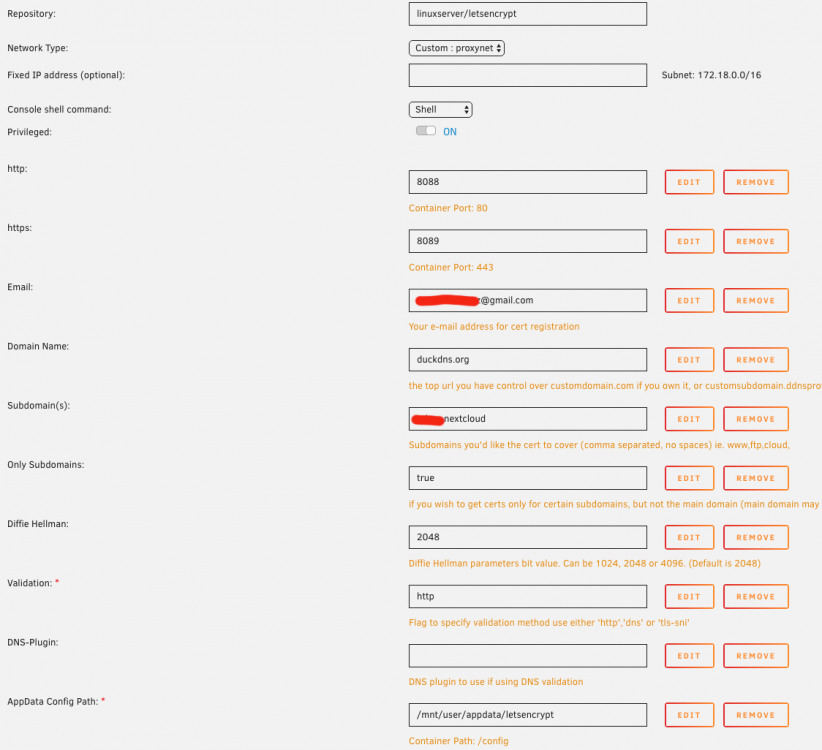
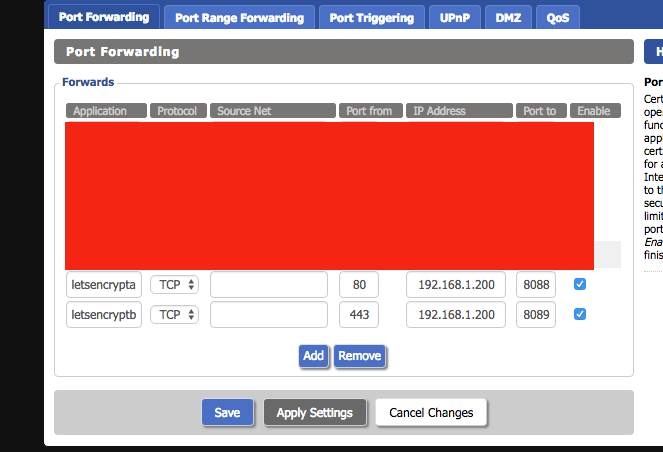
Hey, I've been trying to get letsencrypt up and runnning for a few weeks now with no success. I'm following spaceinvaderone's tutorial with the goal of setting up nextcloud and I'm stuck at requesting the certificate: Domain: REDACTED.duckdns.org ( Type: connection Detail: Fetching http://REDACTED.duckdns.org/.well-known/acme-challenge/REDACTED Timeout during connect (likely firewall problem) To fix these errors, please make sure that your domain name was entered correctly and the DNS A/AAAA record(s) for that domain contain(s) the right IP address. Additionally, please check that your computer has a publicly routable IP address and that no firewalls are preventing the server from communicating with the client. If you're using the webroot plugin, you should also verify that you are serving files from the webroot path you provided. ERROR: Cert does not exist! Please see the validation error above. The issue may be due to incorrect dns or port forwarding settings. Please fix your settings and recreate the container My ports are forwarded correctly, I've double checked by accessing other containers from outside my network on port 80 & 443 and trying different ports (such as the 180 and 1443 recommended by spaceinvaderone). Letsencrypt just isn't receiving anything. One strange problem I've had which may be related is not being able to connect to unraids terminal from the unriad gui. I get the following error: nginx upstream prematurely closed connection while reading response header from upstream Any ideas? EDIT: SOLVED! I called my ISP, they had ports 80 & 443 blocked by default. They're unblocked now and it works!
-
Any chance beatport (and the associated requests & requests_oauthlib libraries) can be added to the plugins list? Most of my music is electronic and discogs has a lot of matching errors. root@server:~# docker exec -ti beets beet -vv import /downloads user configuration: /config/config.yaml data directory: /config plugin paths: ** error loading plugin beatport: Traceback (most recent call last): File "/usr/lib/python2.7/site-packages/beets/plugins.py", line 270, in load_plugins namespace = __import__(modname, None, None) File "/usr/lib/python2.7/site-packages/beetsplug/beatport.py", line 25, in <module> from requests_oauthlib import OAuth1Session ImportError: No module named requests_oauthlib




