





IamSpartacus
Members
-
Joined
-
Last visited
-
I updated fio. Try again and let me know This worked, thank you!
-
Would it be possible to add mergerfs into the Nerd Pack?
-
Thanks for the response. I'm sure my issue is because Unraid is running in a VM. I'm probably SoL.
-
Were you running those fio tests on Unraid or another system? I ask because I'm testing a scenario running Unraid in a VM on Proxmox with an all NVMe zfs pool added as a single "drive" as cache in Unraid. However, I'm unable to run fio even after it's installed via NerdTools. I just get "illegal instruction" no matter what switches I use.
-
Has anyone gotten fio to successfully run? I just get "illegal instruction" even with --disable-native set. I've tried this in both 6.9 beta 25 and 6.8.3 stable.
-
I'm seeing major SMB issues in 6.9 beta 25. Simply browsing my shares it often takes 20-30 seconds for each subfolder to load in Windows Explorer. I'm seeing the same behavior on 4 different Windows 10 1909 machines on my network that I've tested with. I'm also seeing the following error messages in my syslog as soon as I first access a share from Windows Explorer: Aug 20 15:51:07 SPARTA smbd[35954]: sys_path_to_bdev() failed for path [.]! Aug 20 15:51:07 SPARTA smbd[35954]: sys_path_to_bdev() failed for path [.]! Aug 20 15:51:07 SPARTA smbd[35954]: sys_path_to_bdev() failed for path [.]! Aug 20 15:51:07 SPARTA smbd[35954]: sys_path_to_bdev() failed for path [.]! Aug 20 15:51:07 SPARTA smbd[35954]: sys_path_to_bdev() failed for path [.]! Aug 20 15:51:07 SPARTA smbd[35954]: sys_path_to_bdev() failed for path [.]! Aug 20 15:51:07 SPARTA smbd[35954]: sys_path_to_bdev() failed for path [.]! Aug 20 15:51:07 SPARTA smbd[35954]: sys_path_to_bdev() failed for path [.]! Aug 20 15:51:27 SPARTA smbd[36254]: sys_path_to_bdev() failed for path [.]! Aug 20 15:51:27 SPARTA smbd[36254]: sys_path_to_bdev() failed for path [.]! Aug 20 15:51:27 SPARTA smbd[36254]: sys_path_to_bdev() failed for path [.]! Aug 20 15:51:27 SPARTA smbd[36254]: sys_path_to_bdev() failed for path [.]! Aug 20 15:51:27 SPARTA smbd[36254]: sys_path_to_bdev() failed for path [.]! Aug 20 15:51:27 SPARTA smbd[36254]: sys_path_to_bdev() failed for path [.]! Aug 20 15:51:27 SPARTA smbd[36254]: sys_path_to_bdev() failed for path [.]! Aug 20 15:51:27 SPARTA smbd[36254]: sys_path_to_bdev() failed for path [.]! Diagnostics attached. sparta-diagnostics-20200820-2147.zip
-
You probably have to set the number of backups to keep number to something other than 0 first.
-
It does, I'm using it now and it works well.
-
Got it, sounds like that should work. How does one run the container with the headless option? And is there a shutdown option for once jobs are complete?
-
Unrelated issue, if I try to enable Real Time Sychronization and hit OK, the program freezes up and is unresponsive until I restart the container. There is nothing in the container logs when this happens.
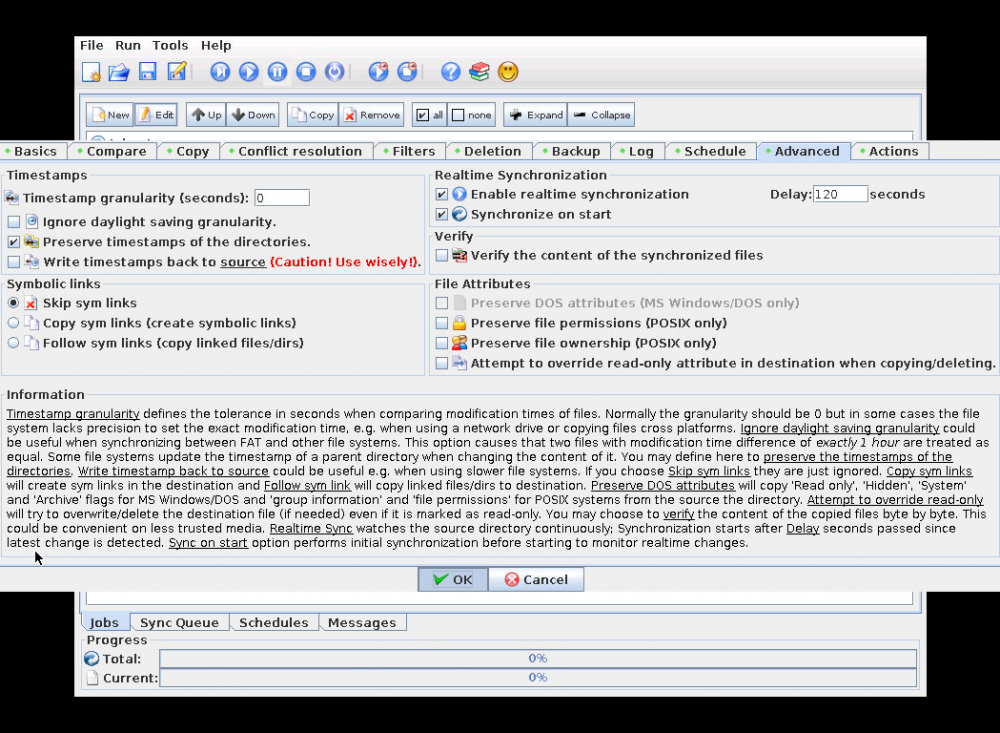
-
Thank you. That seems to have fixed the issue. I don't know why the characters were an issue with the smb option but when the destination is set as a local mount point (via UD SMB mount) it works without issue and identifies the files on both ends are identical thus not creating any duplicates.
-
If I mount the destination SMB share via UD, how do I notate that in the docker template? Local? Because if I still use remote, I'm not sure what's changing.
-
I'm doing a sync now. Will let you know what the result is. Destination is an SMB share, it's not mounted locally via UD.
-
Hmmmm. I guess I'll delete the files off destination and let them copy over with DirSyncPro and then see what happens upon the next analysis.
-
Try just creating a folder named Déjà Vu (2006) with a text file with the same name inside it. Or try this actual video file. And btw, I'm using a local for source and smb for destination.



