





janipewter
Members
-
Joined
-
Last visited
-
Hi, I have just come home to find my server has completed a parity check and found 7430 errors. The first parity disk is showing 42,692 errors although the second parity disk is showing 0 errors. It says the parity is valid. What is going on here, is it a bad disk? Both parity disks are brand new and only have 360 hours power-on time. The first parity disk is showing 486 reallocated sector count.
-
Is it possible to start docker containers without starting the array?
-
Thank you. The drive *was* in a parity protected array, but after I replaced one of the other disks, I got loads of errors on the troublesome disk as well as the parity disk. Believing this to be possible disk issues I actually ended up zeroing the parity drive and starting again, so I think the parity question is well out of the window now. The disk is not in the server at all, in fact I don't think unraid even detects it any more. The power supply is a Corsair SF450, this is the spec from the manual:
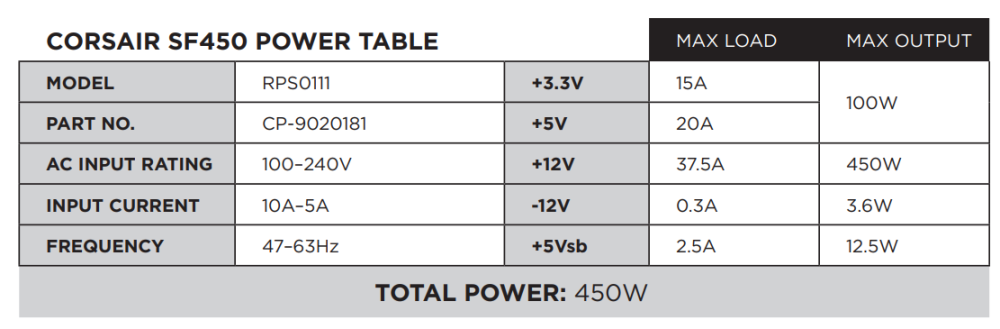
-
Thank you, I gave this a try and it actually worked perfectly! Since reconfiguring the power supply, I haven't had any read errors on any disks, and no bad noises from any of them, so I think that issue is solved thankfully. Can't believe I made such a rookie mistake, but I also didn't expect that HDDs use masses of power (my system is mainly 5400rpm disks) and I never thought the power supply would have been struggling running them all on a single rail. One issue that remains is that I think one disk has possibly gone faulty as a result. I have over 5TB of data on this disk which while not critical, would be nice to recover if possible. Unraid doesn't even detect the disk any more, although it does show up in POST when the server boots. I put it in a USB caddy and connected it to a laptop and booted Partition Magic and it correctly detects it as a 6TB disk although with an unknown file system etc. Is there anything I can do to possibly recover the files from this or is it toast? It's still well within warranty but I'd like to try getting my data off before sending it back.
-
OK never really thought of this...I just checked the server and yes all 10 3.5" HDD plus two 2.5" SSD and a couple of case fans are all running off the same cable from the PSU. It is a micro PSU (can't fit a full size one in this case as it blocks some drives) and it only has two 6-pin connectors on the power supply. I've moved 4 of the HDDs onto another cable to see if it makes a difference.
-
I have been using unraid for a while, initially my array was just a bunch of random disks of varying sizes, and I didn't use parity. Eventually I had a disk failure and lost a load of data which, while wasn't critical, was a very large annoyance. I have since been trying to unify my array, I am slowly replacing all of the drives with WD RED PLUS 6TB (WD60EFPX) and I am also running parity now. However, I seem to have the extremely bad luck that every time I replace a drive, I get loads of issues. My workflow for replacing a drive is: disable docker disable scheduler use unbalance to move all shares off the disk to be replaced gracefully shut down the server replace the disk start up the server new config -> preserve all, but change replaced disk to new disk format the new disk when asked, usually once the parity sync has started I am not sure if I have been extremely unlucky or if the WD RED PLUS drives are extremely unreliable but every time I replace a disk, something ends up going wrong. The first new drive I was purchased in December 2022 from a distributor, when installed it almost immediately started giving read errors. I removed it from the server and tried to zero it in another machine and got loads of I/O errors. I returned this disk and got a refund. I then purchased 2 drives directly from WD Europe store and installed both of these which seemed to go OK. I then purchased 2 more drives from another distributor in March/April 2023 and have just got around to installing these. However, two of the other disks are now playing up. The parity drive (one of the disks purchased in December) is giving loads of read errors, and one of the other array drives (another of the disks purchased in December) is also giving loads of read errors. Furthermore, one of the brand new disks that I've just installed is doing the same. Sometimes these drives are making a noise that sounds like they are briefly spinning down and then back up really quickly, this happens every few seconds and all activity on that disk momentarily stops during it. Unraid is also unmounting these disks and giving I/O errors in the console for these disks. I do not understand why this is happening, I have never had so many issues with so many brand new disks. I am now at the stage where I am attempting to move all of the data off all of the new WD RED disks so I can thoroughly test them all before continuing to trust them with my data. I think at least one disk (the former parity drive) has failed completely and will need to be returned. The parity drive is connected directly to an onboard SATA port in the server, all other disks are connected to an LSI 9211-8i in IT mode. There are still other old random disks connected to the LSI too and I have not had an issue with these, including old WD disks of various types, and I haven't had an issue with these. It just seems any time I made a disk change, one (or more) of the new WD RED disks decides it's time to give up. What am I doing wrong here, and is there any way I can prevent this? Should I give up on these disks completely?
