





Everything posted by dl09r
-
Did you ever make this move? Curious on the experience. Thanks.
-
Owwww, very interesting. I didn't know Github was down during that time. It would make make since. That's for that data point! I can now stop looking at my log every 5-10 minutes, awaiting for the message to pop up again.
-
Okay, looks like I was able to stop the nginx spamming. I stopped all my dockers and VMs to figure out if I'm having conflicts between one or multiple dockers. Couldn't find anything conclusive there. Checking my VM's, I couldn't find any culprits or configuration issues. Then I stopped the array to take a look at my network settings, smb, and docker settings. I turned off NETBIOS, FTP Server, and removed the loopback for IPv6 (which I don't use/employ within my home). Not able to find anything else, I just started the array back up and so far, I haven't seen one entry in the syslog since 8:40am this morning. Will keep an eye on things are report back tomorrow morning.
-
Put me down as noticing this error. Stopping my Ngnix Proxy Manager docker stopped the spamming in my syslog. When you go and look at your processes running (my example 7565#7565) you will see it is associated with ngnix. I haven't touched anything on my sever for the past 37 days and this just started up probably within the last 48 hours (or more). Digging in....
-
Understandable. Thanks for the support...
-
Which browser? Recently I was having issues with using Brave... had to go back to Firefox.
-
Check and see if you have SSL enabled in Sonarr... if so, disable it and try again. Also, what browser are you using?
-
Are you using the same subdomain you used last time? Meaning, bitwarden.mydomain.com. Can you confirm in your router that your dyndns is updating? Lastly, something worth maybe trying is creating a different subdomain name and seeing if you have the same issue. I keep looking at this statement in or error message: The server could not connect to the client to verify the domain :: Fetching http://bitwarden.mydomain.com/.well-known/acme-challenge/zNyaWAy23XZm7n1djCZl82AUFQHIiEFQx6XYQrYq_vA: Timeout during connect (likely firewall problem) It's makes me thing that either your router isn't serving or dyndns or the dyndns isn't serving the subdomain name.
-
I haven't spent a whole lot of time to understand what all Brave blocks and situations it severs when it comes to web browsing, but I'm now back to using two different browsers to get things done...'ole well. Better than have parity drive issues I guess... Glad you're up and running!!!!!!!!!!!!!!!!!!!
-
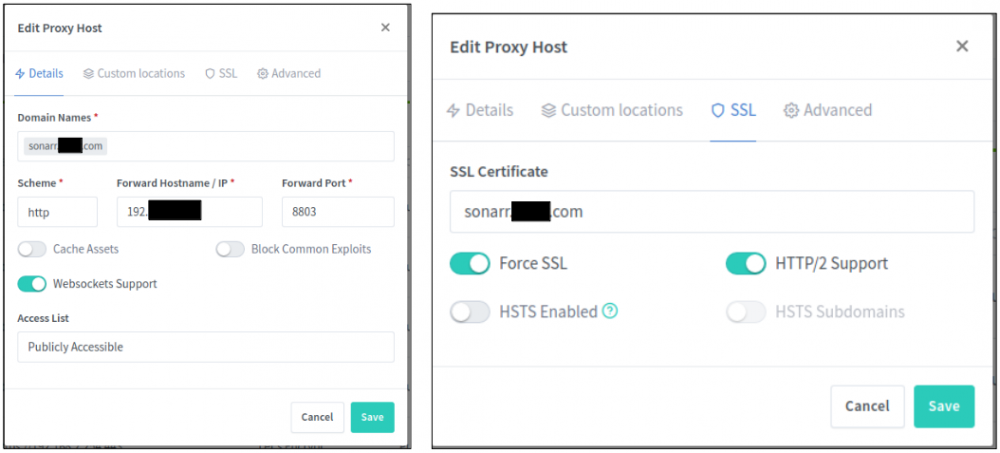
Here is how I have my sonarr (for example) setup. BLUF, the scheme should be to point to your docker via http, then force the use of SSL cert using the "Force SSL" option. The only docker I had to point to it via https was Plex. Then I still used the force SSL option to my own subdomain name and SSL cert. Hope the picture helps.
-
This is definitely browser related. Had the same issue with using Brave verses Firefox. Works perfectly fine in Firefox, but Brave does exactly what you stated. When you said you had to change ports to address deconfliction issues, which ports did you have to change?
-
@tknx and @scud133b - Are you guys using the default docker installation config? No crazy change to the folder structure in the docker setup? My wife got a bit pee'od because I fully deleted my NPM docker and recreated it (Plex was down for about 35 minutes), just to see if I could recreate the scenario. I'm using NoIP as my dyndns and I just can't seem to mimic your situation. Have you tried reverting back to a version like v.1.7.0 to see if that cures the issue(s)? (repo = jlesage/nginx-proxy-manager:v1.7.0) BTW, just trying to help.... another set of eyes...
-
Not sure... I just made this one about an hour ago ago. No issues. Something you can try is either make sure you're up to date on the docker image or roll back to v1.7.0 and see if that fixes the issue. I know, as I stated in my post above, there was an IPv6 situation that was causing some issues.

-
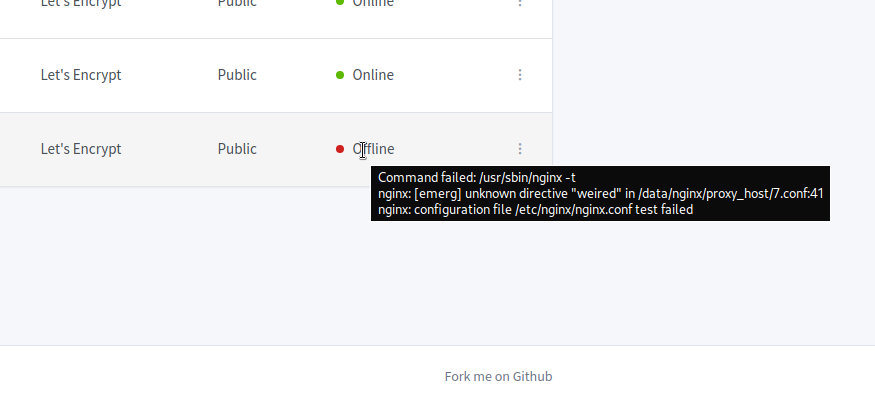
Try creating the certificate first, then go and setup the proxy host. If you hover over the offline, what does the the little popup window say? I attached an example pic of the hover over popup. Are you running the latest docker update? I wonder if you are experiencing the IPv6 issue...
-
Works perfectly! Thank you.
-
So, I guess I should have explained my rollback perspective. I had gone into NPM to play around with a host I just can't get to work and was starting to have issues building a new host and creating certs for it. Things either went Offline, Unknown, or simply failed to complete. Thought it was because of something I did to my unraid server, (in my case) when in doubt, delete and start over. After doing so, I started seeing the error message and couldn't figure out how to fix it. So, I deleted the docker again, but this time, I set it to version v1.7.0 and rebuilt from there. I only have 8 hosts, 2 redirects, and one 404. All is good now and I think I'm good with sticking things out here at 1.7.0 UFN.
-
Yeap, started seeing those right after updating the docker. Rolled back to v1.7.0 and things are working again.
-
NPM is working, which allows me to get to the NVR log in page. I can log in perfectly fine, but when I go to live stream a camera, it tells me it can't load the stream. From the hours Google'ing I've done, it seems like there some command-line witchery needed for the proxy host to understand that there is another port required to make everything work (port 7446). I'm struggling to understand how to implement the verbiage from this: # UniFi Video server { server_name server.*; listen 443 ssl http2; include /config/nginx/ssl.conf; include /config/nginx/proxy.conf; location / { #proxy_redirect default; proxy_pass https://server:7443; } location /ws/ { proxy_set_header Upgrade $http_upgrade; proxy_set_header Connection "Upgrade"; proxy_pass https://server:7443; proxy_redirect default; } } server { server_name server.*; listen 7446 ssl http2; include /config/nginx/ssl.conf; include /config/nginx/proxy.conf; location / { proxy_set_header Upgrade $http_upgrade; proxy_set_header Connection "Upgrade"; proxy_pass https://server:7446; } } and this: ## Version 2019/10/23 - Changelog: https://github.com/linuxserver/docker-letsencrypt/commits/master/root/defaults/proxy.conf client_body_buffer_size 128k; #Timeout if the real server is dead proxy_next_upstream error timeout invalid_header http_500 http_502 http_503; # Advanced Proxy Config send_timeout 5m; proxy_read_timeout 240s; proxy_send_timeout 240s; proxy_connect_timeout 240s; # TLS 1.3 early data proxy_set_header Early-Data $ssl_early_data; # Basic Proxy Config proxy_pass_request_headers on; proxy_set_header Host $host; proxy_set_header X-Real-IP $remote_addr; proxy_set_header X-Forwarded-For $proxy_add_x_forwarded_for; proxy_set_header X-Forwarded-Proto https; proxy_set_header X-Forwarded-Server $host; proxy_set_header X-Forwarded-Host $host; proxy_set_header X-Forwarded-Ssl on; proxy_redirect http:// $scheme://; #proxy_redirect off; # generally okay. proxy_http_version 1.1; proxy_set_header Connection ""; #proxy_set_header Upgrade $http_upgrade; #proxy_set_header Connection "Upgrade"; proxy_cache_bypass $cookie_session; proxy_no_cache $cookie_session; proxy_buffers 32 4k; proxy_headers_hash_bucket_size 128; proxy_headers_hash_max_size 2048; ...into my host to reap the success. Can you assist? Here is the link again from the community.ui forum: https://community.ui.com/questions/NGINX-Reverse-Proxy-in-a-Docker-Container/89509ee7-b920-4d9e-9736-73d981df97bb#answer/5b511459-5a02-46bb-ab60-a1b97c992189 BREAK BREAK - Did the docker update and it broken something.... weird.... rolled back to v1.7.0 and everything is working again. Was getting some weird error message: nginx: [emerg] bind() to [::]:80 failed (13: Permission denied)
-
Glad you got it resolved. Sent from my SM-T720 using Tapatalk
-
Thanks for doing what you're doing. Man I really need to figure all that out... Your said fork and I was just thinking, "man I do remember emptying the dishwasher this morning". I'm extremely thankful for your continued support. Sent from my Pixel 3 XL using Tapatalk
-
Don't leave just yet. As UI-Matt will tell you, they are still working on UniFi Video and the software that supports the NVR. As for the WireTiger issue, i did have that at one point. I made a backup, deleted the docker and the associated appdata folder and reinstalled. After restoring my backup, haven't had the issue since. I've got about $7k in UniFi video products and can understand your frustration. But after many countless hours chatting back and forth with a few members of the UI Video team, I know there is still work being done. Last days point I'll make. This info video docker is one of the unsupported approaches to using the capability. As I have a Cloudkey Gen 2+ and now a UDM-Pro, you would think I'd move over to UniFi Protect... Why? Unifi video works just fine and meets my needs. If or when we are all forced to migrate, I'll see where things are. Support for the docker may have slowed, but the software development hasn't. Hope that helps. If I can figure out how to build and maintain a docker, I'll give it a shot. How hard can it be? Famous last words.... Sent from my Pixel 3 XL using Tapatalk
-
Sorry it's been awhile, but In discussion over on the UI.com site, I was given this post as a workable solution to the Unifi Video not working with NPM. Could you assist with intrepreting the settings and how to implement them in NPM? Here's the link to the post: https://community.ui.com/questions/NGINX-Reverse-Proxy-in-a-Docker-Container/89509ee7-b920-4d9e-9736-73d981df97bb#answer/5b511459-5a02-46bb-ab60-a1b97c992189 Thanks in advance.
-
Never really thought about that. Been using Unifi Video for about 4 years how and just got use to folder naming convention. The only concern I could see with renaming for convenience is that it could confuse the NVR aspect because I believe the naming convention is generated and noted somewhere. I'll play around this weekend.
-
Awesome! Glad you got it working. Sent from my SM-T720 using Tapatalk
-
Ah, okay... Never played synology. Sorry. Sent from my SM-T720 using Tapatalk



