




-
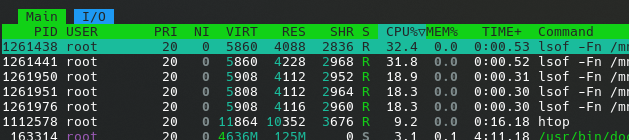
I've noted an significant increase in CPU usage, possibly due to excess usage of the lsof command. Attached is a screenshot from HTOP (via ssh). Also attached is the diagnostic zip. universum-diagnostics-20250803-0959.zip
-
Yeap, seeing the same
-
Is it worth noting cosmetic UI things? At this point in beta testing, I don't want to annoy the team if they have already been noted. I am going to start a thread about the excessive use of the lsof and how it's increased my CPU usages noticeably.
-
Not sure if this has been asked but was curious why these changed are released as .X updates rather than using the patching mechanism that was just released/implemented. Some of these fixes seem to be good candidates for the patching tool. No issues with updating from 7.1.1 to 7.1.2.
-
Not sure what changed in thelasy week or so but I'm hacing to stop and start the fsn controller maybe 3-5 times a day to get my fans to stop spinning at max speed. Nothing in the ipmifan logs or in the syslogs. I thought it was my BMC failing but I've run the BIOS reset several times and it always restarts fine.
-
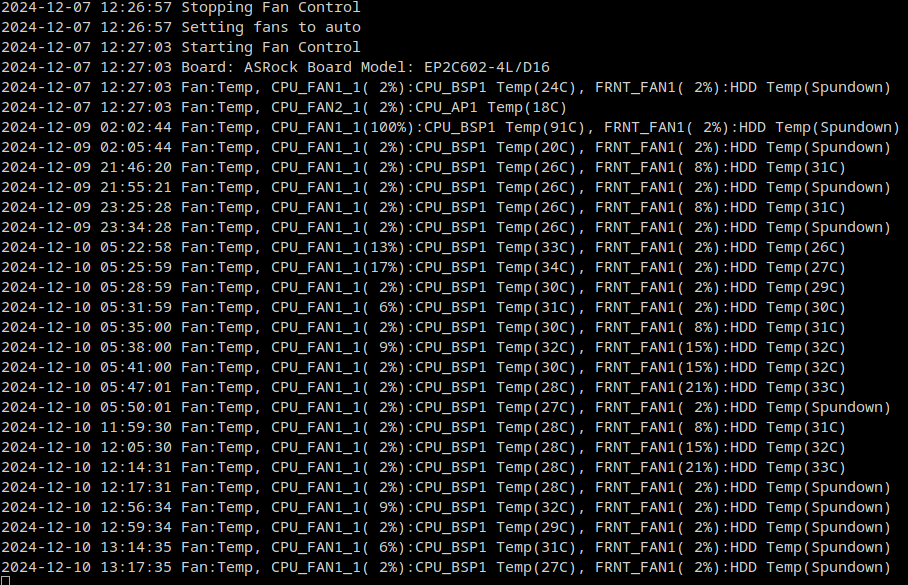
So I had the fans go full tilt again. It's been 3 days since the last event. Below are pictures of the log (have not stop/started the fan controls yet), and the fan speed readings. If there is something else you want me to check, let me know.

-
Yes, that was me having to restart the ipmi fan control to get the fans to turn back down again.
-
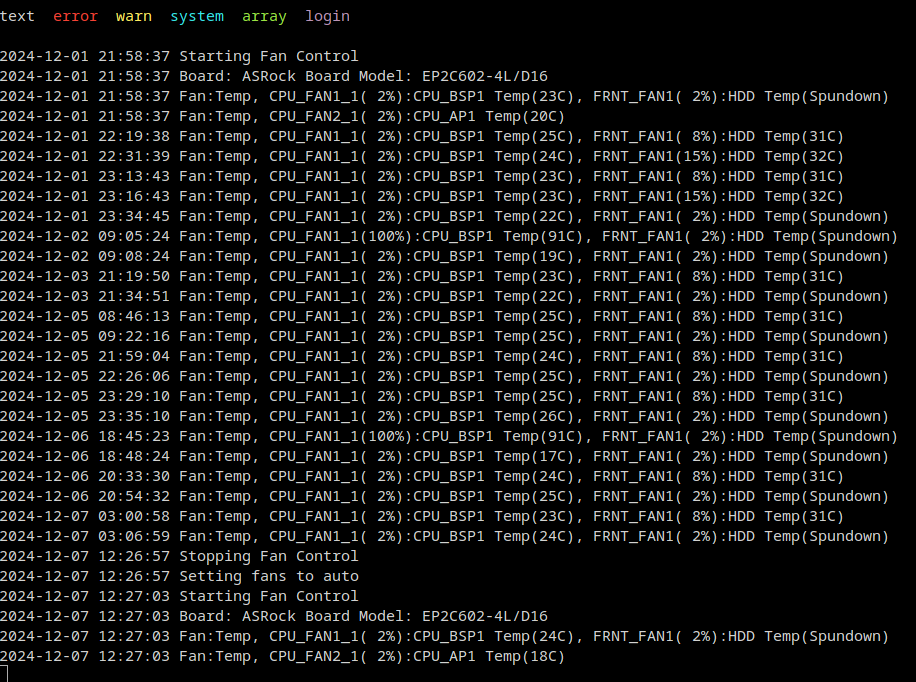
It happened again this morning. Here is the /var/log/ipmifan log screenshot. As you can see, there's not there indicating a error or fault. Also, there is nothing in the syslog. Willing to troubleshoot anything additional. As was mentioned above, things have been fine for a very long time, but something recent has started to cause this situation. Standing by for guidance/feedback. Thanks in advance.
-
Next time it happens I'll pull the log and do a PrivateBin snippet of it. Each time I check there is nothing about the plugin crashing.
-
I'll also add that from the obvious logs, I don't see anything associated with the IPMI plugin. Happened twice today. No rhythm or reason, fans go full speed and I have to go into the plugin settings and turn fan control off then back on.
-
I'm wondering if I'm experiencing a similar issue. I'm running a EP2C602-4LD16 and I've noticed that just about every 1-2 days the IPMI plugin crashes? I don't see anything in the logs. I moved from just having the plugin work directly with the BMC to adding the network information for access to the BMC. At least this way (compared to the past of having to reboot the server) I can just OFF/ON the fan controls and everything is back to normal. It's been a good long while since I've never had to fiddle with the IPMI plugin in, but not I'm having to get in there almost daily to reset the fan controls. @SimonF brother, any ideas and/or thoughts? Could it be related to a need to update the FreeIPMI dependencies (spit ballin')?
-
Good morning all. Over the past couple months I've noticed the IPMI plugin has been crashing to the point where I can't get the the IPMI page and the readings on the dashboard disappear. Seems the only way to restore access is to reboot the server. My setup has not changed for the past 3 years, when I upgraded the size of my array disks. Has anyone had this issue? Can the plugin be restarted via the command line? Is there any updated plugin to be installed. Currently on 2023.12.12 Thanks in advance.
-
I'd offer that this IS NOT fixed. Still can not add my reverse proxy "origins" to the extra origins. Currently running 6.12.8
-
Do you have the same issue if you open the dashboard up via an incognito window? Wonder if you have a plugin/extension/app that may be causing the issue.
-
Were you ever able to figure this out? Noticing the same thing. Not a deal breaker by any means, but would like to see the installation process when installing a new docker.

View in the app
A better way to browse. Learn more.




