





David13858
Members
-
Joined
-
Last visited
Everything posted by David13858
-
plex-diagnostics-20220816-1914.zip Diagnostics
-
I have been out of the country so I wasn't able to sort it out sooner, maybe I misunderstood, I thought the advice was connect the original drive ? As for a new drive, it was full so I thought it was a necessary upgrade at some point so I thought I would just try it, I could always reverse it to the same situation as before. I will post new diagnostics tonight when I get back home. So this is a good strategy to get data off the drive, but wont fix the underlying issue ?
-
Stopped stray -> no drive -> shutdown -> replace physical drive -> turn on -> assign original to disk 20 -> start array
-
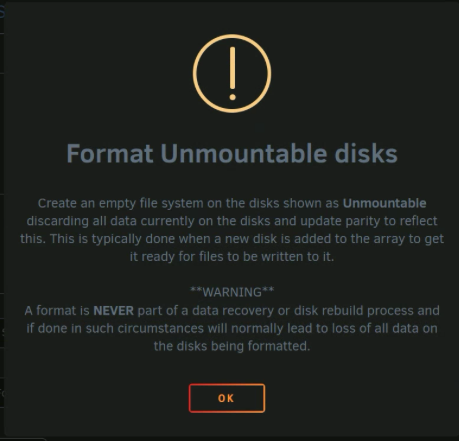
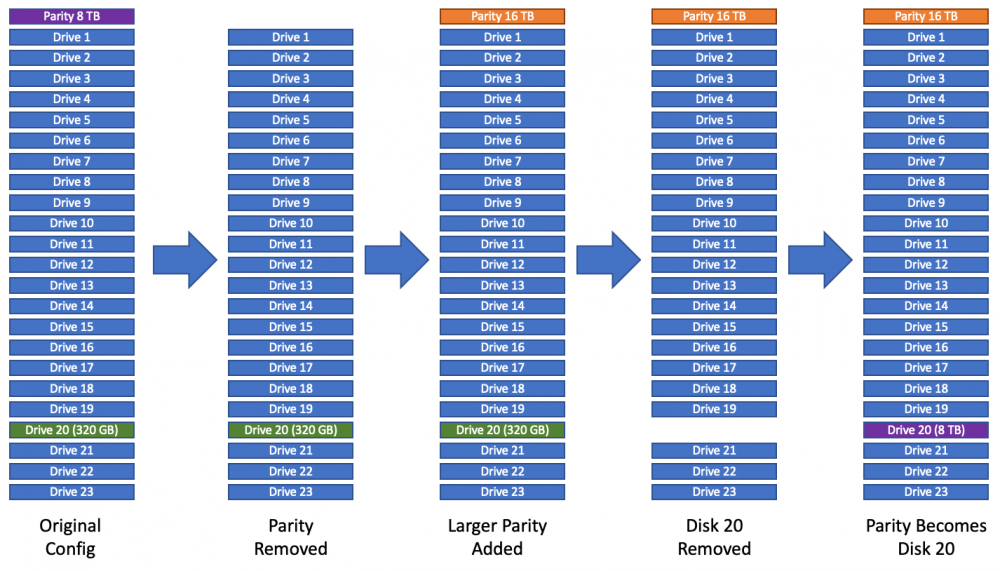
Ok so the replacement was done about a month prior to the initial post (The drive was increased from 320gb to 8TB) so there will be a large loss of data but I can with with it. I added the original drive to the array Instead of the 8TB (Disk 20) - No luck, It still says "Unmountable: Wrong or no file system" My next thought was to get a new drive (since I'm full any way). My hope was that I could just add that drive in and get the parity to rebuild the data. Normally I would format the disk however I get this message. I don't really understand the issue anymore. I though the whole idea of the parity was to protect the array if a drive failed. So I don't understand why It can't just be rebuilt. If it can't be rebuilt then I don't see how the data can be recovered at this point. Sometimes I'm not great at explaining myself so I knocked up a quick visual to show the process I went through just I was still unclear. It is worth noting that the final setup on the right was working perfectly fine for 2-3 weeks until the power went out.
-
It's going to be a struggle to try that, I'm not currently with the server and all the hot-swap bays are full so I would have to get someone to connect it internally which would probably be a stretch for them. Also, to add extra detail/clarification, before the power outage the current setup has been working for a few weeks without any issues.
-
Yes, exactly that. Also, I ran an extended smart test last night to see if that revealed anything ST8000DM004-2CX188_WCT2K6ZL-20220725-2247.txt
-
Sorry, this is my terrible explanation skills. (Disk 20 = Drive 6ZL) Previously: Parity = Drive 6ZL (8 TB) Array = Drive 1 to 23 (Maximum Size 8TB) Current: Parity = Drive DM7 (16 TB) Array = Drive 1 to 23 (Maximum Size 8 TB) In the array Disk 20 is now Drive 6ZL (The drive that previously occupied that spot was removed) Hopefully that sounds a little less cryptic.
-
Disk 20 File System Check.txt Ok, so I have done the file system check. Thought I would check first to avoid doing anything wrong but I presume the next step would be to run the repair ? No, but that sound like something I should definitely do. Disk20 used to be the parity drive. So when the 16 TB drive came, I took Disk 20 (6ZL) out of the array and re-built the parity to the 16 TB (DM7). Then formatted Disk 20 and added it to the array as a normal drive.
-
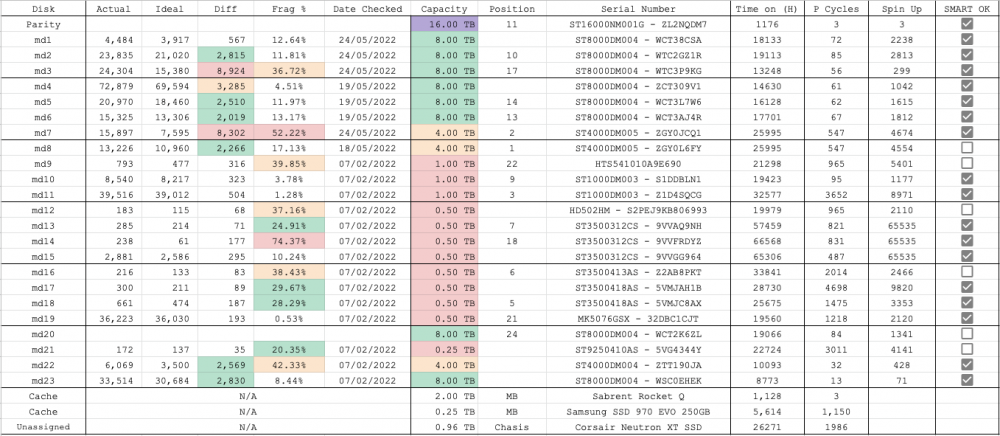
My Apologies, I dragged the zip file across so I must have pressed the wrong button to split them up. It was on reddit so not the most reliable "i dont know if there is an easier way to recovery but what i would do is remove the drive from the array, format it with the unassigned devices plugin and add it back to the array to rebuild the parity. beside this i would recommend getting a UPS so a power loss does not knock out your server anymore." I was 50/50 on the format so you have definitely stopped me from that mistake. Oh ok, this was the first time I had ever looked at the sys logs, I will setup persistent logs to avoid that error next time. Yes, there are a few smart errors on some disks [8, 9, 12, 20, 21] (This is the spreadsheet I have to keep on top of things) I will check the filesystem and get back with the results tomorrow. I was having some issues with docker filling up quickly, I was pressed for time fixing the issue so I had to quickly bump it to 50g to keep everything working but then never set it back to 20 since it was working ok. Primarily cost at the moment, the important data I have is backed up a second PC so I didn't think it was essential to do it but It is on my list of jobs (as well as a UPS) I ended up getting disks 12-19 free all at the same time and I was already set up for 24 drives so I couldn't pass up the opportunity. My plan is too slowly phase them out. I just moved disk 20 from the parity slot and replaced it with a new drive, I was hoping it would last a bit longer before filling up. The next plan is disk 21 getting the boot.
-
Hi All, The other day the power went out (I have no idea when or how long for). Upon reboot I noticed an error on disk 20. At first I thought it was a drive failure, but now I'm not sure, it is still a fairly new drive (19k hours on). I don't know if it makes a difference but it used to be the parity drive. I have seen some suggestions online about moving it to unassigned devices and formatting then moving it back to the array for a rebuild. Issue is I didn't notice the error for a day (maybe more) so there was enough time for a parity check to finish and I'm not sure if it has the data on it or not. Not sure what direction to go in now so I thought I would ask here. Note: The server is in a different location with non technical people so things like physically replacing drives etc is out of the question atm Thanks in advance for any help it is greatly appreciated. plex-diagnostics-20220721-2023.zip



