






Lenny Warren
Members
-
Joined
-
Last visited
-
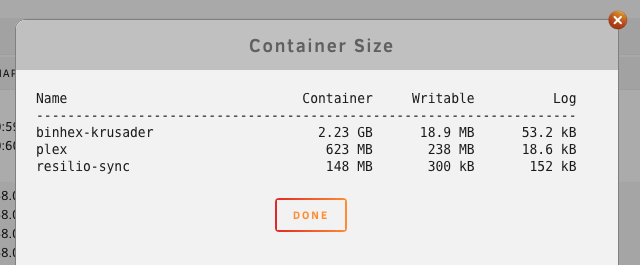
Thanks, I force updated Resilio and it seemed to work.... will keep an eye on it. Do the container sizes in the above screengrab seem small for Resilio, should I and how do i increase it?
-
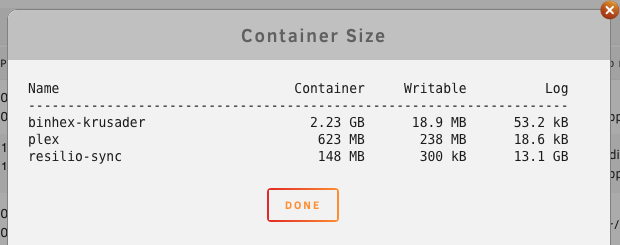
I force updated Resilio and it cleared the log. I've set the Docker log to rotate, but I'm presuming this is a different log which is just for Resilio? Is there a way to keep the Resilio log at a smaller size?????
-
Looks like it is the Resilio log? Any idea how to remove the log?
-
Rebooting the server doesn't clear it, so thinking it's not actually memory, it's data filling the docker container?
-
Thanks, but how do I sort that?
-
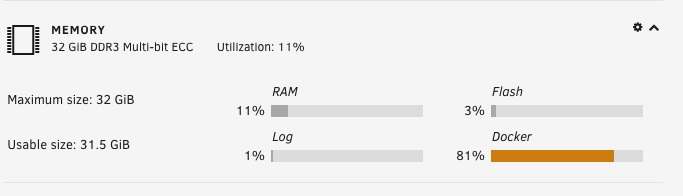
Hi folks, I've stared used Resioio Sync but as it works through syncing files from my synology NAS to my UM+NRAID, the Docker memory usage rises substantially, eventually up to 100% and then it falls over. Is it using the memory as cache, or ???? HELPPPPPPP.... I get this warning... Docker high image disk utilization: 13-04-2019 08:00 Warning [ARCHIVE-2] - Docker image disk utilization of 73% Docker utilization of image file /mnt/user/system/docker/docker.img
-
Newbie to UPS's... I picked up a 2nd hand APC Smart-UPS 750 Connected with a standard USB cable to my server, DELL Poweredge T310. Autodetect found it, all seems ok, but Nominal Power, UPS Load and UPS Load % are blank. If I switch display settings to manual, and add VA and watts I then get Nominal Power to display 500, but not Load or load % Do I need a special USB cable, or ????

