





AVTechMan
Members
-
Joined
-
Last visited
Everything posted by AVTechMan
-
Hello, Wanted to ask on moving my data drives from an existing Unraid server to another Unraid server I just finished putting together. The existing server currently does not have a parity drive but has five data drives. I also have 1 VM and two docker containers that's on a nvme drive in the cache pool. I want to move the data drives to the new server, however the twist here is that I have a valid USB flash drive that has the Pro license going in the SC846 chassis whereas the existing server only has the Plus license (I am not moving that USB stick to the new server). I will probably save what I need from the VM and wipe the cache drive and start new on the new system. All I would need to do is physically transfer the data drives to the new server and do a new configuration and will add a new Parity drive once all the data drives are in place. I will redo and create a new setup for the VM and containers. Does this sound right or is there a step I am missing?
-
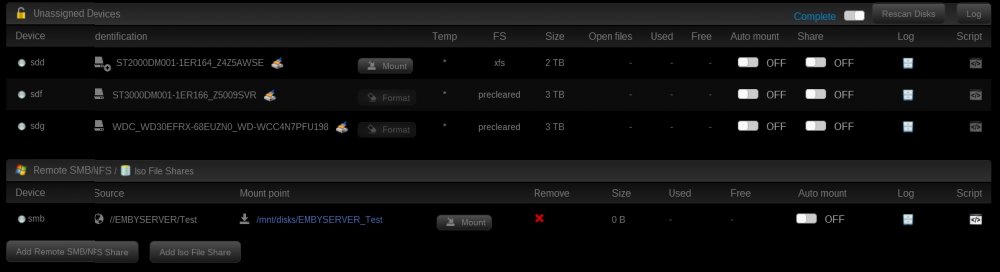
Look at the UD log. There will be a log entry on why is isn't mounting. Probably a permission (credentials?) issue. I clicked on the Log button on the right but nothing appears in the Unassigned Devices Log. I'm able to get into the share from my Windows PC, and the plugin did find the share after I put in my user and pass for that share (located on the Windows PC) but still doesn't mount. Did you let UD find the server and share, or did you manually enter it? When I click on 'Add Remote SMB Share', I choose SMB for IP protocol, and under IP/Host, the button below has 'Search for servers in WORKGROUP'. Thing though is that my Windows 2012 R2 server is a DC so it won't fall under the WORKGROUP category. I typed the server name in manually and after putting in the User and Pass I click the 'Load Shares' button and the share I was looking for comes up, which I then select and click 'Add'. But why it doesn't mount is still a mystery i'm trying to figure out. EDIT: Okay looks like I might have figured it out. Instead of putting in the server name I put in the IP address of the DC and put in my credentials....after adding the share it finally mounted. My DC is also running DHCP and DNS so I put in the IP pointing to the DNS server. Kinda weird, but the whole point was to see if the Emby Docker could see the mounted remote share when it comes to adding media to the library. Mostly experimental as I can transfer the files over to the unRAID server, but wanted to see how it would turn out.
-
Look at the UD log. There will be a log entry on why is isn't mounting. Probably a permission (credentials?) issue. I clicked on the Log button on the right but nothing appears in the Unassigned Devices Log. I'm able to get into the share from my Windows PC, and the plugin did find the share after I put in my user and pass for that share (located on the Windows PC) but still doesn't mount.
-
I have a question, Where the Remote SMB/NFS section is, when I try to mount the remote share from an Windows server, the screen refreshes while the button still says 'Mount' so basically it didn't mount. Has anyone gotten their Remote SMB location to mount?
-
I have the Antec 300 case, which is a nice case, especially the 120mm fans on the front. With that said, I was looking into getting the Antec NEO ECO 520C 520W PSU since it supports 11 drives, which is the max my case will hold once I get the 5-3 drive bay adapter. I don't really need 7200 RPM drives since the server is not an intense read/write operation. So I would assume that the 520W PSU would be more than enough for 5400 RPM drives, or green drives? Case also has a slot for an SSD drive too.
