





sfef
Members
-
Joined
-
Last visited
Everything posted by sfef
-
I'm interested on if this helps, I don't run those mods.
-
I still have the issue as well with new hardware and still can't figure it out. I just deal with it. I have made some adjustments to force library scans with plex to re-add items. I also have sabnzbd restart a couple times a day just in case it was paused it will resume. Things like that and it works for now. I honestly have been so busy, I haven't done much of anything computer/home lab related for months.
-
So I got a new motherboard/ram/cpu and I am still getting this issue periodically. It has nothing to do with drives going to sleep, I see it when say I might have a couple GB of data queued to download in Sabnzbd and it will be actively downloading and then it pauses itself because the incoming share is no longer available. I can notice this within seconds of it happening and I unpause it and it starts working again. These are just split second glitches that cause a share to suddenly not be there. I see it with Sonarr if I am importing a large group of files there may be 1 or 2 that didn't import and it is because the destination folder disappeared for a moment, it skips that file and goes on to the next and it starts working again because this only lasts for a split second. Have you still been seeing this with your new build?
-
Thank you for looking, but the files aren't actually being moved. They still exist on the cache drive only, if I browse to the cache drive mount it is there and if I look under user0 mount the files are not shown on the array. Let me look into this days old, on the website it shows AUTO for the age setting under the global settings and under the TV Shows override section. I've tried a few different settings the past few days, so maybe something caused a bad config file setting. My goal would be to have the cache drives fill up to like 75%, then the mover would drop it down to like 35%. I've been seeing the comments about making sure there is a large enough gap between thresholds so I dropped it to 25%. I was wondering if part of the problem is the shares that use the same cache drive have different cache prefer settings. For instance my cache_3_nvme, it is used by "Incoming" and "TV Shows" Incoming is set for cache as the primary and tries to keep all files on the cache drive. While TV Shows is only using the cache drive temporarily until the cache is getting full and then the mover would move the files to the array. Are the share settings working against each other in this instance, or is that doable?
-
I have been trying to get this to work for weeks, just when I think it works it doesn't seem to anymore. Can someone please take a look and see if they see what is happening? I have a Movies share and TV Shows share that each time it acts like it should move those files, but everytime they do not get moved. It acts like it is in test mode, but it isn't. ca.mover.tuning-debug-20250627-2352.zip
-
Good luck, I can't wait to hear how it goes. From what I was reading the newest unraid version has the newer kernel so all of the cores and the graphics encoding should be supported. Hopefully with the Dockers your templates are good and you can really just recreate them from that without having to make many changes. If you didn't know the system should save your dockers as a template file and should include your changes to the base template. Hopefully you have them setup where they store their data in a folder on the system and it isn't within the docker image. That way your data persists if you destroy a docker and recreate the base data/config files for the apps should exist.
-
That is an older system you have. It is too hard to give up Plex, the metadata the ease of sharing and the it just works (most of the time :-) Your problems with things not showing up, is it where they were showing but are now no longer showing? Or is it possibly a naming issue or something where Plex never showed it? Have you already started buying the new hardware? I haven't yet, I am very indecisive about choosing. At this rate I probably won't get my new system built until this fall/winter.
-
@ksp Are there no issues with the 14th gen intel? I kept reading to avoid 13th & 14th gen. So I was kind of looking at either 12th or just going straight to the 15th.
-
Your saying Unraid dropping drives/folders is a 10 year old issue? I have used Unraid for at least 7 years and have never experienced this. I also think if this was something that happened regularly we would have been able to find more forum topics regarding it. All the ones I've seen are not like this. I am still trying to decide what I am going to do, I've been thinking of upgrading for awhile. This is about my 2nd version of my server built 3 years ago. I am really thinking of just getting away from the used older server hardware and get a top of the line Z890 motherboard with Intel Ultra 7 265K, yes I do like overkill. haha. I just haven't found a good older or used option that I think is worth it. Current: Dual Xeon E5-2690 v4 on Z10PE-D16 WS 128gb ram ECC Array: 252TB (21disk + 2parity) Cache1: 675GB (3x500GB SSSD) Cache2: 2TB NVME Cache3: 1TB SSD Cache4: 2TB NVME Cache5: 3.7TB (4x2TB NVME) Yes that is 33 drives I have and again I've not encountered this before. @ksp What are you thinking of building?
-
I have still been seeing this, I am wondering if it has anything to do with possible overheating. Back when I did the update I also was messing with my IPMI settings and reset it and I believe my fans are running slower than they used to. I am needing to take the server down and get into the BIOS to tweak the fan settings to get the RPM's up on all of them. I am thinking my HBA card is overheating and potentially causing the connection issue to the backplane for all of my drives. However as I type this out, that would possibly explain why plex loses access to folders, but that would not explain why my dockers will lose access to my cache drives. They are all NVME and run on PCIe adapter cards. I honestly haven't had the chance to work on it at all the past couple weeks.
-
I have still been seeing this, I am wondering if it has anything to do with possible overheating. Back when I did the update I also was messing with my IPMI settings and reset it and I believe my fans are running slower than they used to. I am needing to take the server down and get into the BIOS to tweak the fan settings to get the RPM's up on all of them. I am thinking my HBA card is overheating and potentially causing the connection issue to the backplane for all of my drives. However as I type this out, that would possibly explain why plex loses access to folders, but that would not explain why my dockers will lose access to my cache drives. They are all NVME and run on PCIe adapter cards. I honestly haven't had the chance to work on it at all the past couple weeks.
-
Thank you for the update. I have been wondering if I've been having some failing hardware. I've been looking for a reason to get a new motherboard and newer CPUs. I will let you know if I get a chance to run a memtest.
-
I don't use powertop, I also have never seen my drives ever spin down, I never cared enough to look into why. I also use folder caching with very aggressive settings. I did go ahead and disable spin down and it has not changed anything. Also in the case of my sabnzbd not seeing the incoming share, that share is strictly on an nvme cache pool and not on spinning drives. @ksp did you try this and see if it helps your issue? Here is the link to the post I created that has a diagnostics file from my system.
-
I am having this exact same issue, from what I can tell it just started since I upgraded from 6. This is also at the same time my USB thumb drive failed and I had to migrate to a new one. However my docker settings and everything else has not changed. What I first noticed is sabnzbd would pause and have an error that it couldn't write to the output folder. All I would do is unpause and it would start working again. Because the folder exists and nothing changed, it is just like it lost visibility of it. This was the only initial problem I noticed, until a few days ago I realized in Plex went from about 1000 shows to only showing 40 the other day. A refresh starts to bring them back, but then they start disappearing again. So I have disabled cleaning trash after scan, so at least the shows stay visible, they just show unavailable until I rescan. I have not been able to figure this out, and have had trouble trying to find someone else with this same issue.
-
Issues: Docker containers seem to lose access to their mounted folders momentarily, this causes sabnzbd to pause and throw an error. Also causes Plex to no longer see media folders and remove items from my library. Also noticing Docker webgui pages not loading. I had been running 6.12.X for a long while, I believe I was on the latest version but it might have been 6.9.13 or so. I then had many things change all around the same time, so that makes this harder to try and figure out what is causing the issues. The system was giving a warning that the USB boot device had failed, so I bought a new drive and moved my license to it and restored a backup from the old drive. System booted up without issue, then since the system had been down, I figured now would be a good time to take care of updates. So I installed 7.0.1 and everything seemed decent for awhile. However I started to get errors from Sabnzbd that it couldn't create the incoming directory that it downloads to. This is after sabnzbd was working just fine. When this happens it pauses the queue, to fix all I do is unpause and it starts downloading again. The drive is available and writable, however there seems to be a moment where the drive disappears. I then noticed my Plex install only showed about 40 shows out of 1000+. That is when I realized the same thing appeared to be happening with the media folder and Plex sees it disappear and so it removes the shows from my library, restarting a rescan starts to pull them back in. I then decided to upgrade to 7.1.2 to see if that fixes this, it has not. I did change my Docker folder to use the overlay2 driver. I still have Plex and sabnzbd having issues seeing the folders. The Docker settings have been the same and not changed. I did try changing on Sabnzbd to the rw/slave option, but that didn't help. I have also noticed many of my Docker containers not responding on their webgui pages. I do run my docker's through a traefik container, but again the settings haven't changed on the containers. I have also ran SMART short tests on all of the drives and no errors were reported. Can someone check out my diagnostics and see if they see anything that might be the issue? beast-diagnostics-20250519-2139.zip
-
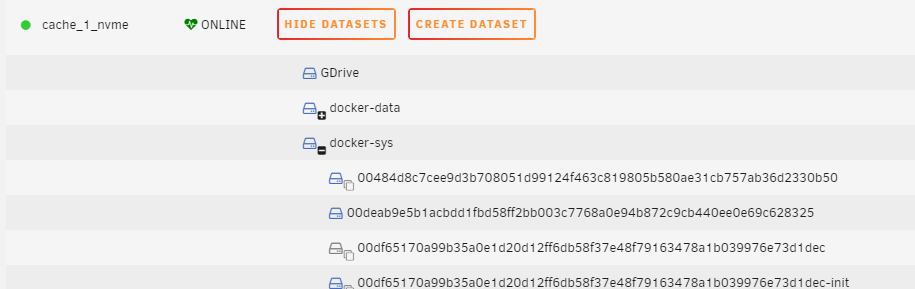
Thanks for the help, @Iker that was what I needed was the % in there. This works: /docker%-sys/.*
-
I can not get the exclusions to work. Reading through these posts I am pretty confident that I should set it to /docker-sys/.* I have tried variations on that and also including the cache drive name /nvme_1_nvme/ When I first installed zfs master I had a parent folder above my docker-sys folder. It was /docker/docker-sys/ when this was my folder scheme I remember them being excluded. However I have now removed that parent folder and the docker-sys folder is its own dataset. I have dozens of these docker images listed.
-
Only a user for about a year, after deciding to build my own server last year. Looked at many options and once I found unraid I knew the search was over. Everything works great and the helpful forums are full of answers. Keep up the great work.

