Reflexion
Members
-
Joined
-
Last visited
Everything posted by Reflexion
-
Danke Dir. Bisher habe ich mit unRAID und der SN550 keine schlechten Erfahrungen gesammelt für Nextcloud/DNS/VPN.. läuft 24/7. Wenn man Pech hat wird Kingston bei der A2000 vlt auch wieder Bauteile einsparen.. MyDealz abzuwarten macht schon Sinn bis dahin muss ich eben erstmal mit den beiden blue NVMe's auskommen. Bin gespannt wie sich die Preislage bezüglich Speicher in den kommenden Wochen entwickeln wird...
-
A2000 (500GB) wäre eine günstige Wahl... mit DRAM cache.. wäre es hier angebracht die WD Blue SN550 vorzuziehen ? (kein DRAM bzw. geringfügig dafür aber "immerhin" eine x4 Anbindung). Qual der Wahl.^^
-
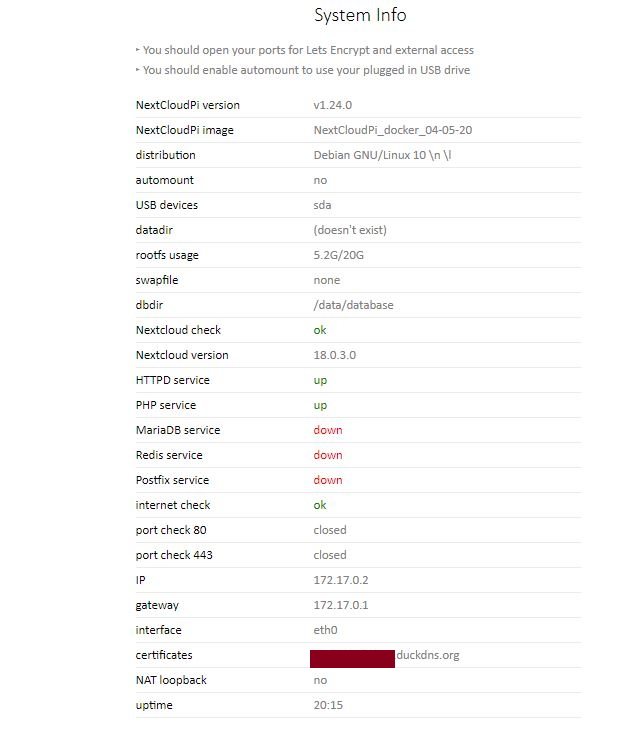
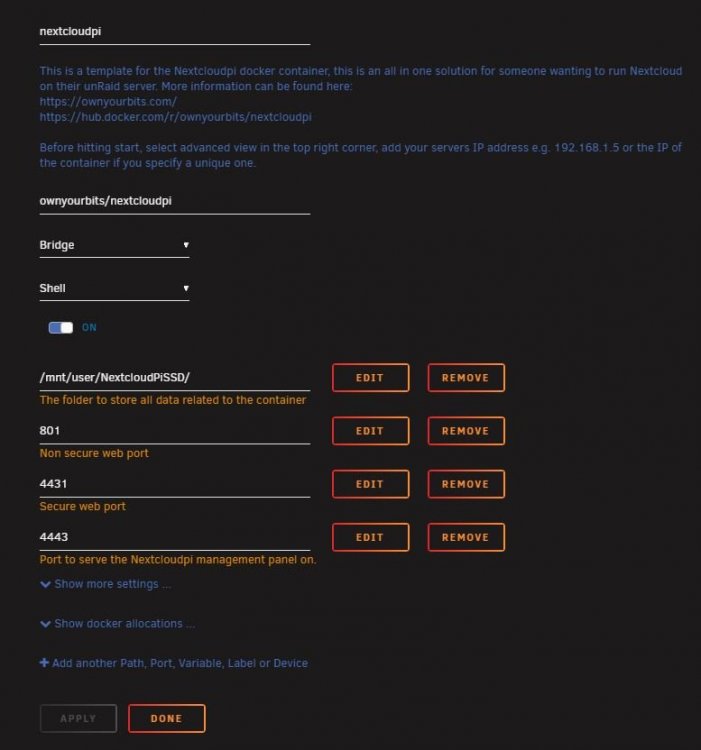
I have "Nextcloudpi" on two unRAID servers, one in beta 19 and one stable 18.x.x. Both went very well according to the instructions here (thanks for that.) On both unRAID servers I have "Plex Hardware Acceleration using Intel Quick Sync" enabled, as explained in the forum (putty; modprobe i915->cd /dev/dri ls->chmod -R 777 /dev/dri and finally "nano /boot/config/go" with the entry "modprobe i915 chmod -R 777 /dev/dri") After a reboot, however, NCP no longer worked on either of the two unRAID servers, but both show the same errors in the :4443 backend (see photo). Maybe someone can help me to get the container started again with the database, I find it strange that activating the HW acceleration caused such an error. Thanks a lot. The config . works quite well so far..