





eleazar
Members
-
Joined
-
Last visited
Everything posted by eleazar
-
Thanks for the quick response! I think I'm going to wipe my 6.2.x VM and start over with 1.02 and 6.1.7. Just to clarify, you didn't have to do anything special? Just use 1.02 bootloader, and install 6.1.7 and it works "out of the box" without having to adjust network adapter? For example, same settings for the VM as your post here (minus the virtio change):
-
This is probably a dumb question, but I'm assuming you're running 6.1.7, because it won't boot with anything higher while using 1.02 bootloader? I'd love to not have to change from e1000e, and fix the weird high network load in DSM, but at the same time, I like being on the more recent versions of DSM. 😕
-
Quick update. I tried your config: ds3617, e1000/seabios (i had never tried seabios before). I was able to successfully install and boot 6.2, but as soon as I attempt to install 6.2.1-23739, it never comes back online after the install. So it looks like you and I are in the same boat.
-
My setup: Dell r730 (Dell 599V5 Mobo) CPU: Intel(R) Xeon(R) CPU E5-2630 v3 @ 2.40GHz Memory: 48 GB ECC DDR4 NIC (1): Integrated Broadcom Gigabit Ethernet BCM5720 (in use by Xpenology) NIC (2): PCIe NetXtreme BCM5720 Gigabit Ethernet (not currently used with Xpenology)
-
I just checked my install, I guess I was stuck on 6.1.7 Update 2. I'll try getting 6.2 working with your setup now 😀 That would be amazing! 😍
-
It sounds like you're running into exactly what I ran into. I tried pretty much every combination and as soon as I attempted anything above 6.2.0, it failed. I'm not sure how the other 2 people in this thread got 6.2.1 to boot successfully.
-
Thanks! I'll run chkdsk /f on the drive when I get home. I'll be sure to get a new backup of the config folder. I also noticed that apps I installed with nerd tools (ie. screen, tmux) aren't usable from terminal anymore, and same with rclone beta I was running.
-
Could be a coincidence, but I was on 6.6.1, installed the 6.6.7 update, rebooted the server, and upon reboot I was still on 6.6.1, and received an error "USB drive is not read-write". This is a new flash drive purchased from Costco about 3months ago specifically to use with unRAID. It also wants to do a parity check, and says "Unclean shutdown detected." despite it definitely being a clean reboot. I tried running the update again and it gave this error: inflating: /tmp/unRAIDServer/syslinux/syslinux.cfg flash write error 0, maybe corrupted? plugin: run failed: /bin/bash retval: 1
-
Unfortunately it's not showing up in the list of devices on the router. :( I'm not sure what else to try
-
Thank you for the quick response Unfortunately it's still not working for me. I've spent a few hours on this today, and I'm stuck at not being able to even find the VM with Synology Assistant (or find.synology.com) I'll post the steps I followed below, could you let me know if I missed something? I included my full XML below. Use CentOS as the VM template Use the 918+ 1.04b bootloader (i also tried the ds3617 1.03b bootloader, and the ds3615 1.03b, with no luck) Change the ethernet model-type to e1000 in the VM XML Update MAC address in the synoboot image to the MAC the VM assigned Generate serial number, update it in the synoboot image (this only applied to the ds3617, since I couldn't find a generator for the 918, but i don't think that would stop it from even showing up on the network) Boot using the VMare/ESXI option (I also tried the bare metal option) I can't think of anything else to try at the moment, and would really appreciate any help <?xml version='1.0' encoding='UTF-8'?> <domain type='kvm' id='18'> <name>Syno-6.2Test</name> <uuid>b94cda6c-xxxx-59e3-36ee-xxxxxxd30d10</uuid> <metadata> <vmtemplate xmlns="unraid" name="CentOS" icon="centos.png" os="centos"/> </metadata> <memory unit='KiB'>8388608</memory> <currentMemory unit='KiB'>8388608</currentMemory> <memoryBacking> <nosharepages/> </memoryBacking> <vcpu placement='static'>8</vcpu> <cputune> <vcpupin vcpu='0' cpuset='0'/> <vcpupin vcpu='1' cpuset='1'/> <vcpupin vcpu='2' cpuset='2'/> <vcpupin vcpu='3' cpuset='3'/> <vcpupin vcpu='4' cpuset='4'/> <vcpupin vcpu='5' cpuset='5'/> <vcpupin vcpu='6' cpuset='6'/> <vcpupin vcpu='7' cpuset='7'/> </cputune> <resource> <partition>/machine</partition> </resource> <os> <type arch='x86_64' machine='pc-q35-3.0'>hvm</type> <loader readonly='yes' type='pflash'>/usr/share/qemu/ovmf-x64/OVMF_CODE-pure-efi.fd</loader> <nvram>/etc/libvirt/qemu/nvram/b94cda6c-xxxx-59e3-36ee-xxxxd30d10_VARS-pure-efi.fd</nvram> </os> <features> <acpi/> <apic/> </features> <cpu mode='host-passthrough' check='none'> <topology sockets='1' cores='4' threads='2'/> </cpu> <clock offset='utc'> <timer name='rtc' tickpolicy='catchup'/> <timer name='pit' tickpolicy='delay'/> <timer name='hpet' present='no'/> </clock> <on_poweroff>destroy</on_poweroff> <on_reboot>restart</on_reboot> <on_crash>restart</on_crash> <devices> <emulator>/usr/local/sbin/qemu</emulator> <disk type='file' device='disk'> <driver name='qemu' type='raw' cache='writeback'/> <source file='/mnt/user/isos/synoboot-ds918/synoboot.img'/> <backingStore/> <target dev='hdc' bus='usb'/> <boot order='1'/> <alias name='usb-disk2'/> <address type='usb' bus='0' port='1'/> </disk> <disk type='file' device='disk'> <driver name='qemu' type='raw' cache='writeback'/> <source file='/mnt/user/domains/Syno-6.2Test/vdisk2.img'/> <backingStore/> <target dev='hdd' bus='sata'/> <alias name='sata0-0-3'/> <address type='drive' controller='0' bus='0' target='0' unit='3'/> </disk> <controller type='usb' index='0' model='ich9-ehci1'> <alias name='usb'/> <address type='pci' domain='0x0000' bus='0x00' slot='0x07' function='0x7'/> </controller> <controller type='usb' index='0' model='ich9-uhci1'> <alias name='usb'/> <master startport='0'/> <address type='pci' domain='0x0000' bus='0x00' slot='0x07' function='0x0' multifunction='on'/> </controller> <controller type='usb' index='0' model='ich9-uhci2'> <alias name='usb'/> <master startport='2'/> <address type='pci' domain='0x0000' bus='0x00' slot='0x07' function='0x1'/> </controller> <controller type='usb' index='0' model='ich9-uhci3'> <alias name='usb'/> <master startport='4'/> <address type='pci' domain='0x0000' bus='0x00' slot='0x07' function='0x2'/> </controller> <controller type='sata' index='0'> <alias name='ide'/> <address type='pci' domain='0x0000' bus='0x00' slot='0x1f' function='0x2'/> </controller> <controller type='pci' index='0' model='pcie-root'> <alias name='pcie.0'/> </controller> <controller type='pci' index='1' model='pcie-root-port'> <model name='pcie-root-port'/> <target chassis='1' port='0x10'/> <alias name='pci.1'/> <address type='pci' domain='0x0000' bus='0x00' slot='0x02' function='0x0' multifunction='on'/> </controller> <controller type='pci' index='2' model='pcie-root-port'> <model name='pcie-root-port'/> <target chassis='2' port='0x11'/> <alias name='pci.2'/> <address type='pci' domain='0x0000' bus='0x00' slot='0x02' function='0x1'/> </controller> <controller type='pci' index='3' model='pcie-root-port'> <model name='pcie-root-port'/> <target chassis='3' port='0x12'/> <alias name='pci.3'/> <address type='pci' domain='0x0000' bus='0x00' slot='0x02' function='0x2'/> </controller> <controller type='pci' index='4' model='pcie-root-port'> <model name='pcie-root-port'/> <target chassis='4' port='0x13'/> <alias name='pci.4'/> <address type='pci' domain='0x0000' bus='0x00' slot='0x02' function='0x3'/> </controller> <controller type='virtio-serial' index='0'> <alias name='virtio-serial0'/> <address type='pci' domain='0x0000' bus='0x02' slot='0x00' function='0x0'/> </controller> <interface type='bridge'> <mac address='52:54:00:5a:7b:f2'/> <source bridge='br0'/> <target dev='vnet0'/> <model type='e1000'/> <alias name='net0'/> <address type='pci' domain='0x0000' bus='0x01' slot='0x00' function='0x0'/> </interface> <serial type='pty'> <source path='/dev/pts/0'/> <target type='isa-serial' port='0'> <model name='isa-serial'/> </target> <alias name='serial0'/> </serial> <console type='pty' tty='/dev/pts/0'> <source path='/dev/pts/0'/> <target type='serial' port='0'/> <alias name='serial0'/> </console> <channel type='unix'> <source mode='bind' path='/var/lib/libvirt/qemu/channel/target/domain-18-Syno-6.2Test/org.qemu.guest_agent.0'/> <target type='virtio' name='org.qemu.guest_agent.0' state='disconnected'/> <alias name='channel0'/> <address type='virtio-serial' controller='0' bus='0' port='1'/> </channel> <input type='tablet' bus='usb'> <alias name='input0'/> <address type='usb' bus='0' port='2'/> </input> <input type='mouse' bus='ps2'> <alias name='input1'/> </input> <input type='keyboard' bus='ps2'> <alias name='input2'/> </input> <graphics type='vnc' port='5900' autoport='yes' websocket='5700' listen='0.0.0.0' keymap='en-us'> <listen type='address' address='0.0.0.0'/> </graphics> <video> <model type='qxl' ram='65536' vram='65536' vgamem='16384' heads='1' primary='yes'/> <alias name='video0'/> <address type='pci' domain='0x0000' bus='0x00' slot='0x01' function='0x0'/> </video> <memballoon model='virtio'> <alias name='balloon0'/> <address type='pci' domain='0x0000' bus='0x03' slot='0x00' function='0x0'/> </memballoon> </devices> <seclabel type='dynamic' model='dac' relabel='yes'> <label>+0:+100</label> <imagelabel>+0:+100</imagelabel> </seclabel> </domain>
-
Hey guys, I'm trying to get my xpenology setup updated to 6.2.1, so I'm setting up a test VM before trying to update my live VM. I'm struggling with being able to find it with synology assistant. I'm using CentOS template, the 1.03b for DS3617xs bootloader, changed mac to actual, and changed from virtio to e1000. I was thinking maybe I need to update the VID/PID/Serial/MAC info in the boot image. I updated the serial and MAC without any issues, but I'm not really sure how to find the VID/PID for a virtual USB drive 😕 @AKPanda can you help me with the process you followed to get the VID/PID to use? Also, did you guys settle on booting as "baremetal" with the loader, or do you choose the ESXI/VM option?
-
I've not encountered Error 13, but I just want to confirm, you're not trying to install a version higher than 6.1.7-15284, right? You definitely cannot let DSM update itself, or install the latest version, that will always fail, since the bootloader only supports up to 6.1.7-15284.
-
I'm still running 6.1.7-15284 Update 2 without any problems. I also installed this for a friend within unRAID recently as well, without any problems. all i do is change the model from virtio to e1000. Just fyi, if you make the change to the xml, but then at any point later you switch back to basic view to make other changes, the e1000 change will be lost every time. You have to make your "basic" changes, save it, then go in and edit the xml to change it back to e1000.
-
Just a quick note. I was able to successfully update to DSM 6.1.7-15284 Update 2. Do not install DSM 6.2. To my knowledge, there is no way to run 6.2 currently.
-
It depends on what version you were updating to. As far as I know, there is no way to run 6.2 right now (I haven't researched it for a while, so I could be wrong). So if you updated to 6.2, it would break your install and you wouldn't be able to boot anymore. I haven't tried updating yet, but I believe you should be able to install small updates and hot fixes. You should always check the xpenology forums before installing updates. They have an entire subforum for update compatibility with the current loaders.
-
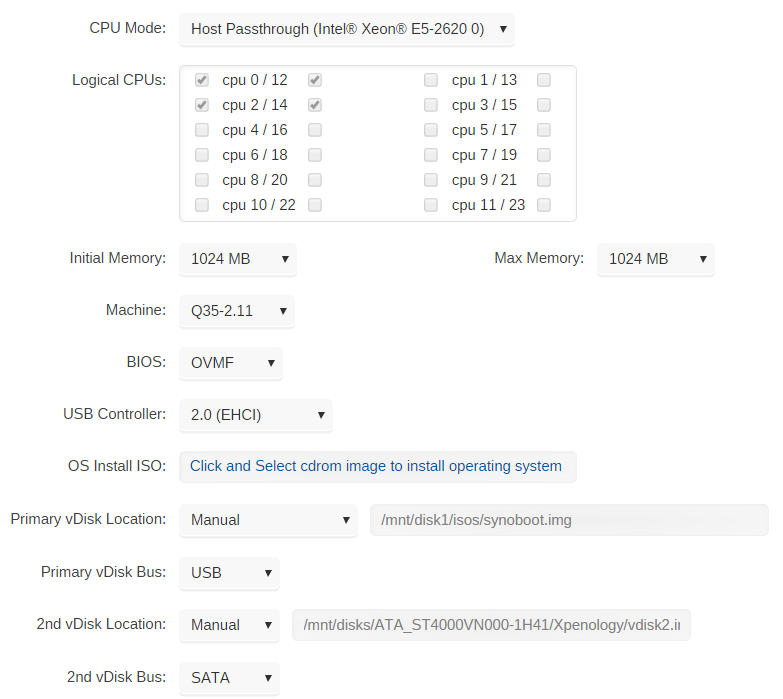
Hey guys, I was able to get this working. I've put together a quick and dirty "guide" below: Here is a screenshot of my config: The synoboot.img is downloaded from here: https://mega.nz/#F!BtFQ2DgC!JgomNP3X8V9EuwxL4TXbng!R4VmQbaC I can't remember which one I used, but I believe it was 1.02b for the ds3617. If you guys have trouble, I can upload the one I'm specifically using. Unfortunately it's just named synoboot.img, so it's hard to differentiate them. At this point, I had trouble accessing the webGUI for DSM, so I had to edit the VM XML and insert the following at the bottom: <interface type='bridge'> <mac address='52:54:00:23:2d:dc'/> <source bridge='br0'/> <model type='e1000'/> <address type='pci' domain='0x0000' bus='0x05' slot='0x00' function='0x0'/> </interface> I'm a noob when it comes to XML configs, so I have no idea why this worked, but I was just following the advice from earlier in this thread. I had to change bus='0x05' to bus='0x07' or else it wouldn't let me save the xml edits. At this point I could access the DSM webGUI and it was waiting for me to set it up. From here on out, you can probably just follow a normal Xpenology guide. I manually loaded DSM_DS3615xs_15284.pat to install DSM (https://archive.synology.com/download/DSM/release/6.1.7/15284/). It warned me that it would wipe my disks, but obviously it only had the virtual disk that it could access. That's it In the end it was pretty easy. I have been running this for a couple weeks now with no issues at all. Much thanks to the people that were helping in this thread earlier. I would've never been able to get this working without their advice.
-
I had Tautulli working perfectly with this container, but now I am constantly getting the below connection issues. Initially Tautulli was working great, but I was having issues with plex not detecting when I was playing streams from the LAN, so I switched the plex docker to have its own IP instead of bridge mode. This solved the plex issue, but ever since that change, Tautulli is unable able to connect to plex. Everything with Plex is working fine (detecting that players are local, pinging plex locally, etc), so I feel like Plex is ready to accept any needed connections from Tautulli. The problem is that whenever I try to specify the correct IP:Port in Tautulli, it fails to connect (10.0.0.146:32400) and i recieve this error: Server found but unable to connect websocket (I've tried with SSL enabled, and without). I've also tried the external IP and outward facing port (but I receive the same error) Error I get in the UI: "There was an error communicating with your Plex Server. Check the logs and verify your server connection in the settings." Apologies if i'm posting this in the wrong thread/forum 🤔 Oh and one last note, my router is running pfsense, and I had to add plex.direct to some DNS settings, so I'm wondering if maybe it's somehow related to that too? Someone on discord helped me realize I needed to move Tautulli to its own IP as well. After doing this, I was able to connect immediately.
-
@Taddeusz I hope this post is not against the rules, but I just wanted to say thank you for maintaining this container. I'm anxiously awaiting v1.0 release, but in the meantime, I'm loving this and it's working perfectly for me :)
-
I second Pearsondk's comment. I would really love a youtube video to walk us through this

