





bigdave
Members
-
Joined
-
Last visited
-
Done. New diag attached. unraid-diagnostics-20240122-1711.zip
-
Will the data on those be safe or should I back them up first?
-
Attached. unraid-diagnostics-20240122-1404.zip
-
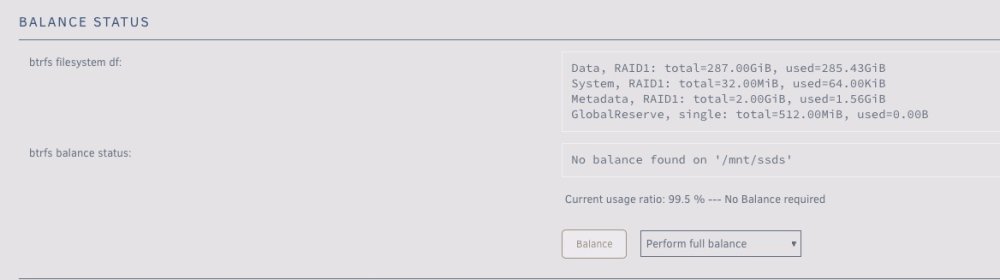
I've read all the other posts I can find on how to replace a failing cache pool drive but they don't seem to work for me. What I have tried is, run balance, shut down array, replace bad drive with a new drive, start array, I get an error that I can't start the array and that the Cache pool BTRFS missing device(s) even if I try to specify the new drive, it says too many missing and can't start the array. I have two drives and they are in RAID1 at least in the GUI. What am I missing on how to replace a cache pool drive? I have both drives in now so if needed I could make it a 3 drive pool. Thanks, bigdave
-
Can this same process be used to downgrade firmware? I need to go to 16 to get TRIM support back.
-
Changed it to Yes, same happens. Installing MariaDB/MySQL system tables in '/config/mysql' ... 2019-01-02 10:53:35 22395577351048 [ERROR] InnoDB: preallocating 12582912 bytes for file ./ibdata1 failed with error 95 2019-01-02 10:53:35 22395577351048 [ERROR] InnoDB: Could not set the file size of './ibdata1'. Probably out of disk space 2019-01-02 10:53:35 22395577351048 [ERROR] InnoDB: Database creation was aborted with error Generic error. You may need to delete the ibdata 1 file before trying to start up again. 2019-01-02 10:53:36 22395577351048 [ERROR] Plugin 'InnoDB' init function returned error. 2019-01-02 10:53:36 22395577351048 [ERROR] Plugin 'InnoDB' registration as a STORAGE ENGINE failed. 2019-01-02 10:53:36 22395577351048 [ERROR] Unknown/unsupported storage engine: InnoDB 2019-01-02 10:53:36 22395577351048 [ERROR] Aborting
-
No, it's Auto. Changing it now.
-
root@unraid:/mnt/user/appdata/NginxProxyManager/log# more init_db.log Installing MariaDB/MySQL system tables in '/config/mysql' ... 2019-01-01 17:43:17 22792248212360 [ERROR] InnoDB: preallocating 12582912 bytes for file ./ibdata1 failed with error 95 2019-01-01 17:43:17 22792248212360 [ERROR] InnoDB: Could not set the file size of './ibdata1'. Probably out of disk space 2019-01-01 17:43:17 22792248212360 [ERROR] InnoDB: Database creation was aborted with error Generic error. You may need to delete the ibdata1 file before tr ying to start up again. 2019-01-01 17:43:17 22792248212360 [ERROR] Plugin 'InnoDB' init function returned error. 2019-01-01 17:43:17 22792248212360 [ERROR] Plugin 'InnoDB' registration as a STORAGE ENGINE failed. 2019-01-01 17:43:17 22792248212360 [ERROR] Unknown/unsupported storage engine: InnoDB 2019-01-01 17:43:18 22792248212360 [ERROR] Aborting Installation of system tables failed! Examine the logs in /config/mysql for more information. The problem could be conflicting information in an external my.cnf files. You can ignore these by doing: shell> /usr/bin/mysql_install_db --defaults-file=~/.my.cnf You can also try to start the mysqld daemon with: shell> /usr/bin/mysqld --skip-grant-tables --general-log & and use the command line tool /usr/bin/mysql to connect to the mysql database and look at the grant tables: shell> /usr/bin/mysql -u root mysql mysql> show tables; Try 'mysqld --help' if you have problems with paths. Using --general-log gives you a log in /config/mysql that may be helpful. The latest information about mysql_install_db is available at https://mariadb.com/kb/en/installing-system-tables-mysql_install_db You can find the latest source at https://downloads.mariadb.org and the maria-discuss email list at https://launchpad.net/~maria-discuss Please check all of the above before submitting a bug report at http://mariadb.org/jira /mnt/user/appdata is large enough for this.
-
Yes and yes. Just tried deleting and reinstalling with the same result.
-
The default 000, you?
-
I see this error in the init_db.log /mnt/user/appdata/NginxProxyManager/log# more init_db.log Installing MariaDB/MySQL system tables in '/config/mysql' ... 2018-12-27 14:32:02 22714951916424 [ERROR] InnoDB: preallocating 12582912 bytes for file ./ibdata1 failed with error 95 2018-12-27 14:32:02 22714951916424 [ERROR] InnoDB: Could not set the file size of './ibdata1'. Probably out of disk space 2018-12-27 14:32:02 22714951916424 [ERROR] InnoDB: Database creation was aborted with error Generic error. You may need to delete the ibdata1 file before trying to start up again. 2018-12-27 14:32:03 22714951916424 [ERROR] Plugin 'InnoDB' init function returned error. 2018-12-27 14:32:03 22714951916424 [ERROR] Plugin 'InnoDB' registration as a STORAGE ENGINE failed. 2018-12-27 14:32:03 22714951916424 [ERROR] Unknown/unsupported storage engine: InnoDB 2018-12-27 14:32:03 22714951916424 [ERROR] Aborting
-
I'm having this same issue, logged into the docker to confirm it has access. Weird thing is some work fine and some don't (most don't) then I have to manually move them.

