





bkastner
Members
-
Joined
-
Last visited
Everything posted by bkastner
-
Sorry, what do you mean try the other half? If I rename .plg to .bak that is removing all plugins after next reboot, correct? Am I adding some back in, then the other half?
-
So, I've tried different browsers (in regular and incognito mode) wihtout success. I was finally able to boot into safe mode (GUI without plugins) and was able to update the docker containers. Once I booted back up normally and tried I can't update again. Short of removing all plugins and adding back one-by-one to see what works is there anything else worth trying? Here is an updated diagnostics... I think setting up Kapowarr caused the 3 shares to be created / errors to exist.. I am removing them, but don't think they are relevant. cydstorage-diagnostics-20260702-1355.zip
-
I deleted and re-created the docker image, but it hasn't helped. My first docker update showed this morning, but the same issue - I can't click on the Yes, Update It button
-
Hi Does anyone have any suggestions? The only way I seem able to update dockers is to remove them, and then re-add, but not a great long term strategy.
-
I recently updated to Unraid 7.3.1 from 7.2.5 and am having issues with updating Docker containers (no idea if related). When I click on Apply Update I can't select 'Yes, Update It'. Nothing happens when I click it and my only option is to cancel. Clicking on the Container and selecting Update (which takes to the same ' Yes, Update It' window behaves the same. I've rebooted, but no difference. I can do a command line update: root@CydStorage:~# docker pull lscr.io/linuxserver/kavita Using default tag: latest latest: Pulling from linuxserver/kavita 61737db555fd: Already exists f6a4c3e338ed: Already exists 5a82e1d40891: Already exists 270c2aad620b: Already exists c39ad81c3326: Already exists 170f2bd5d661: Already exists 0cab6b09c296: Already exists 817e8a9d1f78: Already exists df568c0c9e71: Pull complete f522b776808a: Pull complete Digest: sha256:c6c90d701e8d28e83ae8c90cd66e016afd72a1f929c3a941f467956bc860b265 Status: Downloaded newer image for lscr.io/linuxserver/kavita:latest lscr.io/linuxserver/kavita:latest root@CydStorage:~# But if I run check for updates on the Docker tab it still shows an update available. I have had GUI hiccups with Unraid Connect in the past, but dont' think this is related. I did try and remove the plugin, but no difference. I've also tried Chrome in incognito mode and tried MS Edge - both with the same results. Not sure what else to try so am hoping someone has a suggestion on how to resolve. cydstorage-diagnostics-20260617-1148.zip
-
Thank you. I rebuilt the disk and all seems normal again. I've even moved it back to the original position and it seems okay. I appreciate the assistance.
-
Sorry... Long delay on getting back to this. So, I have a case with backplanes. I moved the drive to a new backplane and am still seeing the same error. I can still look at drive properties and there are no SMART errors, but it shows as disabled on the main page. Here is a re-run diagnostic log. cydstorage-diagnostics-20260429-1525.zip
-
I had one of my parity drives fail a while back, so RMA'd the drive and got the replacement and put back into Unraid to rebuild parity. While the rebuild seemed to go fine, the parity disk showed offline (red x). I saw a recommendation to first bring the array up without the new disk, then stop array, add disk, and rebuild parity. So, I did that, parity rebuild again seemed to go fine, but for some reason the new parity drive still shows offline. Reboots don't change this. I can run SMART tests on that drive, and they complete without error. I am not sure how to resolve this, and would appreciate any ideas. Disgnostics are attached. cydstorage-diagnostics-20260413-1208.zip
-
Oh... okay, that's a possibility I hadn't considered. I don't remember that happening, but that's not saying much. Okay, I will start moving data from that disk to reformat. Thank you both for your help.
-
Yup, that all makes sense, but isn't my scenario. These drives were bought in April 2022, and I would have been running 6.10 at the time... I typically wait a week or two after a release, but otherwise keep unraid up to date. So, the drives were all added/formatted within a 72-96 hour window, and XFS would have been used as the file system across them all. So, all 8 drives should have had the same version of XFS installed as I would have just used the Unraid notification that disks were seen, but not formatted, and I would have then had Unraid format them all. This all ties into why I am confused that 1 of those 8 disks is reporting an older XFS version. I would expect all or none of them to be reporting. That is why I wanted to understand if there was something more going on.
-
Right, I did understand that, but the point is I bought the 8 disks, did the exact same process for adding the file system, but am confused only 1 is showing that it needs to be upgraded. None of my older disks are complaining about an older file system either, which makes this an outlier for no good reason I can see.
-
I recently upgraded to Unraid 7.2 and upon reboot got the notice that a single disk needs to be updated: I am somewhat confused as I purchased 8 WD161KRYZ disks in a single batch, and added them to Unraid at the same time. I have older drives that don't have this warning, and the other 7 disks added at the same time don't either (samy with anything newer). I don't understand why just this single disk is providing this warning. Is there potentially something else going on that I should be aware of? Is this somehow valid? Should I be clearing / reformatting this drive. I've added my diagnostic log in case it sheds some light. cydstorage-diagnostics-20251113-1429.zip

-
Okay, so the recommendation is to not use Connect until a new version is released that should address this issue?
-
So, it took a while to get to a point where I'd solved my other issues (cache pool, nic), and did see this Docker issue pop up again just over a week ago. I removed the Connect plugin and haven't seen the issue since... though it's somewhat intermittent so while I am not 100% sure it's gone, I've been updating a bunch of media content, which seemed to be a trigger when this issue occured previously, and I don't seem to have the issue now while doing similar work, so am trusting the issue may be addressed by removing the plugin (for whatever reason). Should I be re-adding the plugin and see if it occurs again? As an aside... I did try the commands you posted above when Docker crashed (before removing Connect). I could find the dockerd.pid, but the ls /proc/proc# didn't return any result.
-
Since upgrading to 7.1.2 I am having a Docker issue. Docker starts normally on boot and all the containers come up properly, but I've had 5-7 times in the last 2 weeks where the Unraid GUI says the Docker Service Failed to Start (hours or days later) and the containers have issue seeing each other (Radarr/Sonarr will not see Sab, etc). Rebooting solves this, but the message crops up again after a day or two and I need to reboot again. Docker has never actually failed to start on a reboot.. it's just after a period of time this appears. I do have another issue with one of my cache drives (the Data pool with one device). It's a nvme drive that went unmountable about a week ago. I've tried reseating it without success, but eventually tried reformatting and using it again (it's Adata with no advanced RMA and a 18-35 day turnaround so I want to make sure I need to replace before going through that). After reformatting the drive worked again for a day or two, but has died again and will need to be replaced. Appdata is on the main cache drive as is the docker container. the data pool was just a 4tb drive to use as cache for downloads, so I wouldn't expect it's death to cause the Docker issue, but the timing is suspicious so wanted to mention. I have been refreshing some of my movie content so Radarr and Sab have been using that drive, and Plex would be looking at it as well for the media updates, so don't know if that's part of the issue. I am looking to remove the data cache completely from the system and redirect the couple of shares that reference it to the main cache drive. I realize this may fix the docker issue as well, but wanted to get more experienced eyes on the logs to help solve if the 2 issues are unrelated. cydstorage-diagnostics-20250528-1333.zip
-
Yes, I never would have guessed that. Not intuitive at all.
-
Huh... that was easy... and it populated tags and trackers too. Thanks for the quick response.
-
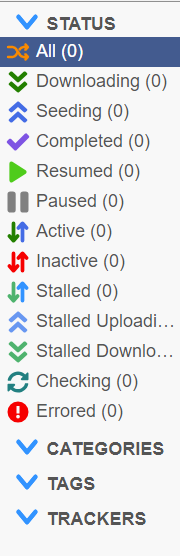
I have just setup the binhex-qbittorrentvpn docker and am having an issue with categories... the issue being there are no default ones, and i can't seem to add any. I've been going through a number of support issues, but haven't come across a fix (unlike the adminadmin password issue - thanks for that!). The categories.json is empty, and I can't think of anything else to try. I appreciate any suggstions, or please let me know what else I can provide to give insight. I also realize I am missing tags and trackers... I assume that's going to be the next issue after categories so hopefully the fix addressses them all.
-
Perfect. Thank you for your help Jorge
-
I have 2 drives on that particular backplane... the one with 130000 CRC errors (disk3), and the second drive that has 1 random one (disk8). Disk3 isn't in the array anymore and is being simulated. I had to do a parity check over the weekend as I inadventenly caused an unclean shutdown, and I didn't get any CRC errors on Disk8 during the check. The 130000 CRC errors on Disk3 occured while UnRAID was rebuilding the previously failed drive, but disk8 just had that one minor hiccup. Is a parity check still worthwhile in this scenario? I am guessing not, but want to confirm in case I am missing something.
-
Okay, so I've flashed the firmware (what a pain in the ass that was), and I've replaced all my sff-8643 cables, and brought the system back up. Everything seems like it's better. The last drive that was screaming at me as 130050 UDMA CRC errors, but seems to not be moving. When I started rebuilding the last failed drive the CRC errors on this drive were skyrocketing, so I am guessing them remaining stable now is a good sign. Is there an easy way to test? I've browsed the drive through the GUI as I figured that would cause a read operation which would maybe cause the CRC errors to climb, but it's still the same. I also ran a short SMART test and it came back without error. Is it fairly safe to assume that it was a controller/cable issue, and I shouldn't have any more drive failures? Or is there another test I should run before considering this case closed?
-
lol.. sorry. I didn't realize I'd sent that. I was going to ask about the lsi flash. I had the files on the flash drive, but couldn't make them executable, so was going to ask you, but figured I could create a MS DOS boot USB with the files and do it that way.
-
@jorgeb
-
Thank you. I've ordered replacement cables and will check the LSI firmware and see how things progress
-
For some reason I've been having an issue since May or so. I had a drive fail, and got a RMA replacement sent from WD. I did a preclear on another machine, shut down UnRAID, swapped the drive and brought UnRAID back up to start the rebuild. However, as the rebuild started I started getting udma crc error count errors on a drive that previously reported no issues. I figured it was just a fluke that a second drive failed while rebuiding, but once the rebuild was done I RMAd the new drive and repeated the process. Then another drive failed during that build with the same thing, and this just keeps happening over and over. I am now rebuilding my 5th or 6th drive, and again, I am getting a ton of udma errors (Disk 3 (disk dsbl) in the logs). While all my previously failed drives were bought a couple of years ago, the new Disk3 drive with errors is a WD Gold I just bought back in May (just before this all started). I did preclear it with no issue originally. I don't understand what's going on, but am hoping someone can take a look at my diagnostics and provide some insights. This is happening far too frequently for me to think it's actually drive failure after failure, but I could be wrong. I know sometimes rebooting will clear the crc errors, but I'd like to try and understand root cause and see if I can do something more permanent to fix it. cydstorage-diagnostics-20221015-1520.zip

