





Raz
Members
-
Joined
-
Last visited
-
Raz changed their profile photo
-
Azure has a different layout and it changes css classes! You can edit the custom css file to make it works :)
-
The tables are a mess basically! It's good man! Include them with the plugin
-
#nav-block #nav-item:focus:after, #nav-block #nav-item:hover:after { background-color: #f15a2c; } Here you go
-
Thanks, i was lazy and just uploaded by zipping each cfg and css file together! The checkbox option could be the way to go, or simply overwrite the theme if exist by default? If it's a theme update, is for an improvement i suppose 😆 Either way, people can always rename the theme and export it using the GUI before importing the new one, am i wrong? PS: i am still searching for a way to properly style everything. I think i am going to rewrite the whole views some point in the future 😂! Do you think it is possible to do given the way the frontend is built? I have to dig it but i am kinda full of work these days. With something like tailwindcss restyling everything and importing new themes would be a breeze
-
No worries! Everything works as intended anyway I've made some themes, i am going to list them here You can unzip the themes.zip file and place everything inside the themes folder or download and upload the single theme files; EDIT: the styling can't be perfect. Some UI elements (tables) have common classes so i couldn't style everything as i would've liked to! themes.zip ashes.zip brushthrees.zip dracula.zip grayscale.zip monokai.zip nova.zip rebecca.zip solarizedDark.zip
-
Nice! Going to test it now
-
Ok, but without a base css file every background will be the color of the base unraid theme
-
Ok, what about something like this: -one base css file provided by the plugin with some edits -one base css file with css variables for the colors -one custom empty css for user custom css ? Url upload is pretty neat, so people can share custom themes easily
-
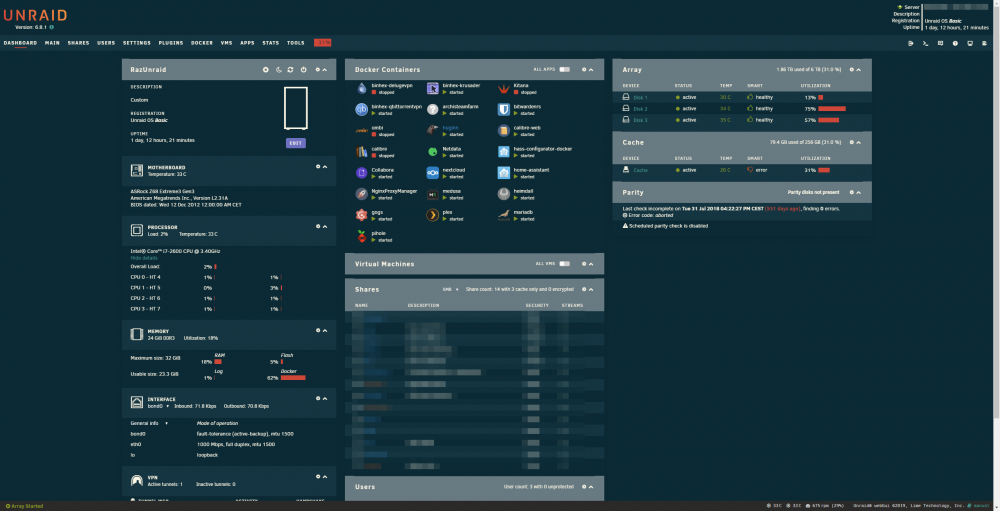
Example of a Solarized Dark theme:
-
sure man! I am making some edits to the css file and i have some ideas to make the base theme easier to edit. Using css variables and a form to edit those variables in the custom.css file, we could edit the theme using only one css file. This is the refactored custom css file with the latest edits: EDIT: https://pastebin.com/YnZnRXrY updated css file I am going to point out that i am using the base16 design architecture. We could pull the themes color from this list https://github.com/chriskempson/base16 and give the users the possibility to select the preferred one. Another feature could be the option to edit the css variables in a form like you did for the base16 colors: :root { --base00: #2e3440; --base01: #3b4252; --base02: #434c5e; --base03: #4c566a; --base04: #d8dee9; --base05: #e5e9f0; --base06: #eceff4; --base07: #8fbcbb; --base08: #88c0d0; --base09: #81a1c1; --base0a: #5e81ac; --base0b: #bf616a; --base0c: #d08770; --base0d: #ebcb8b; --base0e: #a3be8c; --base0f: #b48ead; } Let me know if i can help you with anything 👌🏽
-
Thanks man! I love your plugin anyway. I am going to build A LOT of themes based on famous base16 color palettes and the feature you're planning to add is perfect. Right now the only problem is that i have to have multiple css files and edit the name if i want to activate a theme with the corresponding css file. With that feature it would be soooo simple to ad a tons of themes (i can help with that!)
-
Great plugin! I've made a Nord inspired theme with it. Imgur Album Theme Engine settings CSS File
-
If you buy your domain, you have to change the dns records to point it to your public ip. So something like "sonarr.mydomain.com" points to "yourpublicip" and on nginx proxy manager you setup everything according to your configurations
-
Don't you have a domain name? You still need a domain name! If you don't have it, you have to use Duck DNS
-
If you don't have a static public IP, you need something like DuckDNS point your domain/subdomains to your unRaid Server


