Kirkbuilder
Members
-
Joined
-
Last visited
-
Forgive me, one of the 18TB parity drives has also failed. So 2 drives reporting errors one 18TB Parity Drive and one 14TB array drive.
-
I have an array with 2 18TB parity drives and a failed 14TB drive in the array with many other mixed sized drives in the rest of the array. Can I buy 2 20TB drives, replace the failed 18TB parity drive and then replace the failed 14TB drive in the array? Any suggestions on procedure would be helpful. I can get other sized drives, but the above scenario is best for what I want to do.
-
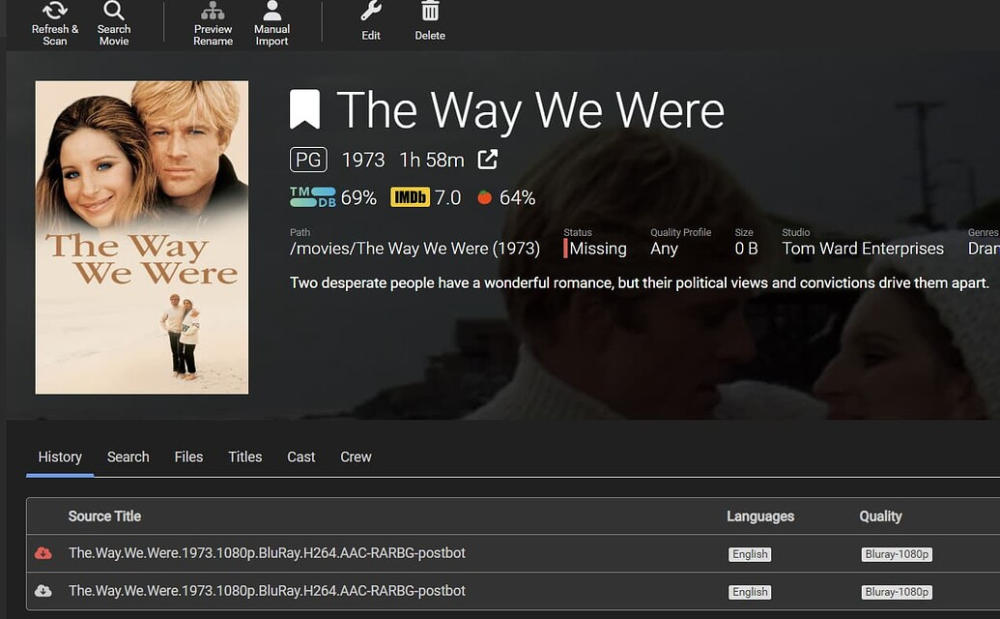
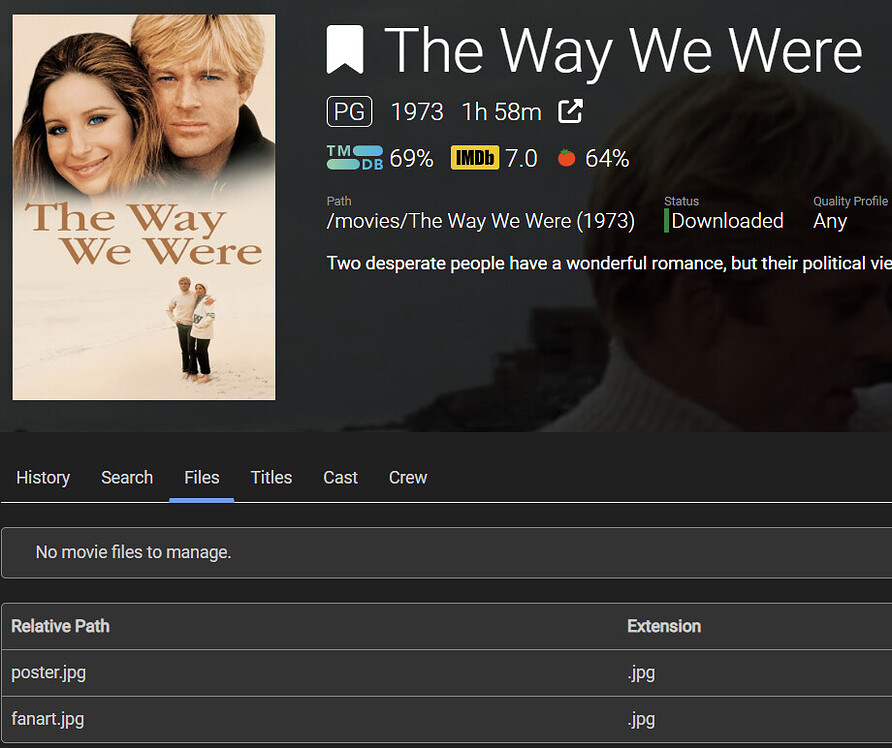
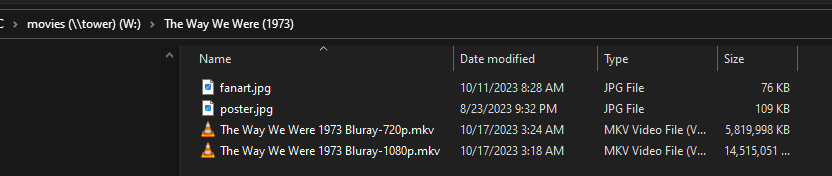
Hey! Did you ever figure this one out? After updating to newest Unraid and Radarr 5.0.3.8127 I started having similar issues. I was able to get Radarr working with nzbget again - sort of, but am still having multiple issues. Radarr is continuing not see movies in some directories and so continues to download and move files to directories. For example, Radarr does not see that a copy of the movie “The way we were” is in the directory, but will download a new copy (in this example 2 copies a 720p and 1080p) and copy the files to the directory, but not update that those very files it moved to the directory are in the directory. I am seeing lots of database “locked” errors in the log, but have performed .recover operations via sqlite3 commands in the wiki and they persist. Logs: https://privatebin.net/?aa32f003bc3fde6e#8T6LZPWCmaUBRnW7GrNoQVFxsNWJddKYqndCKb7ZHCui Any assistance would be appreciated.
-
No other cards are installed in the PCI slots. I have been looking for a way to determine if there is a setting which is keeping the power low on the motherboard or on the expander card. Any ideas?
-
I am having trouble figuring out how to fix this. Googling and googling with no joy 😞
-
Yes. The expander was in an 16x PCI slot. I switched it to an 8x slot. here is my new lspci. Still shows LnkSta: Speed 5GT/s, Width x4 (downgraded) lspci.txt
-
https://download1.gigabyte.com/Files/Manual/server_manual_7pesh_e_1003.pdf?v=102d7cc391a19a751aff685e16f3ee87 I believe so.
-
Thank you for your analysis! I have had a great deal of luck with HP so probably want HP 12G SAS3 EXPANDER (761879-001) or would you suggest another card?
-
What would you suggest to replace it?
-
Here you go. I was hoping to get something over 200MB or more with a change. lspci.txt
-
tower-diagnostics-20230905-1721.zip
-
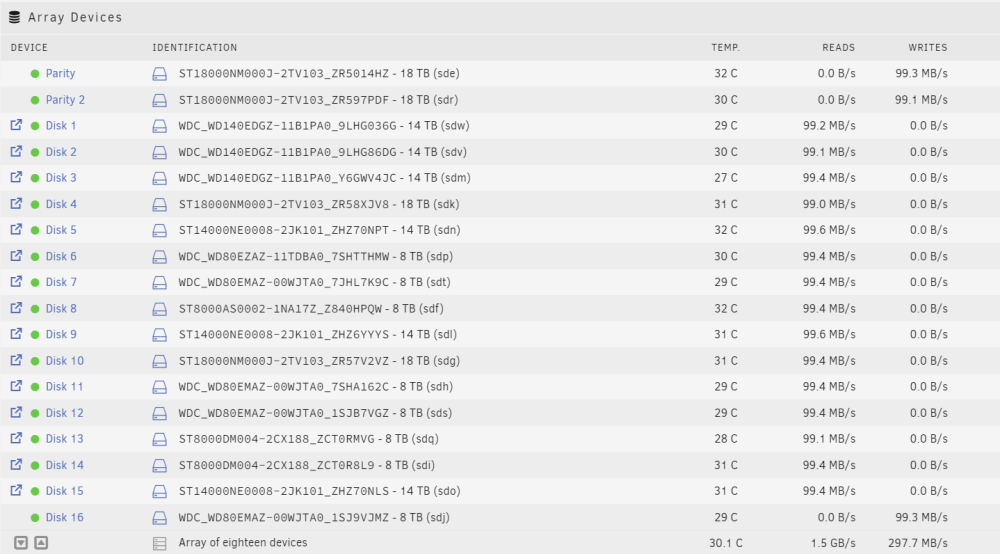
Love this topic! I read all the posts here and I am still a bit confused. Please forgive my ignorance about hardware, but I am trying 🙂 I have been trying to figure out how to increase my disk speeds on my array and was told in a discord channel that I was stuck at my current speeds and there was nothing to be done about it. BUT, I kept on looking and found this wonderful article which I have learned a great deal from. My problem, my array of 18 disks is doing read/write at ~100mb and am currently shrinking my array using the second non-volatile procedure of moving the data using unbalance and then 0'ing out the drive to update parity, etc, etc. but am only getting 69.8 MB/s. As can be seen here: Here is my array: Here is my setup Unraid 6.12.3: GA-7PESH2 GIGABYTE Intel Rev1.0 LGA2011 E-ATX Server Motherboard LSI2008 8x SAS/SATA, 2x 10G X540-AT2, Avocent IPMI 2.0 (GA-7PESH2) 2x Intel Xeon E5-2690 v2 3.0GHz 10 Core 25MB Cache Processors 128GB DDR3 1600MHz ECC Registered Memory 8x 16GB HP 487738-001 468405-001 24-Bay 3Gb SAS Expander Card Samsung 860 QVO 1TB 2.5 Inch SATA III Internal SSD (MZ-76Q1T0B/AM) x2 Cache 24 x 8+ TB Drives I want to try to maximize bandwidth since it is taking me ~40 hours to "0" out an 8TB drive. From what I have read, I am now thinking I need to get 2 SAS cards to do this, but was hoping you might confirm that a good option would be 2x LSI 9305-24i's.

-
Thank you JorgeB and Itimpi! All I needed to do is get the GUID fixed and I am off and running again. The reseat also worked now reconstruction is going along just fine. I really appreciate your assistance 🙂
-
So I was able to download the flash backup and install it to a new usb drive and get into the web UI. It asked me to set the root password and the array is currently stopped. Is there anything else I should do to retain my configuration or am I good to go?
-
After updating to the most recent copy of Unraid yesterday I performed the My Server backup.