



Skip to content
View in the app

A better way to browse. Learn more.

Unraid

A full-screen app on your home screen with push notifications, badges and more.

To install this app on iOS and iPadOS
  1. Tap the Share icon in Safari
  2. Scroll the menu and tap Add to Home Screen.
  3. Tap Add in the top-right corner.
To install this app on Android
  1. Tap the 3-dot menu (⋮) in the top-right corner of the browser.
  2. Tap Add to Home screen or Install app.
  3. Confirm by tapping Install.

themightygeckoe

Members
  • Joined

  • Last visited

  1. I am getting a microsoft authentication error and saw that one of the fixes was to change the online flag to false but I cannot figure out how to edit the server.properties file in unraid. How can I do that?
  2. I know, sorry about that. I was trying to keep it clean by putting everything in the same post. Thank your for the help.
  3. Added diagnostics to original post.
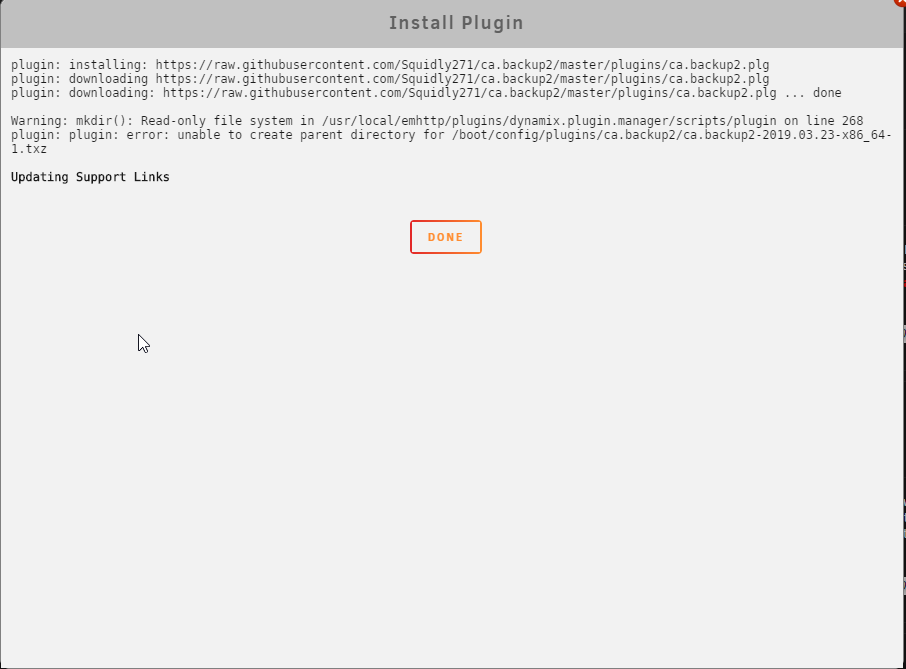
  4. I started getting errors from my cache drive today and wanted to back it up just in case. I found the CA appdata backup program and attempted to install it but keep getting a mkdir error. I am running 3.7.2 unraid. I can install everything else but this one won't work. Any suggestions? diagnostics-20190802-0341.zip
Account

Navigation

Search

Search

Configure browser push notifications

Chrome (Android)
  1. Tap the lock icon next to the address bar.
  2. Tap Permissions → Notifications.
  3. Adjust your preference.
Chrome (Desktop)
  1. Click the padlock icon in the address bar.
  2. Select Site settings.
  3. Find Notifications and adjust your preference.