




Skip to content
View in the app

A better way to browse. Learn more.

Unraid

A full-screen app on your home screen with push notifications, badges and more.

To install this app on iOS and iPadOS
  1. Tap the Share icon in Safari
  2. Scroll the menu and tap Add to Home Screen.
  3. Tap Add in the top-right corner.
To install this app on Android
  1. Tap the 3-dot menu (⋮) in the top-right corner of the browser.
  2. Tap Add to Home screen or Install app.
  3. Confirm by tapping Install.

techeek

Members
  • Joined

  • Last visited

  1. 对我有用,正解,屏蔽系统底层驱动。
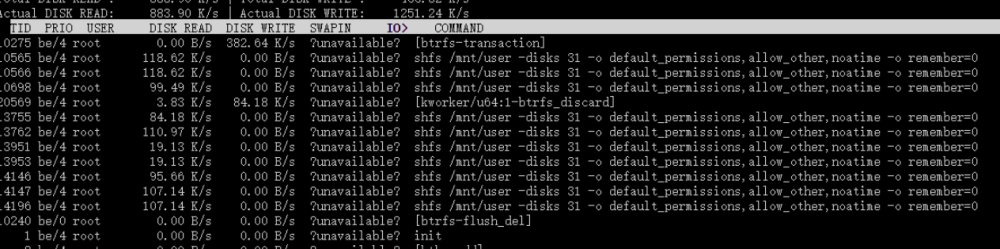
  2. 通过iotop命令可以看到shfs一直在写入缓存盘,考虑到缓存盘有写入次数,因此这样是否会造成缓存盘损坏? unraid shfs /mnt/user -disks 31 -o default_permissions,allow_other,noatime -o remember=0 With the iotop command, I can see that the shfs keeps writing to the cache disk. Considering that the cache disk has a write count, will this cause the cache disk to be corrupted?
  3. Hello, I am Chinese, do not understand English, the following English translation from Google Translate. I just bought the unraid $59 package without logging in to unraid, but I have not received any emails. I have sent an email to ask, my email address is [email protected] I hope you will reply as soon as possible, thank you!

Account

Navigation

Search

Search

Configure browser push notifications

Chrome (Android)
  1. Tap the lock icon next to the address bar.
  2. Tap Permissions → Notifications.
  3. Adjust your preference.
Chrome (Desktop)
  1. Click the padlock icon in the address bar.
  2. Select Site settings.
  3. Find Notifications and adjust your preference.