





Biff Bojangles
Members
-
Joined
-
Last visited
-
That is super helpful. That was the one thing that always bothered me with FolderView and FolderView2, there was a disconnect with container order in unraid for autostart and the look and feel of folderview. Awesome work with keeping this alive.
-
If I understand everything correctly now, in FolderView3 the default container order Autostart is replaced by what you see in FolderView3. For Example: Pre-Folder View - Container 1 - Container 2 - Container 3 Would start 1, 2, 3 In FolderView3 - Folder A -- Container 1 -- Container 3 - Folder B -- Container 2 Would start 1, 3, 2 Is that correct or is the Unraid Container order still setting the autostart settings? I asked because some containers need to start before others since they are dependent upon each other.. mainly databases.
-
As a follow-up to this discussion. I have a similar issue when enabling Tailscale within the SWAG docker container and using Docker MODS. When enabling the Tailscale integration directly in the container, the container can no longer access the DNS records for lscr.io. The use case for this would be to allow subdomain access via tailscale only as the A Record resolves to a 100.x.x.x tailscale ip and also have externally facing reverse proxy. This is similiar to SpaceInvaderOnes Uncast Ultimate SWAG on Unraid walkthrough (https://www.youtube.com/watch?v=3uW97tXYWVI) It seems like it is an issue with the port that tailscale inside the docker container uses is 443. Is there a way to solve this?
-
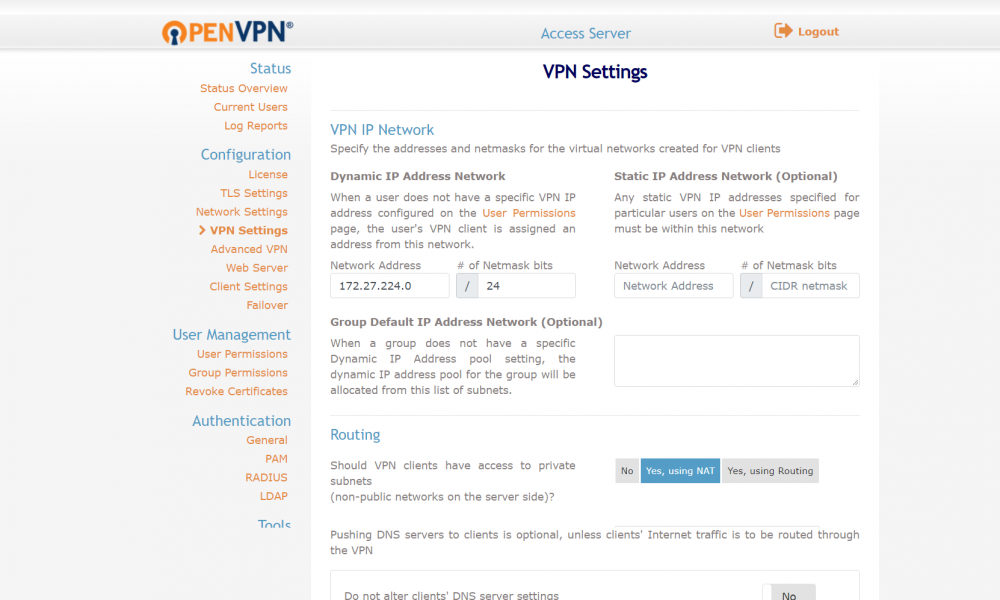
In either the user accounts under show more info Or in the box at the bottom of the picture you shared. In the routing box with yes, using NAT
-
I added the following in the NAT table from your last picture: 192.168.1.0/24 and I also added some other internal 172.XX. subnets based on other dockers
-
@jfrancais Can you access the unRAID gui by going to 172.27.224.1?
-
I ended up doing the same thing. Kept it off the proxynet and put in the mydomain. By any chance do you also run OMBI? Having trouble utilizing .htpasswd to access it.
-
Have you been able to figure this out. I am having the same issue with the 502 Bad Gateway. For the tutorial, I set up the proxynet network, but if I select that, I get an error for plex.

