HAMANY
Members
-
Joined
-
Last visited
-
Check this post. The guide has some troubleshooting steps.
-
I've already check the firewall and DNS server. The issue was confirmed to be from the ISP. Several friends of mine using the same ISP with different routers/firewalls have the same issue.
-
Thanks for the tip from @yaharga , modifying CA’s code has fixed the issue (it’s basically a workaround). This is a step-by-step guide. Follow it at your own risk; it was created by Claude. https://claude.ai/code/artifact/7e6deebd-68c7-4d8c-989e-dd8c75f38aa5
-
Tried that already, unfortunately it didn't work. I've used the AI to investigate, the conclusion was that I was not able to reach the subdomain (ca.unraid.net) through TCP, however the HTTP works fine. It's blocked from the ISP level. Troubleshooting: curl -sS -o /dev/null -m 15 -w '%{http_code}\n' https://ca.unraid.net/assets/feed/applicationFeed-lastUpdated.json # Fails (Works with VPN only) curl --http3 -sS -o /dev/null -m 15 -w '%{http_code}\n' https://ca.unraid.net/assets/feed/applicationFeed-lastUpdated.json # Works
-
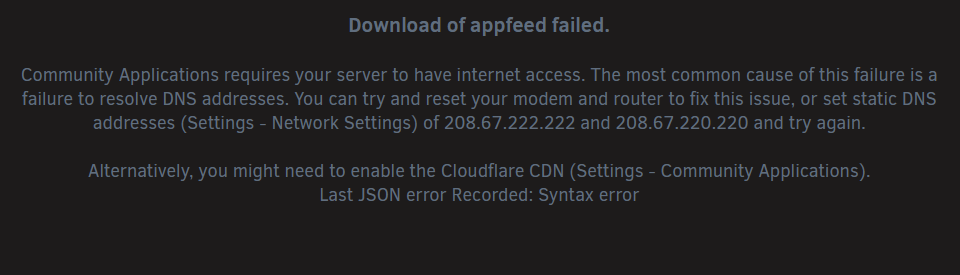
Hi all, Is there anyway to overcome this issue? Contacting my ISP was pointless, as they don't have anyone smart enough to understand that it's an issue from their side. Thank you. Error: Download of appfeed failed. Community Applications requires your server to have internet access. The most common cause of this failure is a failure to resolve DNS addresses. You can try and reset your modem and router to fix this issue, or set static DNS addresses (Settings - Network Settings) of 208.67.222.222 and 208.67.220.220 and try again. Alternatively, you might need to enable the Cloudflare CDN (Settings - Community Applications). Last JSON error Recorded: Syntax error
-
Thank you @JorgeB @trurl for your support. The content of all drives are viewable, the lost+found are minimal, any lost content can be restored again. The used space looks almost similar, around 1TB less. Unrelated question: Is it possible to add an (xfs) drive with existing content to an array of the same file system (xfs) without losing the content of the new drive? I'm aware that the parity has to be rebuild again. I'm thinking about copying the data to a local xfs drive instead of transferring them through the network. tower-diagnostics-20260706-1953.zip
-
Done, it didn't ask for -L Can I run the array in normal mode now? Disk 1 xfs_repair status
-
Noted, will check that. Should I run the repair on disk 1 without -n and with -L when requested?
-
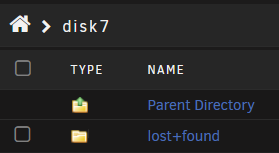
Hi JorgeB, this is the xfs_repair status of disk 1 Disk 1 xfs_repair status You're right, I can browse my files now in disk 7 and noticed the lost+found folder. Which is a good sign.
-
It was emulating the last time on normal mode. Since I unassigned it, this is the first time I started the array in normal mode.
-
Attached, thanks. tower-diagnostics-20260706-1550.zip
-
disk 2 - L.txt disk 7 - L.txt Done - L for both. Logs are attached. What should be done next? Thank you.
-
Please find attached both xfs_repair reports. disk 2.txt disk 7.txt
-
Thank you for your response JorgeB. Should I start the array in normal mode first? Should I keep disk 1 as unassigned?
-
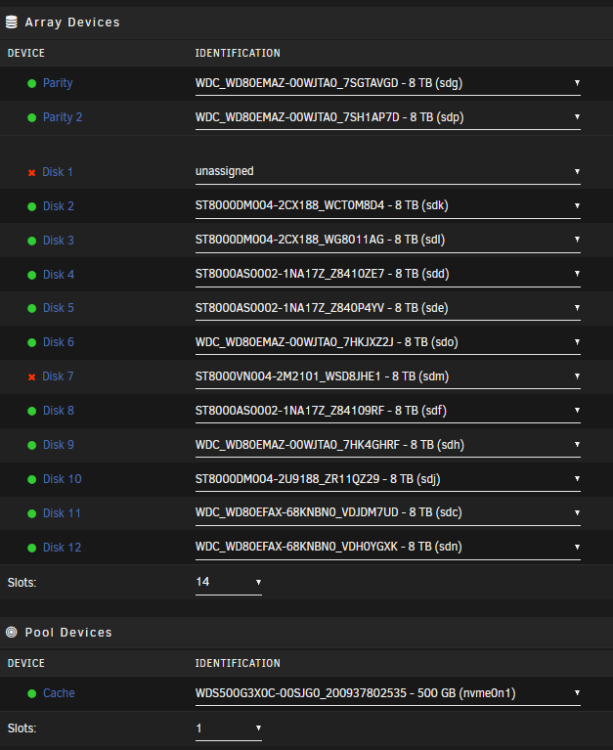
Hi all. I would appreciate your help. 2 of my drives are disabled (Disk 1, and Disk 7), and I've 2 parity drives. Disk 1 was disabled for sometime, and the data was emulated. But when disk 7 got disabled, the content of disk 7 where disappeared, although the status is (Disabled, content emulated). When I tried to browse disk 7, I got "Invalid path" or something close to that. Could be a file system corruption. I've unassigned disk 1 and tried to assign a larger drive (18TB), then discovered that it's not possible, as my parity is 8TB. The current status is "unassigned". Since unassigned and disconnect disk 1, I have only started the array in "Maintenance mode" once only. I didn't start it in normal mode. After starting the array in "Maintenance mode", I tried to "Check Filesystem Status" of disk 7 with and without -n. The repair button didn't appear. Didn't do anything else. Q: What is the best way to proceed with minimal data loss? I'm moving my data to the new Unraid server, and will do a new config for this server. So rebuilding the drives in not really important unless necessary. Thank you. tower-diagnostics-20260704-0423.zip ST8000VN004-3CP101_WWZ2J8M4-20260704-0245 disk1 (sdi) - DISK_DSBL.txt