





tucansam
Members
-
Joined
-
Last visited
Everything posted by tucansam
-
Thanks. -ffs2-diagnostics-20241111-1049.zip
-
Thanks Jorge. I replaced the old disk as per above and started a correcting parity check as recommended. I'm 15 hours and 26 minutes in, at 21.7% done with 1 day and 20 hours remaining, with 6.08 million sync errors corrected so far.... Should this be of concern?
-
To be clear, because I have nearly 180TB at risk here.... Stop array, new config, unassign Disk 10. Start array, parity rebuild occurs. Data on Disk 10 is not available. Once parity is rebuilt, stop array, new config, put old Disk 10 back in, tell unraid to preserve everything, run parity check. Then data on old Disk 10 will be availale. Is this the correct work flow? Thanks.
-
Yes I have the original drive, but its smaller (14tb) than the problem replacement (20tb) and I don't know how to revert back. I also have a replacement 20tb disk on the way. I am unsure of my next move.
-
Upgraded a disk and got this: Last check completed on Tue 5 Nov 2024 08:53:21 AM MST (today) Duration: 1 day, 20 hours, 54 minutes, 50 seconds. Average speed: 123.7 MB/s Finding 411584 errors Disk 10 (the disk that was replaced) shows writes but zero reads. From the shell, all of its values during an 'ls /mnt/disks' shows ???????? symbology. The array was not accessible during the entire rebuild (was getting i/o and permissions errors in Windows). Still getting i/o errors (unable to write to the array at all from within unraid or Windows). Also, no surprise I guess, my log is at 100% Seek error rate on that disk is 12114501 Diags attached. I assume I need to swap back to the old disk (still have it) and RMA the new one.... Not sure how to do that. ffs2-diagnostics-20241105-1452.zip
-
What's the story with these cheap "Water Panther," "MDD," and other no-name/clone hard disks on the jungle store? Some say unlabeled name brand disks reside within. Others believe they're refurbs/repairs from major brands relabeled (with SMART data deleted....). Some say name brand labels are under the clone labels. I've been buying refurb HGSTs and Seagates, and I'm probably going to continue doing the same. But these look interesting, I gotta say.
-
I wasn't playing around with either on those days. They were running just as they always have for the past 10 years.
-
First time I've seen this error, ever. Diags attached. affs2-diagnostics-20240801-1444.zip
-
So no one is monitoring this thread then? How do we pass yt credentials so we "log in" to yt and avoid the bot errors and failed downloads?
-
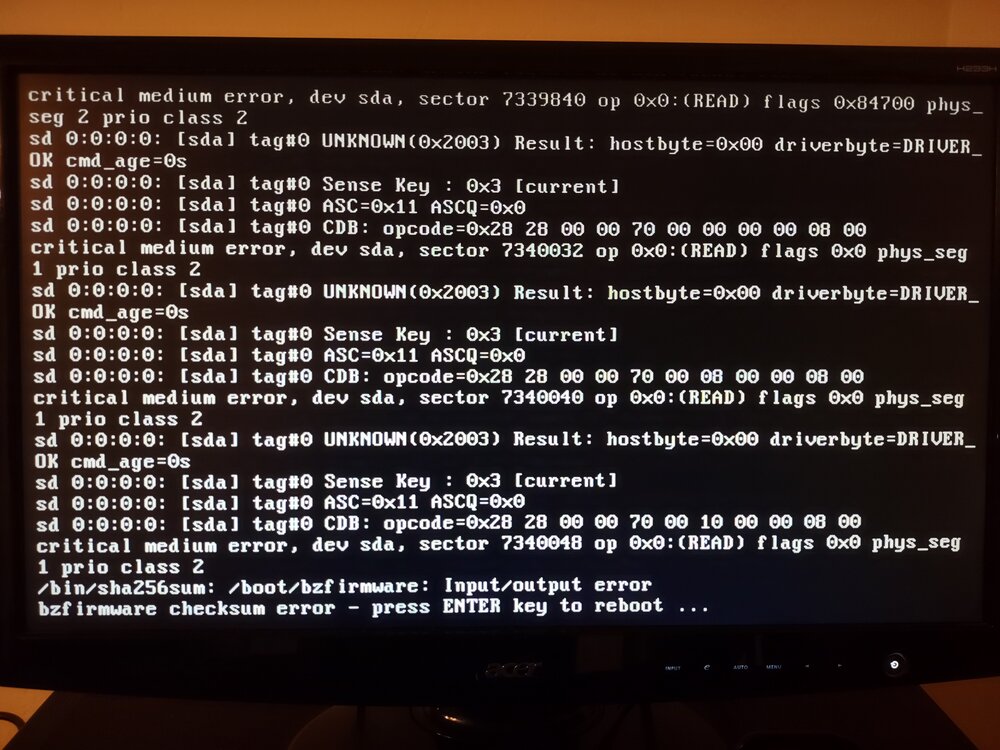
Looks like my brand new USB drive had failed. bzroot checksum fail on reboot. My USB drive failed after 10-12 years a couple weeks ago. The one I brought back up is literally brand new. And I think I ended up with a different/new key? Said it was a one-time thing when I logged in to do the recovery? Am I going to have to buy a new key? What can nuke a USB drive twice in a week? What can nuke a brand new USB drive?
-
Looks like my brand new USB drive had failed. bzroot checksum fail on reboot. My USB drive failed after 10-12 years a couple weeks ago. The one I brought back up is literally brand new. And I think I ended up with a different/new key? Said it was a one-time thing when I logged in to do the recovery? Am I going to have to buy a new key? What can nuke a USB drive twice in a week? What can nuke a brand new USB drive?
-
First time this has ever happened. Was running fine a few days ago. Diag attached. ffs2-diagnostics-20240714-1009.zip
-
Tried it four times with two different USB drives and it never worked. Used the debian hack from an earlier thread on the same subject on this forum and it worked just fine.
-
Found some stuff online. Used the unraid usb creator and it installed unraid on my new thumb drive, but it appears that it may not have made it bootable as I get a "missing operating system" when I try to boot off it.
-
After 10, and probably approaching 15, years of humble service, I assume this means my USB drive is dead. I actually just do happen to have backed up the drive (although it was to the array....) a week or so ago. How do I recover key, etc etc etc after a usb drive death?
-
I was seeing download speeds of 7-10MB/s, and now I'm getting 600k/s.
-
I'm seeing in the log that youtube thinks I'm a bot and want me to log in. All downloads are failing. How do I log in?
-
I am having trouble understanding how to download the video description and comments. How and where do I put these variables? I've read the above posts but am still confused. Also, is there a multi-threaded option whereby multiple videos can be downloaded at the same time?
-
I see that I have stumped you all.
-
Anyone? Old version I could copy-and-paste an URL, click the button, and away it goes. Now, clicking the button adds it to the list, but I have to click the actual download arrow icon to get it to download.
-
Latest update won't auto-start the downloads?
-
Nevermind. For some inexplicable reason the "Movies" share had some things in it that the "movies" share also had, and since "movies" in my main share, I simply removed the "Movies" share and all of its contents.
-
I don't know what the problem is or how to fix it. My share is defined in one place, and only one place, as far as I am aware. I only ever remember creating one share, with one case of the first letter. Now there are two shares. With two cases. I don't know where the second share came from.
-
Just upgraded to the latest, got this now: Same share (movies) exists in a different caseThis will confuse SMB shares. Manual intervention required. Use the dolphin / krusader docker app to combine the shares into one unified spelling More Information Same share (Movies) exists in a different caseThis will confuse SMB shares. Manual intervention required. Use the dolphin / krusader docker app to combine the shares into one unified spelling More Information I have no idea what this means. Well, I know what it means, but where do I "manually intervene?" I'm not interested in downloading another docker appp, and when I looked at both of the suggestions, they simply appear to be file managers.
-
I have 250GB of queue going in sab. I have Windows Explorer open as I peruse the filesystem cleaning up old files, fixing renaming errors sonarr or sab screw up, etc. Within 60 minutes of conducting both of these activities at the same time, the issue surfaces. Its now happened six or seven times today. It seems to be the consistent manipulation of the filesystem in some way (usually unpacking downloaded rar files is the instant at which it occurs). It occurs when Explorer is closed and sab is the only thing messing with the filesystem (although in fairness Plex is doing its constantly watching thing in the background, indexing newly downloaded files)
