





tucansam
Members
-
Joined
-
Last visited
Everything posted by tucansam
-
Done. Parity is being rebuilt. Assuming all goes well, I will mount the old Disk 15 on another system and copy data back over. There are several (four) disks under "Historical Devices." I have never seen that before.
-
One last question before I begin. Should I do this with the "new" Disk 15, and then mount the old drive with unassigned devices or on another system for restore, or should I put the old Disk 15 in, run New Config, and when everything is back up, replace it with its replacement disk as originally planned?
-
Both disks passed SMART, correct. So even though one disk says "new disk," it is safe to do a New Config and sync parity? How do I address the disk that is red X'd?
-
Yes, I have the original Disk 15 that I will mount and restore from. The other two disks, one of which is showing "new" and one of which is red x'd, are my priorities. I just don't know the process to start working on it.
-
Not sure how to start, what the steps will look like, etc., for beginning to recover this array.
-
Thank you! Will do.
-
A format was begun, but aborted not even a minute into it. I do have the original Disk 15.
-
Diags attached. ffs2-diagnostics-20221002-0752.zip
-
I have two spare 8TB, new-in-box disks, yes. BUT, I replaced the long break-out cable from the SAS controller and Disk 16 has completed an extended SMART test without error.
-
Short SMART test lasted 33 seconds and got to 50% before I got the host interrupt message on #16.
-
No effect. Extended SMART won't even run for a few minutes before host interrupt occurs.
-
Unless I'm missing it somewhere else, under Settings -> Disk Settings, I set "default spindown delay" to "Never," and the extended SMART on #16 isn't running for more than a few minutes without "Interrupted (host reset)" being the result. I see there is a place to set individual disk spindown as well -- I have set it to "never" for #16 specifically and run extended SMART yet again.
-
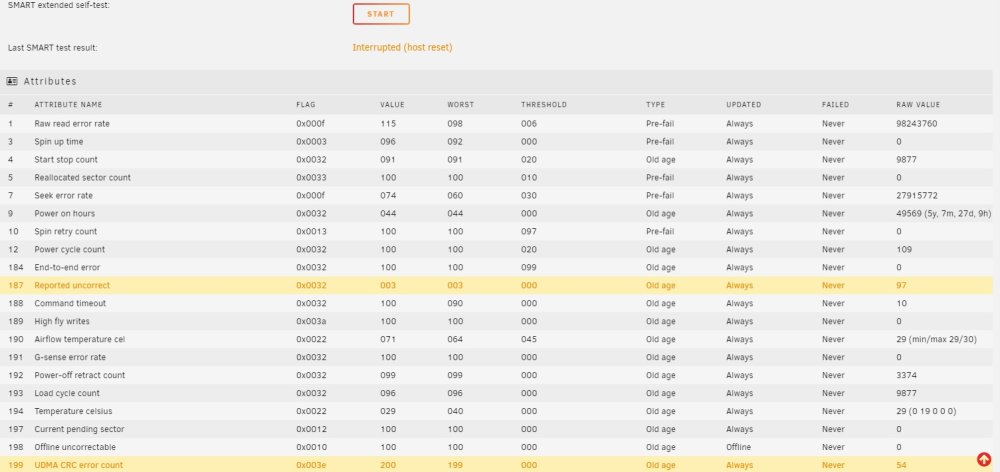
Test didn't run for very long (not sure how long as I wasn't babysitting but it wasn't more than 30 minutes) before the host interrupt error popped again. See attached.
-
Disk 19 reported no errors on the extended test. Disk 16 stopped showing up in the list of disks. I re-seated all power and data cables (external disks are directly connected to a break-out cable coming from an HBA with external SAS connections) and rebooted everything. Disk 16 showed up again (still showing as "new disk") and I have started another extended test (it reported "host disconnect" or something to that effect). It is showing 97 "Report Uncorrected" from previous tests. I'll advise when the extended test finishes -- thank you for your help.
-
After starting extended SMART on 16 and 19, 16 shows the unraid equiv of the hourglass and never loads any data, and 16 and 19 both show "cannot read attributes." How do I begin rebuilding the array to maximize data preservation? Thank you again.
-
ETA I selected the "old" disk 16 so I could run an extended test (doing it now) and it shows it as "new device."
-
Running extended diags on 19 now. Disk 16 says "no device." If I select the disk that was (formerly?) it, will it try to reconstruct it if I start the array? I don't know why that disk dropped off. Its still good, as is the data on it.
-
Its also listed all three disks as "to be encrypted." ffs2-diagnostics-20220930-0409.zip
-
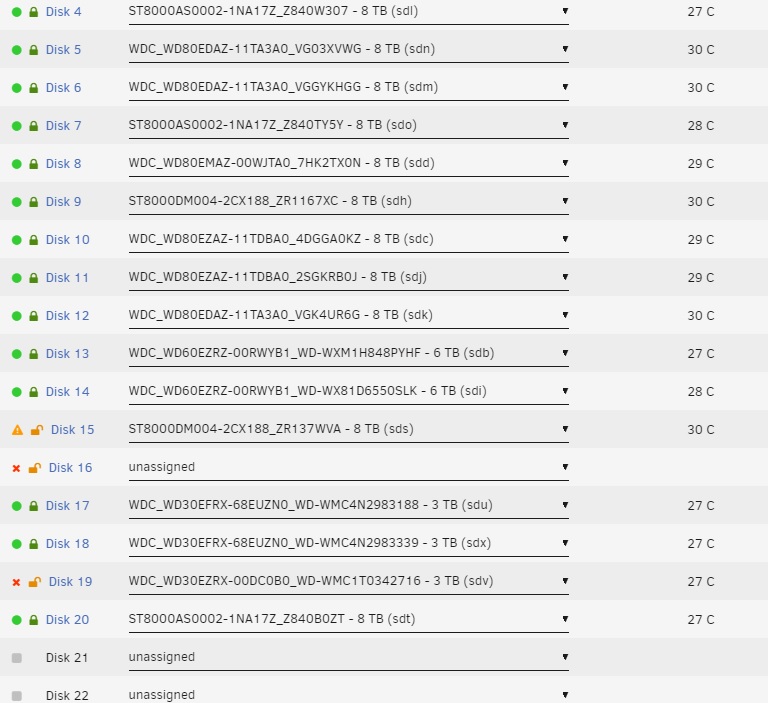
Here is current state of things. Disk 15 is the new disk, formerly "unmountable," which got 30-60 seconds through a format before I aborted and shut down the array. I have the original Disk 15, the one with SMART errors. Disk 16 is physically present, but not showing as assigned. Disk 19 is also red x'd. I have two new-in-box 8TB disks waiting, arrived a few hours ago. I have absolutely no idea how to proceed at this point (two parity disks if it matters). At the very least I'd like to get 16 and 19 back in the game, and worry about 15 later. Unless there is a better order to this.....
-
Yes, I still have the original Disk 15. I am more concerned about the other two disks that are now showing up as Red X's, although I don't believe them to be truly problematic, as I looked at all SMART data for them. My old procedure for disk replacement was to pre-clear the disk on a separate unraid server (this was years ago). Then, at some point, the new unraid version started either doing it automatically (I think I remember that being a thing) or I just stopped doing it. I would pop in a new disk, start the array, unraid would rebuild it, and its off to the races. The last three times I've replaced a disk, this has happened. The array starts, the disk shows up as "unmountable" and is offline, yet a parity sync starts. I end up confused and format the disk. In fact, the very last time this happened, I lost data as well, but I thought it was me mis-remembering something along the way and screwing it up. Right now I have the server powered down with two red X disks and one that needs to be rebuilt. Plus the old drive that I'm replacing.
-
Disk 15 showed tons of unrecoverable errors, so I replaced it. It came up as "unmountable" so I checked the box to format it, and clicked format. Disk 16 immediately went into an error state (red x). I have two parity disks, so I began reconstruction of Disk 15, and just bought an overnight replacement for Disk 16 (I keep one spare on hand and used it to replace Disk 15). During the rebuilt, Disk 19 has now thrown red X! I now have one freshly formatted disk that was 0.000001% done being reconstructed, and two disks that have just thrown red x's. My only priority at this point is data preservation, all other considerations are secondary. This array has given me absolutely no end of trouble since Day 1, with months or even years of trouble free running, followed by weeks of multiple cascading disk failures, errors, etc. They all come in spurts. I've swapped cables, power supplies, etc over the years. And years. And years. I'm do have 20+ disks, which is far too many, and I'm trying to talk myself into dropping $$$$$$ on a brand new sever with the same capacity but a third the number of disks. Too many variables with this many drives, cables, controllers, etc. In the mean time.... The disks that are all failing right now are on an HBA and a SAS expander in a separate chassis. Not sure if that's a coincidence or not but I doubt it. The red X's have started right after I pulled the tower to swap disk 15 -- while I was in there I reseated all of the cable and data connectors on the disks in that chassis (6 disks total, three have now apparently died). The original Disk 15 was definitely dead as per SMART. These other two disks are probably fine (99.9% of my red x's over the decade+ that I've used unraid have been false alarms). Once again.... many disks down.... data preservation key. How do I proceed? Thank you.
-
197 Current pending sector 0x0012100100000 Old age Always Never 16 198 Offline uncorrectable 0x0010100100000 Old age Offline Never 16 Do these two errors, and their count of 16, mean the disk is done? I'm getting yellow notification popups, although the disk is still online.
-
-
My present unraid server has been running for over a decade, maybe longer. I did do a MB/CPU swap very early on, maybe with a half dozen disks or less attached. Over the years it has grown into quite a monster, and there are enormous amounts of data spanning 20+ disks. I want to minimize the risk involved with upgrading MB/CPU again. I will also be converting some isolated mechanical disks to SSDs. I am open to suggestions, however, my plan is currently: - Back up flash drive - Back up docker.img - Screen shot disk assignments - Screen shot docker images config pages At that point I will shutdown the server, take it apart while giving it a really deep clean, swap in the new MB and then fire it up for testing. What best practices am I missing? Thanks.
-
Will I be able to get past the encryption?

