





tucansam
Members
-
Joined
-
Last visited
Everything posted by tucansam
-
Reboot worked. Now I have /mnt/user and /mnt/user0 which appear to be the same thing W T F This thread looks relevant
-
I started and stopped the array.... No effect. Will reboot now. Diags attached before I do. ffs2-diagnostics-20210711-1604.zip
-
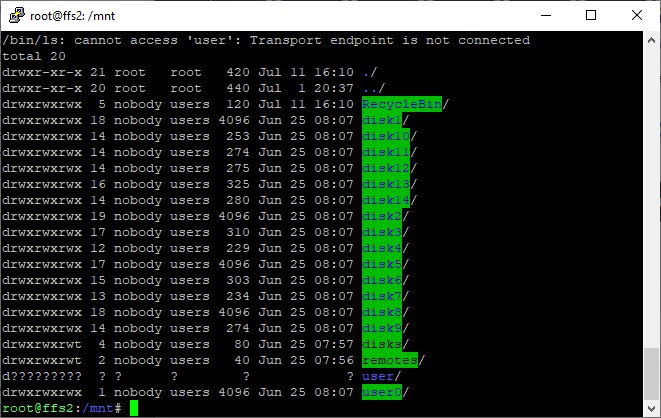
Matter of fact here's a screenshot.
-
Plex is down. At least, its not finding content. I ssh into unraid and my SSD with the dockers is fine. I try to cd into /mnt/user and get "-bash: cd: user: Transport endpoint is not connected" Cannot cd into this folder. Also now have a directory called "remotes". And the directory names are different colors now. My disk are all blue text on green background (putty) as usual. /user is blue text on black background, /disks is black text on green background (never seen that before). Strange. I can access data via cd /mnt/user/disk* just fine.
-
https://www.amazon.com/iStarUSA-Group-3x5-25-Trayless-BPN-DE350SS-RED/dp/B009XA27NQ/ref=sr_1_36?dchild=1&keywords=computer+hard+drive+enclosure+istarusa&qid=1621471245&s=pc&sr=1-36 this but black. i hope its ok to post jungle store links.
-
I've been using the iStarUSA 5-in-1s for going on a decade with essentially zero issues.
-
I managed to set up the VLAN. br1 is the main interface, 192.168.0.5 for unraid and 192.168.0.222 for plex. br1.10 is new VLAN interface, tagged with 10. I set up 192.168.10.5 as unraid's IP address for this VLAN. However, in the docker edit for Plex, I cannot select multiple interfaces. How can I get Plex to answer across both networks, ie, accessible on the main network at 192.168.0.222 and VLAN 10 at 192.168.10.222? Thanks.
-
Is there one? Not sure if this should go in the Docker area or not, so here it is. I have three VLANs on my network; an IOT and Guest network are totally isolated and can only reach the internet. The third VLAN is for phones and tablets and other less-than-secure devices that I do not want seeing other hosts on the network. However, a couple of those devices (Roku, iPhones) use Plex to reach my server, which has its own IP address as a docker on my unraid server. I would like to set up VLANs on my server in such a way as to provide the hosts on that third VLAN access to *only* that Plex server, so it would need an IP address on at least two networks (main wired and the third VLAN). Not sure how to go about this from the unraid side of the house as I've never used VLANs with unraid. Thanks.
-
Dockers can't point to pi-hole, is my understanding, and my docker and plug-in update checks were taking upwards of 6-10 minutes. Also now I can do service on my server without taking down DNS for the whole house. The pi-hole docker is sweet but my needs are much better served with a real device.
-
In order to install unbound and run 127.0.0.1#5335 as an upstream DNS server. I am trying not to use external DNS unless they are the root-level servers. I scrapped the docker and went back to running pi-hole on an actual pi.
-
How do I configure pi-hole on docker to accept incoming ssh connections?
-
Sonarr is finding episodes and sending them to sab, with the little notification "send to sab" and the little cloud download icon, but sab is not getting the request (or if it is, its not showing up on the download page). Some shows are working just fine, others seem not to be at all. Nothing has changed, configuration-wise, in years. Any ideas where to start?
-
Lots of buffering lately. A Roku on a wired gigabit connection and a laptop with the web client on a 5GHz wifi connection. i7-2600 is virtually sitting idle, its definitely not resource related on the server end or network related. Shows will play fine, suddenly I get the gold circle, sometimes it plays again shortly, other times I get the error telling me my network connection is too slow (even on the wired gig Roku). Any ideas?
-
Power went out a few days ago. After a few minutes, I went into the GUI and executed a proper shutdown. I then turned off the UPS. After power came back on, I turned on the UPS, and unraid. Now unraid cannot see the UPS, I get the red box of death "Communications Lost" in the status window popups, and under the UPS Settings it shows no communications with the UPS. During and after the power outage, nothing changed or moved, no cables were unplugged, etc. I just re-seated the USB cables on both the UPS side and the unraid side -- no effect. Any ideas? Thanks.
-
Disregard
-
Have done a reboot, yes. Its gone and won't come back. ETA just tried three different browsers just for kicks, and its gone.
-
"Docker safe new permissions" is gone from the Tools menu. I have removed and reinstalled CA Fix Common problems a few times now, and can't get it to reappear. Any ideas?
-
Of all the times that unraid has hung on me over the years, whether it was the GUI that froze or the dockers that froze or a file transfer that hung or the command prompt that froze, when things like 'reboot' and 'init 0' and 'poweroff' and stopping everything by hand didn't work, the only thing that I have ever been able to do do fix a hung server is to temporarily put the ON/OFF device on the front of the server in the OFF position. And then cancel the subsequent parity check.
-
"docker safe new permissions" disappeared after a reboot. I removed and re-installed CA and its still missing. How can I get it back?
-
No, but I will now. Thanks.
-
The Plex forums are utterly useless for support, so I am trying here: Server Version#: 4.34.4 Player Version#: Latest Roku On the Roku, and only on the Roku, Plex routinely (almost always) skips to the next episode within the last 3-5 minutes of the current episode. The files are not corrupt, and it does not happen on iPad or Android. It also does not happen on every show, but it does on many. When we return to the episode whose last few minutes were skipped, and then fast forward to the skipped part, it plays fine. This has been happening for many months, across numerous Roku and Plex software updates. Any advice would be great.
-
How do I turn on ssh so I can ssh into pi-hole? ETA how do I make settings persist across reboots ie hostname etc
-
You may be the winner of this thread!!!!!
-
Question. I have noticed a lot of dupe movies in Plex, turns out Radarr is downloading copies of movies if the filenames don't have "1080p" or "720" or "bluray" in the name. So if I rip a BluRay from my collection with MakeMKV and get "Star Wars.mkv" as the filename, or "\movies\star wars\title01.mkv" as the filename, Radarr seeks a version from the internet with something in the filename that makes it believe its in a high-res format. I have been playing with the various search parameters, ie, standard def, high def, etc., and can't seem to make this stop. Advice? Thanks.
-
Hi. In the description it says, "It also includes Privoxy to allow unfiltered access to index sites, to use Privoxy please point your application at "host ip:8118" Can anyone tell me what that means? I have been using it with PIA VPN (am getting ready to change so I went back to see if there were updates and noticed that description) and didn't know I could (should?) be using a proxy?

