





shaunvis
Members
-
Joined
-
Last visited
Everything posted by shaunvis
-
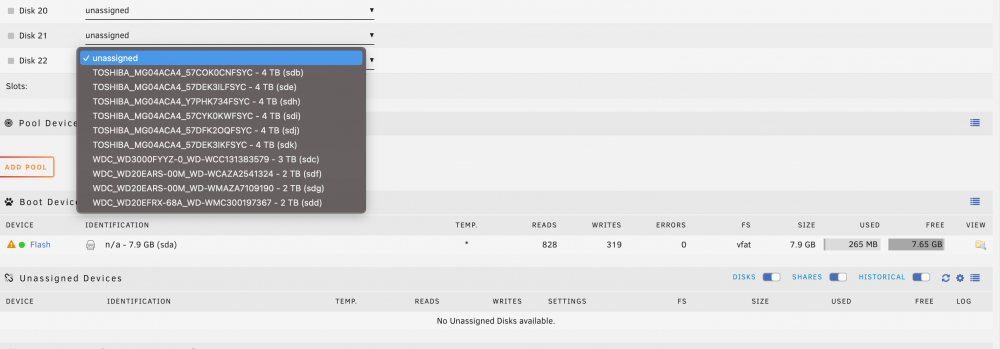
I'm assuming typo and you mean unassigned devices plugin. If so, I have that installed but nothing shows up under it. Meanwhile, I can pick my disks even though they're not assigned. So maybe the plugin isn't working.
-
I'm setting up a new Unraid box. A few of the disks I'm using are from an old Unraid setup. So when I add them to the array they mount as separate disks. How do I clear all my drivers (I don't need data from them), add them all to a new array and start everything from scratch? thanks
-
I'm trying to find the current list of PIA servers that support port forwarding. In the docs, it says check /config/supervisord.log all I have is: 2021-07-28 15:47:42,750 DEBG 'start-script' stdout output: [info] List of PIA endpoints that support port forwarding:- [info] Attempting to get dynamically assigned port... There's no actual list of servers. Any idea where to get that?
-
I'm trying to do this but having issues. I try to import the LtConfig plugin in Deluge and nothing happens. I go to plugins, browse to the ltConfig-2.0.0.egg, import it, and nothing happens. The plugin doesn't appear. Am I missing a step?
-
Which server are you using? I use PIA and have tested a few. Switzerland seems the fastest but still only 5mb tops.
-
You really want to use VPN with torrents, but you don't have to. As for speed, in my experience it's been horrible. I have a gigabit connection and best I've seen is 5MB or so through VPN in Deluge.
-
I'd agree but it's not every torrent. Some work fine. For example yesterday I grabbed 2 versions of the same movie. One theatrical, one Director's cut. They both finished. One went to the completed folder, the other disappeared and said there was no file at location /complete/filename. I turned off the move to completed option and am trying again but I'm wondering what else could cause something like this.
-
I'm having trouble with deluge deleting completed torrents. I have a simple setup downloading to data/incomplete then moving finished ones to data/complete. It seems when I get to the complete part it's deleting things instead of moving to complete. Then the torrent has a status of "No such file at this location". Anyone else ever see this? I'm wondering if maybe another app is interfering or something. Thanks
-
Thanks! I hadn't found that one yet. I'll check it out
-
I got Handbrake working fine. It's converting things I grab to h265 as it should. The file size difference between h264 has been pretty significant, sometimes half the size. Is there a way to get Handbrake to through my existing videos, recode them, delete the originals, and leave the new files in their place? I can go in and manually do it, but that's a LOT of work an dI'm looking for a way to automate it.
-
I think initially I was adding more malware oriented lists and not ad oriented lists. The things that's surprised me with piehole is my freaking Roku and Onkyo receiver are chattering nonstop to things, even when they're "off".
-
I'm using a Dell server for Unraid. Am I correct that I could pop in an Nvidia video card, give it over to Handbrake and it will use that fr faster encoding? If so, could Plex also use the card for better transcoding?
-
Thanks. I followed Spaceinvaders video & added the lists he had. I'm more concerned with ads, tracking from the likes of google, FB, etc. and things like that. I guess I just need to play around with lists
-
Thanks, I'll give those a shot.
-
I got Pi-Hole up & running for a few days. It seems like it's working and is the DHCP & DNS server for my house. It doesn't seem like it's blocking much though. In Safari, I have ghostery and never really noticed may ads or things like that. But if I try Chrome or another browser, I still see tons of ads on websites. Is there a setting to check or adjust?

-
I got it working faster, 5MB down. So that's probably closer to the limit of PIA's connection with a different config file. I'm sure I'm not going to be getting much better than that with a VPN. Thanks for the help!
-
Thanks for the link, I think it got me looking in the right place. I had to install PIA's client on my PC to find out what ports the server I'm connecting to supports. I found one that gives decent speeds on my PC. What I'm not sure of is how to get Deluge's VPN to use that port. Also, testing on my PC I got way better performance with UDP instead of TCP, but I'm not sure how to make it use UDP. Just for some more info, I have a 1Gb connection. Sepeedtest on my PC with PIA I get 70Mb/8Mb. For whatever reason, even with 2 or 3 torrents going with multiple seeds on them, it seems like DelugeVPN is capped at 1..2Mb, I just can't seem to get faster than that.
-
For the life of me, I can't fix my speed issues. I'm using PIA per SpaceInvaders youtube guide. I can only get around 1Mb downloads no matter what server I try. Any suggestions?

