





andyd
Members
-
Joined
-
Last visited
-
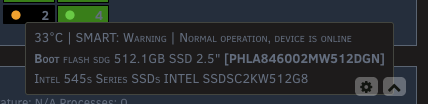
Hi thanks for this! Looks like there is a bug when one of the discs being tracked is a part of internal boot. Even though I already acknowledged the CRC error count on the drive, the display on the main page keeps flashing
-
Missed your last message. I'm coming back to this because it's parity check for the month and it's the same problem. This has never happened before. So yeah, something is reading on that drive but it only seems to happen during parity check now because it's normal otherwise. Could the drive be corrupted in some way? It's where I do my zfs backups but I don't see any zfs errors. The extended test took over a day to finish but it didn't have any errors
-
Yeah I was only running it because it seemed to be the problem drive and then noticed it was stalling with the test too. I’m waiting for my monthly parity check so I’ll try extended later
-
Ok well smart test passed and read speeds now 0 MB/s 🤷♂️
-
I cancelled parity check restarted parity check started again - is there a way to not have this auto start? smart check stuck at 90% while there are high reads on the drive - ~188 MB/s don't really understand what's going on with the high read speeds homeserver-diagnostics-20260222-0912.zip
-
Smart shorts passed on all other disks. It's just the one. I'm not sure about waiting for parity check to end - that's the reason why I'm posting. I don't think 15 days makes sense.
-
So some things... I'm seeing high read speeds on disk 3. Cancelled smart test and hasnt changed. The read speed is 100 mb/s + compared to 9 mb/s for parity check I have smart short running on that which seems to be stuck on 90% There was a tmp appdata folder for some reason that I deleted -> Share appdata_tmp_20250510110541 is an implied array-only share, but files / folders exist on the cache -> never noticed this before. Could have been there for a long time disk 3 is zfs and where I backup appdata too
-
Yep makes snese homeserver-diagnostics-20260222-0810.zip
-
Never had this issue and I’ve been running unraid for years. I had to unfortunately hard reset while the server was booting up I’m not seeing any errors so far at 28% or any failures with the drives. How to handle this?
-
After some days, it was back to normal. It happened again a few days ago and was back to normal again 🤷♂️
-
It is correct yeah
-
Yeah, folderview I'm aware of and I've been lazy to switch over. That's not the reason though. It's been broken for some time. The issue with "not available" and updating started more recently Uninstalled Unraid Connect as well but still same issue
-
Not on ipv6 Diagnostics attached homeserver-diagnostics-20250706-0624.zip
-
Still same outcome
-
Started some time after installing 7.1.4. Every docker container (~30) has this message. If I click on "check for updates", it'll be stuck on checking. Nothing on my network or Unraid has changed. The only meaningful change has been to 7.1.4. Any reason this could be happening?
