




Skip to content
View in the app

A better way to browse. Learn more.

Unraid

A full-screen app on your home screen with push notifications, badges and more.

To install this app on iOS and iPadOS
  1. Tap the Share icon in Safari
  2. Scroll the menu and tap Add to Home Screen.
  3. Tap Add in the top-right corner.
To install this app on Android
  1. Tap the 3-dot menu (⋮) in the top-right corner of the browser.
  2. Tap Add to Home screen or Install app.
  3. Confirm by tapping Install.

jcmorris

Members
  • Joined

  • Last visited

  1. Found it, the USB drive is dying and need to be scanned in Windows. Going to do a replacement USB drive and try again
  2. Sorry didn't give the flash this is strange, it look like the drive is being used but is showing this

  3. I have about 105 GB, I use a 256 NVME for just appdata and have a 1 TB for cache
  4. I'm getting even after a reboot and checking that all plugins were up to date: boot device shows free but upgrade needs 913740061 plugin: run failed: '/bin/bash' returned 1 Executing hook script: post_plugin_checks
  5. I'm also seeing this on a RTL8111 running 6.12.6
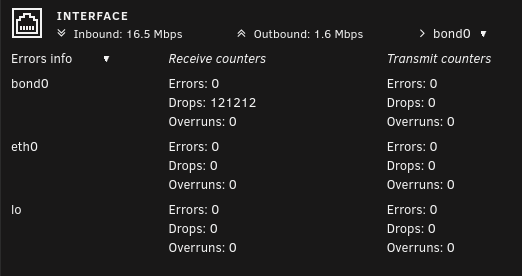
  6. Not sure if you found your answer but you have to click the basic view at the top to advanced and you will see the field

Account

Navigation

Search

Search

Configure browser push notifications

Chrome (Android)
  1. Tap the lock icon next to the address bar.
  2. Tap Permissions → Notifications.
  3. Adjust your preference.
Chrome (Desktop)
  1. Click the padlock icon in the address bar.
  2. Select Site settings.
  3. Find Notifications and adjust your preference.