





oh-tomo
Members
-
Joined
-
Last visited
Everything posted by oh-tomo
-
"1) Just wait it out" worked. Also audio seems to play better now with MSI enabled.
-
I restarted Windows and am looking at the spinning dots again. Spinning is better than not spinning I think we’ve established, right? It’s been going for over 30 minutes. Not that I watched the spinning for 30 minutes but it was spinning when I first rebooted 30 minutes ago and now that I’m rechecking it 30 minutes later it is still spinning. Before I selected restart in Windows I had just run MSI utility v2 and enabled MSI on both HD audio and NVidia graphics and set both to High. Then when selecting restart I encountered the option to either update and restart or update and power down. I selected update and restart. So are the thirty plus minutes of TianoCore spinning dots because : 1) Windows is applying an update and needs (30+ minutes of) time to finish? 2) my changes using MSI Utility v2 are trapping my VM in a perpetual spinning dot state? 3) something else? should I : 1) just wait it out? 2) force stop the VM and disable NVidia ? 3) something else?
-
I couldn't see any problem with the cables. Maybe they were arcing too high towards the upper case fan. I tucked them a bit to the side away from the fan. I guess I just wait and see if the problem returns.
-
I guess I could resume the parity check.
-
"Completed without error" Now what? ST16000NE000-2RW103_ZL2P6V5T-20220619-2307 redacted.txt
-
Extended SMART test (second attempt) has been stuck at "self-test in progress, 10% complete" all this time.
-
Extended SMART test didn't finish -- "Interrupted (host reset)" I'll try again.
-
I paused the rebuild and ten minutes later got an alert that Disk 1 (the new disk) is in error state. So maybe JorgeB is onto something. Running an extended SMART test now. How long do they take? Will the test reveal an actionable solution to the cause of the errors?
-
Disk 4 has error (UDMA CRC error count 1), the rest are healthy on dashboard.
-
Here's an updated diagnostics while it rebuilds. Took a while to generate with the rebuild going on. server2018-diagnostics-20220618-1202.zip
-
What kind of problem does it look like? 14 hours left on new disk data rebuild. Should I abort and put the old disk back in for an extended SMART test? My impulse was that the array was vulnerable with a disabled disk exhibiting read/write errors so I wanted to get a functioning disk in there ASAP. Old disk warranty expired in February.
-
I'm going to shut down and replace the disk. Attached are the diagnostics. Wish me luck. server2018-diagnostics-20220618-0010.zip
-
Installed this, selected Start and "Execution error - Server error" popped up.
-
Well I consider it 5 because I hadn't planned on using the internal two. Leaving a webcam running for a few days on this new card has left it frozen (all connected usb ports non functioning) again. Shutting down the VM and starting it again has reached the Tianocore logo without the spinning dots, which suggests that booting the VM won't be possible without shutting down unRAID and restarting. So I'm in the same situation I was with the previous four port card.
-
So I saw this post suggesting the Inateck KT5001 as a suitable card. I've installed the KT5001 and was able to boot into Win10 VM without the pci=noaer argument. But it looks like the same VL805 chipset I started with. Except it has 5 ports instead of 4.
-
Hey that worked. Thanks.
-
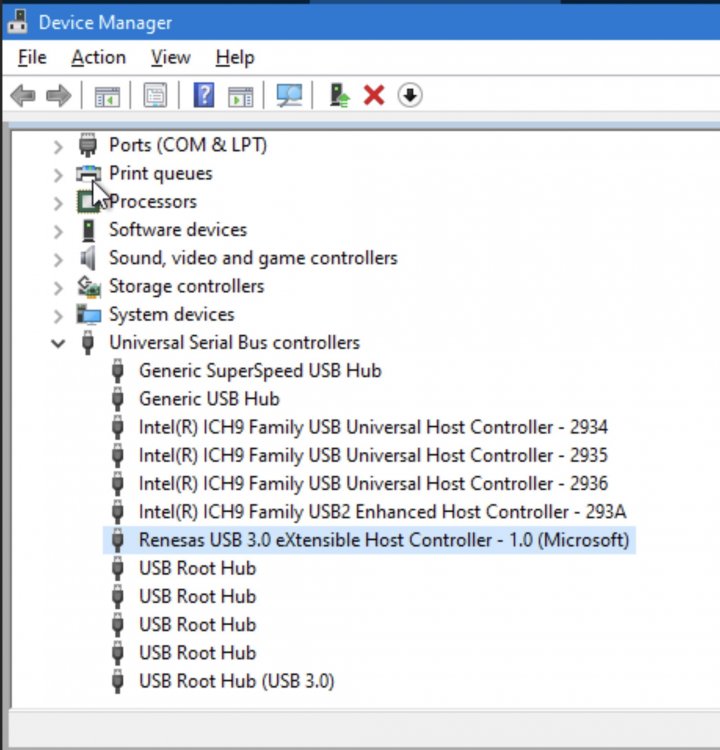
I have swapped out the Orico ("VIA Technologies VL805/806 xHCI USB 3.0 Controller") for a Rivo USB 3.0 card (appears as "Renesas Technology Corp. uPD720201 USB 3.0 Host Controller (rev 03)" in System Devices) because the Rivo was better reviewed than the Orico on Amazon. Win10 VM boot up is just the TianoCore logo without the spinning dots and the log reports: 2022-05-12T18:22:54.274577Z qemu-system-x86_64: vfio_err_notifier_handler(0000:02:00.0) Unrecoverable error detected. Please collect any data possible and then kill the guest When I edit the VM settings to disable the uPD720201 controller, Win10 boots fine. Looking at the system log, I don't see anything referencing pcie issues. <?xml version='1.0' encoding='UTF-8'?> <domain type='kvm' id='12'> <name>Windows 10 VT</name> <uuid>b7d3fdd0-bad9-57c6-1819-514f71618295</uuid> <metadata> <vmtemplate xmlns="unraid" name="Windows 10" icon="windows.png" os="windows10"/> </metadata> <memory unit='KiB'>17301504</memory> <currentMemory unit='KiB'>17301504</currentMemory> <memoryBacking> <nosharepages/> </memoryBacking> <vcpu placement='static'>8</vcpu> <cputune> <vcpupin vcpu='0' cpuset='0'/> <vcpupin vcpu='1' cpuset='1'/> <vcpupin vcpu='2' cpuset='2'/> <vcpupin vcpu='3' cpuset='3'/> <vcpupin vcpu='4' cpuset='4'/> <vcpupin vcpu='5' cpuset='5'/> <vcpupin vcpu='6' cpuset='6'/> <vcpupin vcpu='7' cpuset='7'/> </cputune> <resource> <partition>/machine</partition> </resource> <os> <type arch='x86_64' machine='pc-i440fx-3.0'>hvm</type> <loader readonly='yes' type='pflash'>/usr/share/qemu/ovmf-x64/OVMF_CODE-pure-efi.fd</loader> <nvram>/etc/libvirt/qemu/nvram/b7d3fdd0-bad9-57c6-1819-514f71618295_VARS-pure-efi.fd</nvram> </os> <features> <acpi/> <apic/> <hyperv> <relaxed state='on'/> <vapic state='on'/> <spinlocks state='on' retries='8191'/> <vendor_id state='on' value='none'/> </hyperv> </features> <cpu mode='host-passthrough' check='none' migratable='on'> <topology sockets='1' dies='1' cores='8' threads='1'/> <cache mode='passthrough'/> </cpu> <clock offset='localtime'> <timer name='hypervclock' present='yes'/> <timer name='hpet' present='no'/> </clock> <on_poweroff>destroy</on_poweroff> <on_reboot>restart</on_reboot> <on_crash>restart</on_crash> <devices> <emulator>/usr/local/sbin/qemu</emulator> <disk type='file' device='disk'> <driver name='qemu' type='raw' cache='writeback'/> <source file='/mnt/disks/SSD_1TB/domains/Windows 10 VT/vdisk1.img' index='3'/> <backingStore/> <target dev='hdc' bus='virtio'/> <boot order='1'/> <alias name='virtio-disk2'/> <address type='pci' domain='0x0000' bus='0x00' slot='0x05' function='0x0'/> </disk> <disk type='file' device='cdrom'> <driver name='qemu' type='raw'/> <source file='/mnt/user/isos/Win10_1809Oct_v2_English_x64.iso' index='2'/> <backingStore/> <target dev='hda' bus='ide'/> <readonly/> <boot order='2'/> <alias name='ide0-0-0'/> <address type='drive' controller='0' bus='0' target='0' unit='0'/> </disk> <disk type='file' device='cdrom'> <driver name='qemu' type='raw'/> <source file='/mnt/user/isos/virtio-win-0.1.160-1.iso' index='1'/> <backingStore/> <target dev='hdb' bus='ide'/> <readonly/> <alias name='ide0-0-1'/> <address type='drive' controller='0' bus='0' target='0' unit='1'/> </disk> <controller type='usb' index='0' model='ich9-ehci1'> <alias name='usb'/> <address type='pci' domain='0x0000' bus='0x00' slot='0x07' function='0x7'/> </controller> <controller type='usb' index='0' model='ich9-uhci1'> <alias name='usb'/> <master startport='0'/> <address type='pci' domain='0x0000' bus='0x00' slot='0x07' function='0x0' multifunction='on'/> </controller> <controller type='usb' index='0' model='ich9-uhci2'> <alias name='usb'/> <master startport='2'/> <address type='pci' domain='0x0000' bus='0x00' slot='0x07' function='0x1'/> </controller> <controller type='usb' index='0' model='ich9-uhci3'> <alias name='usb'/> <master startport='4'/> <address type='pci' domain='0x0000' bus='0x00' slot='0x07' function='0x2'/> </controller> <controller type='pci' index='0' model='pci-root'> <alias name='pci.0'/> </controller> <controller type='ide' index='0'> <alias name='ide'/> <address type='pci' domain='0x0000' bus='0x00' slot='0x01' function='0x1'/> </controller> <controller type='virtio-serial' index='0'> <alias name='virtio-serial0'/> <address type='pci' domain='0x0000' bus='0x00' slot='0x04' function='0x0'/> </controller> <interface type='bridge'> <mac address='52:54:00:00:29:81'/> <source bridge='br0'/> <target dev='vnet0'/> <model type='virtio'/> <alias name='net0'/> <address type='pci' domain='0x0000' bus='0x00' slot='0x03' function='0x0'/> </interface> <serial type='pty'> <source path='/dev/pts/0'/> <target type='isa-serial' port='0'> <model name='isa-serial'/> </target> <alias name='serial0'/> </serial> <console type='pty' tty='/dev/pts/0'> <source path='/dev/pts/0'/> <target type='serial' port='0'/> <alias name='serial0'/> </console> <channel type='unix'> <source mode='bind' path='/var/lib/libvirt/qemu/channel/target/domain-12-Windows 10 VT/org.qemu.guest_agent.0'/> <target type='virtio' name='org.qemu.guest_agent.0' state='connected'/> <alias name='channel0'/> <address type='virtio-serial' controller='0' bus='0' port='1'/> </channel> <input type='tablet' bus='usb'> <alias name='input0'/> <address type='usb' bus='0' port='1'/> </input> <input type='mouse' bus='ps2'> <alias name='input1'/> </input> <input type='keyboard' bus='ps2'> <alias name='input2'/> </input> <graphics type='vnc' port='5900' autoport='yes' websocket='5700' listen='0.0.0.0' keymap='en-us'> <listen type='address' address='0.0.0.0'/> </graphics> <sound model='ich9'> <alias name='sound0'/> <address type='pci' domain='0x0000' bus='0x00' slot='0x08' function='0x0'/> </sound> <video> <model type='qxl' ram='65536' vram='65536' vgamem='16384' heads='1' primary='yes'/> <alias name='video0'/> <address type='pci' domain='0x0000' bus='0x00' slot='0x02' function='0x0'/> </video> <memballoon model='virtio'> <alias name='balloon0'/> <address type='pci' domain='0x0000' bus='0x00' slot='0x06' function='0x0'/> </memballoon> </devices> <seclabel type='dynamic' model='dac' relabel='yes'> <label>+0:+100</label> <imagelabel>+0:+100</imagelabel> </seclabel> </domain> server2018-diagnostics-20220512-1449.zip
-
Instead of a full reboot of unRAID did a full shutdown, which is probably what the PCI USB controller needed because now I'm seeing the spinning dots again. Is there a more robust PCI USB controller that won't require a full shutdown to keep running?
-
No spinning dots on TianoCore screen after re-enabling PCI USB controller. Would the unRAID Tools/SysDevs page indicate something if this PCI device was having hardware issues? I don't know how to interpret the spinning dots shyness in the presence of the PCI USB controller. CPU 1 on the unRAID dashboard is 100%.
-
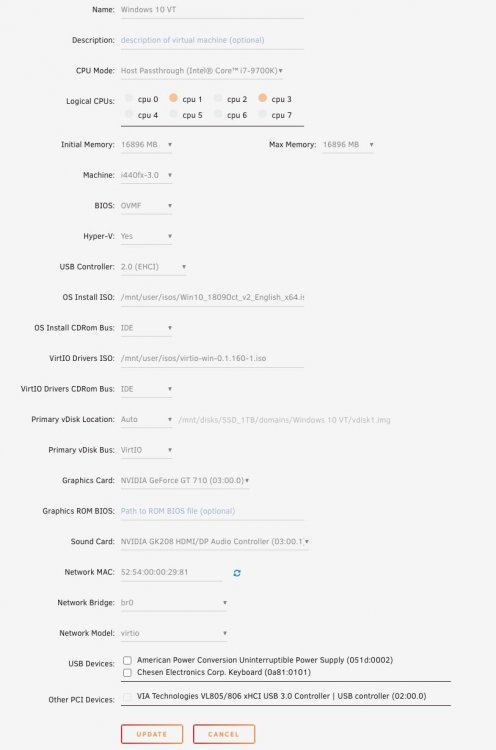
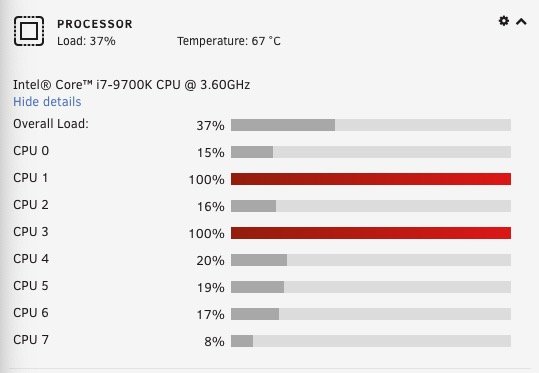
I disabled the PCI device "VIA Technologies VL805/806 xHCI USB 3.0 Controller | USB controller (02:00.0)" and was able to boot. Finally. CPU 1 and 3 are both at 100%. Gonna shut down and try to re-enable the PCI USB controller.
-
Checked again 10 hours later and VM boot still on the same TianoCore screen with no spinning dots. Adjusted the Logical CPUs setting (i7-9700K) from 0 through 7 selected to just 1 and 2. Not sure what the best Logical CPU setting is for an i7. Maybe an i7 is unsuitable for unRAID? So far not seeing any spinning dots. Is the lack of spinning dots off the top a dead giveaway that boot will be stuck on that screen for 8 hours or until the end of time? Is there a wiki checklist with red flags like "no spinning dots = not gonna work, try something else" on it? Also forgot to mention that unRAID dashboard shows CPU 1 at 100%.
-
Did a full reboot of unraid. Still no spinning dots on tianocore screen. Left it for hours and hours. Disconnected all usb devices. Noticing cpu core 0 in unraid dashboard is 100% when VM started. I guess I’ll just leave it for another eight hours and see if it finishes booting.
-
USB on Win10 VM became unresponsive (maybe it can't handle having a usb webcam always on?) so I restarted Win10 and eight or so hours later Windows login screen still hadn't appeared so I've forced quit and started the VM from unRAID UI. I don't see the spinning dots on the TianoCore screen. Maybe a full unRAID reboot is necessary this time?
-
My current approach is the "watched pot never boils" method. I have no idea how long those dots spin but the Windows log in screen appears if I check back much much later.
-
Tried to do a File / Export and got the Error "The file cannot be open" -- is that because the docker umask setting is 000?


