





Holaf
Members
-
Joined
-
Last visited
Everything posted by Holaf
-
Sorry, I was a little busy the last days, i'll try to fix as much things as possible this weekend
-
I'll try to make coresponding changes this weekend, i'll keep you updated
-
with a clean install on the last version I have no errors 12/03/2024 11:07:02 Building wheels for collected packages: insightface 12/03/2024 11:07:02 Building wheel for insightface (pyproject.toml): started 12/03/2024 11:07:07 Building wheel for insightface (pyproject.toml): finished with status 'done' 12/03/2024 11:07:07 Created wheel for insightface: filename=insightface-0.7.3-cp311-cp311-linux_x86_64.whl size=873701 sha256=87ee8a0b7c162192252daa84f7eec0b04cfeef8f771a2fb2bb1bd90a1f41857d 12/03/2024 11:07:07 Stored in directory: /config/temp/pip/wheels/27/d8/22/f52d858d16cd06e7b2e6aad34a1777dcfaf000be833bbf8146 12/03/2024 11:07:07 Successfully built insightface I changed the packages I install before running forge/auto11 : pip install --upgrade pip pip install coloredlogs flatbuffers numpy packaging protobuf==3.20.3 sympy pip install packaging pip install onnxruntime-gpu --extra-index-url https://aiinfra.pkgs.visualstudio.com/PublicPackages/_packaging/onnxruntime-cuda-12/pypi/simple/ pip install insightface pip install basicsr pip install torch==2.2.0 torchvision==0.17.0 torchaudio==2.2.0 --index-url https://download.pytorch.org/whl/cu121 pip install xformers --index-url https://download.pytorch.org/whl/cu121 I see that you have this error : error: command '/config/02-sd-webui/conda-env/bin/gcc' failed: Permission denied perhaps the virtual env didn't rebuild as expected (but I dont know why). perhaps you should do a clean install by removing/renaming the whole 02 folder.
-
@Araso did you also tried after removing the conda-env folder ?
-
you can stick with the latest (the scripts are the same), It's an error on my side.
-
Holaf_tests is only the branch where I test things, it's broken most of the time ^^ The last things I changed in the test version are what you reported. I add the "bc" command, I fix the bug with the parameters file and the output folder. I updated again the test version and I don't see errors on my side 🤔
-
@Joly0 @Araso If you use the tag "test" you can try the next version earlier. I changed my mind and added forge in thins version ... Since it's a clean fork of auto1111 instead of having a number on it's own, you must use WEBUI_VERSION="02.forge" It will be installed next to auto1111 and it will use the same environment. If you choose to do so you can remove those two folders : /mnt/user/appdata/stable-diffusion/02-sd-webui/env /mnt/user/appdata/stable-diffusion/02-sd-webui/webui/venv (I will auto-remove them in a future version if this one is working fine) @Araso with a clean install reactor and instant-ID works fine in auto1111, since the test version isn't using the same conda environment I assume you can try to switch to this version to see if that's enough to fix your issue They're also working in forge, but I have a mismatch in cuda version between onxx and torch, so you'll have errors in the log and some parts of the process will be done on CPU (it's still fast, but it will hit the global perf of your computer for a few seconds) In this test version I have update lama cleaner (now IO Paint). It will install in a new folder. @Olivilo I don't support AMD gpu because I can't test easily. You should take a look at Jolyu0 repo's, he is working on it : https://forums.unraid.net/topic/143645-support-stable-diffusion-advanced/?do=findComment&comment=1371508
-
Thanks for the info, i'll take a look on my side
-
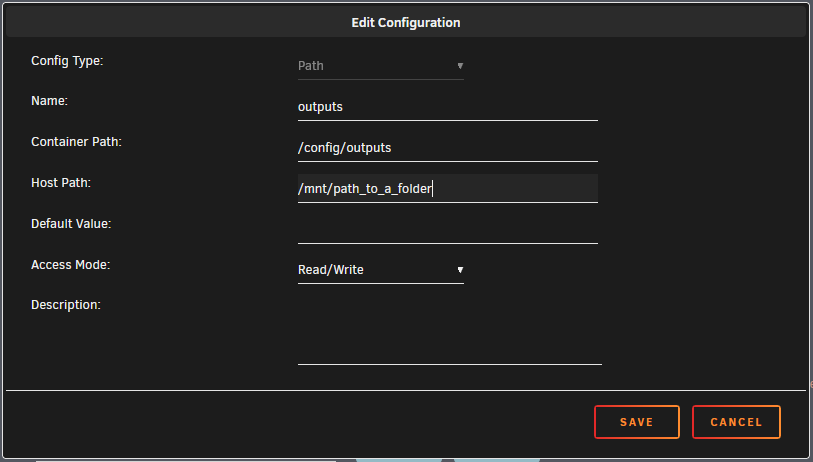
Yes there is a way With unraid on your container config you have an option at the bottom to add another path. You'll have to add two path : one that points to this one inside the container : /config/outputs and one to : /config/models for example for outputs it should looks like this :
-
@brainbone_@Joly0 , Honestly I don't know if I want to add more stuff ... It's allready hard to test everything. That's why I added the ability to run custom scripts (It should allready be possible in the last version if I didn't forgot to push it 😅) I have a script for Forge available here : https://github.com/grokuku/stable-diffusion-custom-scripts/ You just have to put it in this folder : /mnt/user/appdata/stable-diffusion/scripts and in the container config you replace the number (eg 02) by the script name (eg sd-webui-forge.sh) I did not test a lot but it seems to work . The WebUI will be installed in this folder : /mnt/user/appdata/stable-diffusion/00-custom/sd-webui-forge And outputs will be in this one : /mnt/user/appdata/stable-diffusion/outputs/00-custom/sd-webui-forge
-
I had the same issue, it looks like it's a bug of auto1111. I reinstalled it from scratch and embeddings were back. embeddings should be stored in the models/embeddings folder (eg : /mnt/user/appdata/stable-diffusion/models/embeddings) if you don't want to reinstall you can try to add this option in the parameters.txt file : --embeddings-dir "/config/models/embeddings"
-
I tried on my existing install and I tried on a fresh install and I don't have any issue I don't really know where to look
-
@GradwellZA Perhaps they change something in the installer 🤔 I'll take a look. @mrguymiah what's important is the name of the link, the name of the folder it points to doesn't change anything. When the interface is launched, you can try to delete the Lora symlink and replace it with your folder (with an uppercase L). Then click on refresh to check if it sees the loras 🤷♂️ (at the next launch of the container the folder will be moved again to the common folder)
-
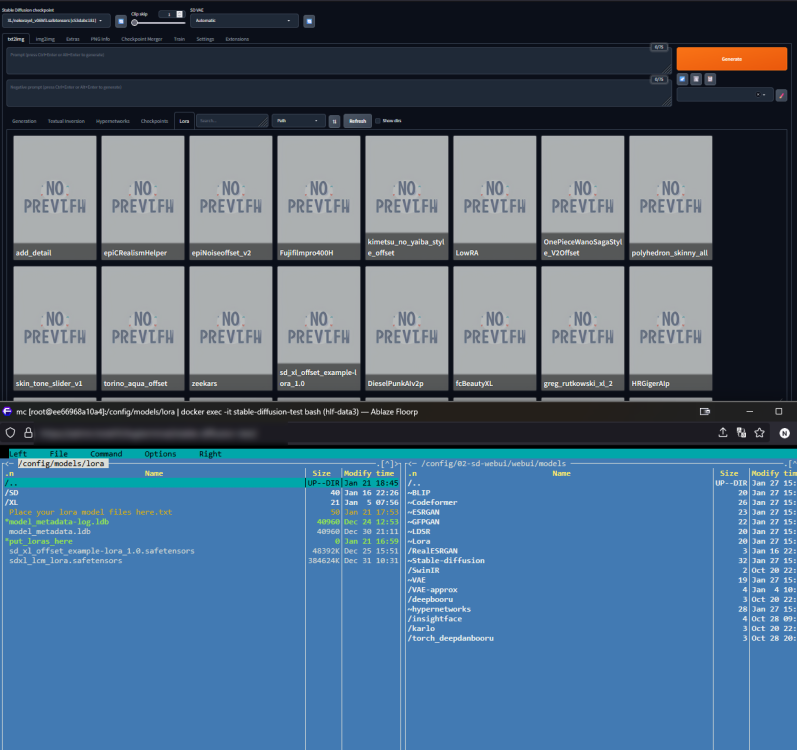
@mrguymiah Strange, it's working fine with me 😵💫 When you go into /config/02-sd-webui/webui/models/Lora do you see your files ?
-
i'll have a look at it ... I dont use Kohya so I admit I didn't do a lot of tests with it 😅
-
@sonofdbn If you want to run multiples UI at the same time you have to run multiples containers. But those containers can point at the same folder on unraid (eg /mnt/user/appdata/stable-diffusion)
-
@BigD can you check in the parameters.txt file if the output directory is ok ? --output-directory /config/outputs/05-comfy-ui
-
The best way to do this is via a reverse-proxy. https://nginxproxymanager.com/ is a good one, easy to use, and you can find a lot of help on the internet
-
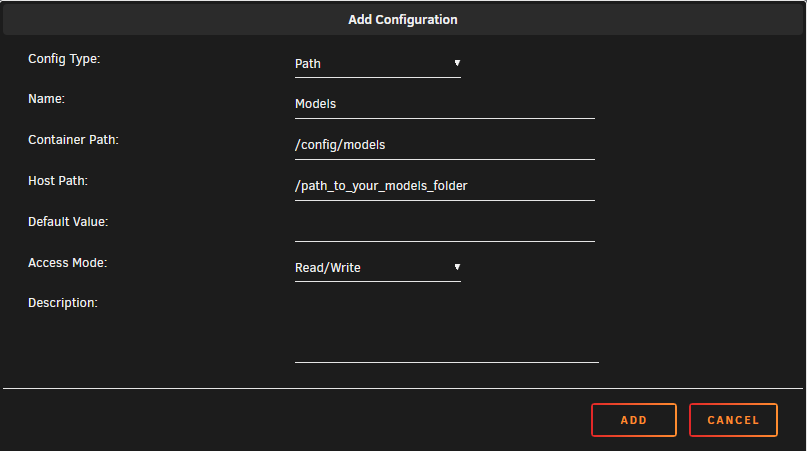
You can just edit the template and change the WEBUI_VERSION. Interfaces are stored in different folders and work alongside each others. You can even run multiple containers pointing to the same local folder at the same time. If you want to split data, you can edit the container and add a path like this : You can do the same thing for the output folder that also have a tendency to grow fast Indeed, Pinokio is a cool project for a Windows workstation. On Windows you also have Stability Matrix that offers to install different webUI, but it has a very small collection compared to Pinokio.
-
I don't have much time these days, but can you try to remove temp folders and re-reun the container ? ( this one for comfy : stable-diffusion\05-comfy-ui\env )
-
please tell me if you find wich folder it is
-
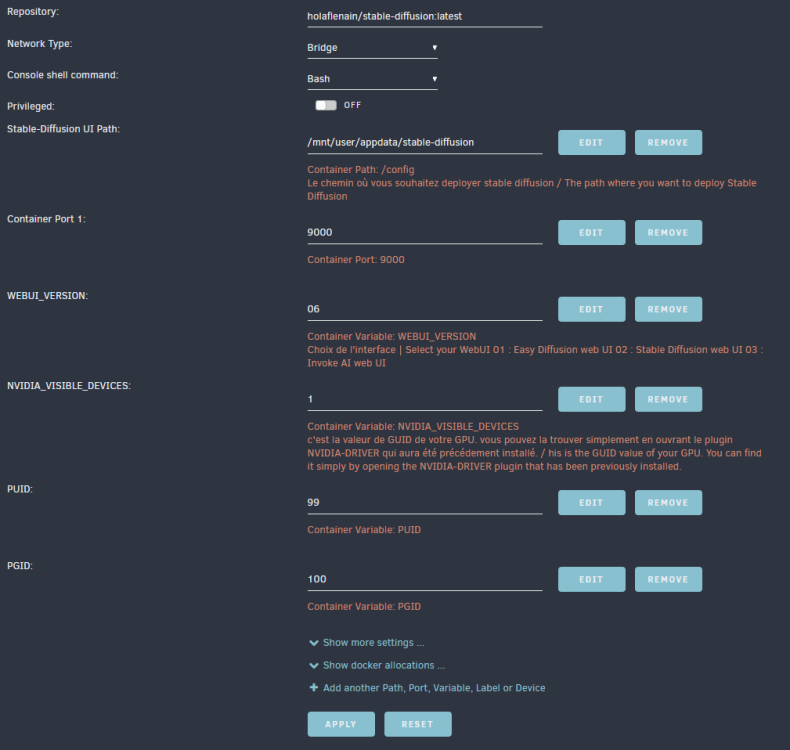
I don't have this kind of error on my side FYI, I made a screenshot of my template if you want to compare with yours. I saw that I made a mistake for the save folder of Fooocus, it should be fixed now (3.0.2) If you still have those crashes, can you post the output of the logs ? Thanks
-
I pushed a new version, you can find the steps for migration here :
-
the move is intentional. What isn't is the push of the new image on dockerhub 😵 If you stick to the tag 2.0.2 it should be as before I'll update the image and the description soon.
-
Thanks for all this work I'm in the process of trying to understand everything and merging all your PR. Since I'm on holidays, I hope to have a working version soon.




